
Permalinks has a minor influence on search engine ranking, the importance of a well-structured URL can never be overemphasized.
An SEO-optimized URL can help search engines better understand the page’s topic and assist users in navigating your website more effectively.
User experience is Google’s ranking factor; URLs can help improve a site’s user experience, which in turn helps Google understand how people use your site and find it more helpful.
So, in today’s post, I discuss how to determine the best WordPress permalink structure for SEO.
I also discuss when adding the post date makes sense and when it should never be done. Furthermore, I show you how to add redirects when you change published URLs.
You will find the most answers to questions related to WordPress permalink SEO best practices in this post.
But first, let’s define what precisely a permalink or URL is.
What are Permalinks?
Permalinks simply mean permanent links, which is another word for URL (Uniform Resource Locator). It is used to locate a page, resource, or post on a website.
A permalink is the address to locate a web page, post, or other content on your website.
Typically, it includes your domain name, followed by additional url path that direct users to specific resources, posts, or pages. These other parts of the permalink or URL may include tags, country-specific subdirectories, categories, dates, years, post author, and so on.
An SEO-friendly URL, also known as a permalink, helps search engines understand the page’s content, facilitates user navigation and discovery of information, and ultimately ensures a better user experience.
Next, I discuss determining the best URL structure for your website type.
Choosing The Best WordPress URL Structure
While selecting a URL structure may seem straightforward, it must be done correctly to ensure it benefits both your SEO and website users.
Depending on your website content, industry, or niche, you must follow specific guidelines or tips to create SEO-friendly permalinks that help your ranking.
For example, using symbols, special characters, or numbers can make your permalink difficult for users to read and confuse search engines about the relevance of your topic to users’ queries.
Making your URL easy to read, descriptive, and structured can benefit search engines and users. Avoid using long IDs or numbers in URLs; it makes things difficult for users and Google.
Here are some tips and advice for selecting the optimal URL structure for your WordPress blog.
Note that some of these permalink best practices are more of general acceptance and what Google prefers. It is not that you can not break the rule, but you might be the exception and get users confused. So, follow the flow and the consensus.
Use Hyphen
Google recommends using hyphens instead of underscores.
Hyphens help create consistent URL structure and help users and crawlers quickly identify concepts in the page URL.
By default, WordPress uses hyphens, which is the preferred option in URLs according to Google and other search engines.
Unless you manually code something else, you don’t need to make changes in WordPress to use hyphens. WordPress uses only hyphens, so you don’t have to worry about this.
For example, here is how the WordPress permalink looks when using a hyphen to separate words.
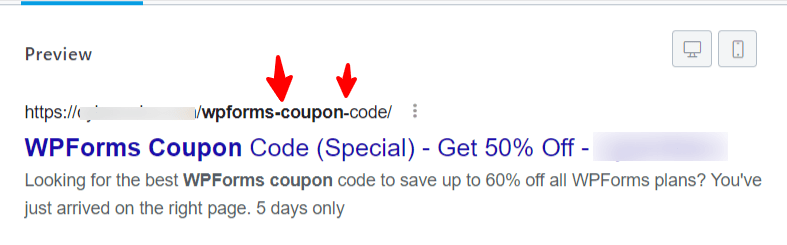
As I mentioned earlier, use hyphens and nothing more.
Make it Short
Avoid using long URL slugs.
A shorter URL is easier for users to remember and type, improving the website experience. It can also help improve ranking, as shorter URLs reduce unnecessary wording in the permalink.
Moreover, shorter URL structures can be more aesthetically pleasing, as they tend to be more visually appealing than longer URL patterns.
Look at the three URL types; which is more readable and pleasing?

From a user perspective, the 3rd URL is easier to read, remember, and make more sense.
Include Keyword
Including relevant or primary keywords in your page URL is a good SEO practice. It can help improve context and let search engines better understand a page’s topic.
Although page URLs don’t directly impact ranking, keywords in URLs can help improve a page’s search engine ranking.
However, be cautious when adding irrelevant or keyword-stuffed content to include your target keyword. It may actually harm rather than help your website’s SEO.
Date or No Date?
The question or debate about adding the content publish date to the URL depends on the content type and niche.
If you blog on evergreen content topics like family, health, money, diet, finance, and marketing, you don’t need to include dates in your URL.
These types of topics affect everyday life and are generally informative. They adhere to fundamental principles or established ways of doing things that tend to remain consistent for years.
The information remains current, never becoming outdated or changing too frequently.
On the other hand, if you’re interested in entertainment, sports, politics, or breaking news and events, consider adding dates, years, and publication months to your permalink structures.
This type of content changes too often. In some cases, the content requires minute-to-minute updates, and users want to avoid reading outdated information in such niches.
For example, if you’re covering sports and reporting on specific events or tournaments, your readers expect to know when the information was published.
Since this type of information is time-sensitive, adding a post date and other publication time information can enhance the user experience.
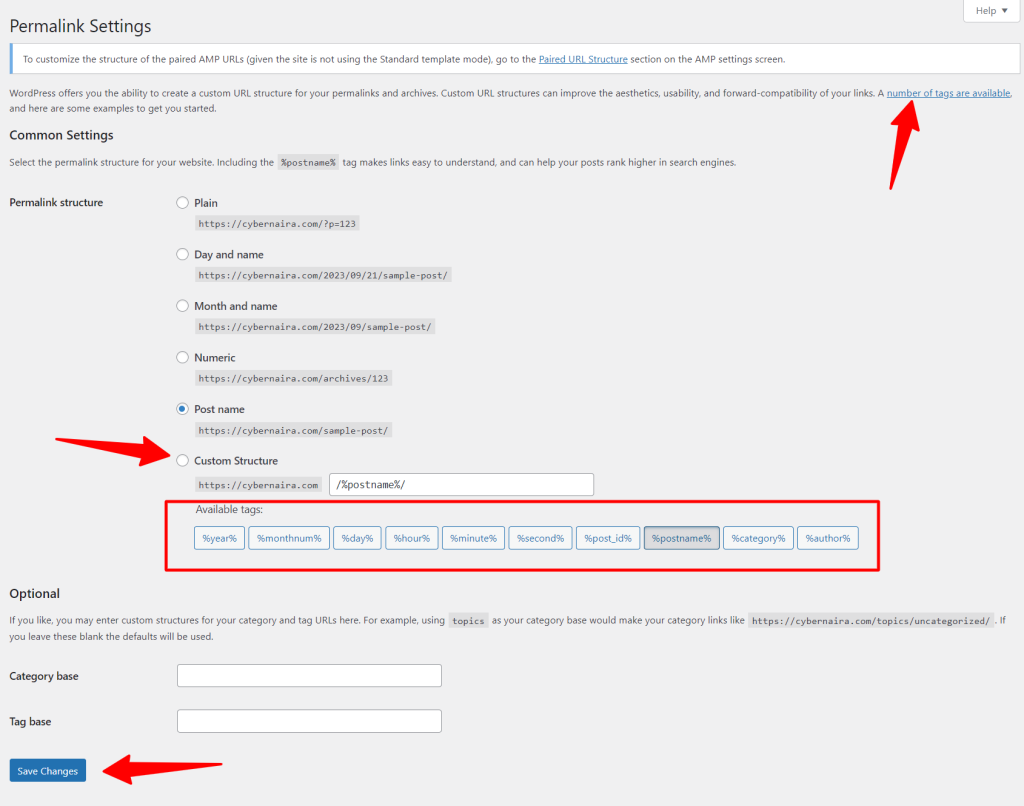
To add publishing time (date, months, year, and time) to the URL, go to WordPress admin and click settings> permalink.

On the next page, select the Month and Name permalink option.
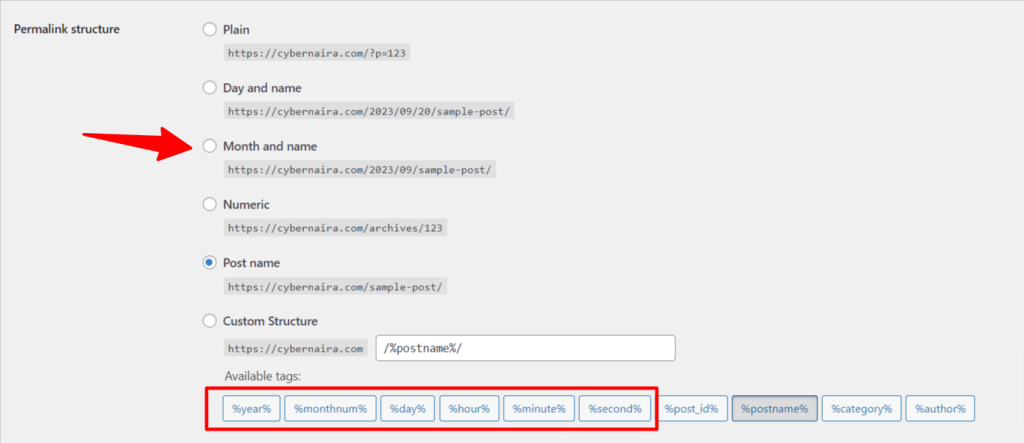
Scroll down the page to pick from the other variables (as shown in the red box). Here, you can see that WordPress includes the option to add the year, month, day, hour, minutes, and seconds to the URL.
You can further customize the URL to your preferred option. To do this, select the Custom Structure permalink option. Then, follow the instructions above to include other variables in your URL.
Use Category
This is especially true for eCommerce shops and large content sites.
Unlike other online businesses, selecting the best eCommerce URL pattern for SEO isn’t as straightforward as it sounds or appears on paper. Things aren’t straightforward with eCommerce permalink settings.
However, you can include categories, subcategories, product types, and product variants in your permalink to help users find content or products faster on your site.
For example, an e-commerce site uses categories in its permalinks and other variables, allowing users to identify the product type and access additional helpful information.
Here is a good example of an eCommerce store URL structure.
https://www.example.com/store/category/cloths/menswear/white-t-shirt/This URL has the store’s main category as clothes and subcategory, men’s wear, before the main product variants page URL, white T-shirt.
In WordPress, you can use the custom permalink variables to set your eCommerce URL structure. Use the %category% and %postname% variables to customize the URL part.
Remove Stop Words
Stop words like “a,” “at,” “and,” etc should be avoided in the URL. Even though they are part of your primary keyword, remove them from the URL part.
Though there are conflicting expert opinions on using stop words in page URLs, their inclusion can make the URL more readable and help users.
However, search engines like Google tend to ignore stop words in the URL as long as doing so does not change the context or search intent of the page.
If you want to learn more about the impact of stop words in the permalink, consider reading this post from the Search Engine Journal.
Changing URL Structure in WordPress
Assuming you want to change your WordPress permalink structure, one of your utmost concerns is the impact on SEO.
How safely can the WordPress permalink be changed without affecting the WordPress site’s SEO or ensuring minimal impact?
The good news is that I have done this several times without any noticeable impact on SEO or poor user experience.
Whether you want to change the URL for a single post/page or the default permalink for all published posts, you should point the old link to the new one with a 301 redirect function.
With 301 redirects, traffic to the old URLs will automatically be routed to the new URL, preventing users from seeing the 404 error page.
You won’t lose out on referral links from other websites and social media shares. All traffic from existing links on the web pointing to your pages will automatically redirect to the corresponding 301 redirect pages.
However, you need plugins to set up and properly manage 301 redirects in WordPress. Several SEO plugins make this effortless.
WordPress SEO plugins, such as Rank Math and AIOSEO, have 301 and other types of redirects built into their plugins. This plugin lets you manage redirects more efficiently.
Still, if you want to use dedicated redirect plugins, I recommend the Redirection plugin by John Godley for added help. You can download it from your WordPress admin plugin area.
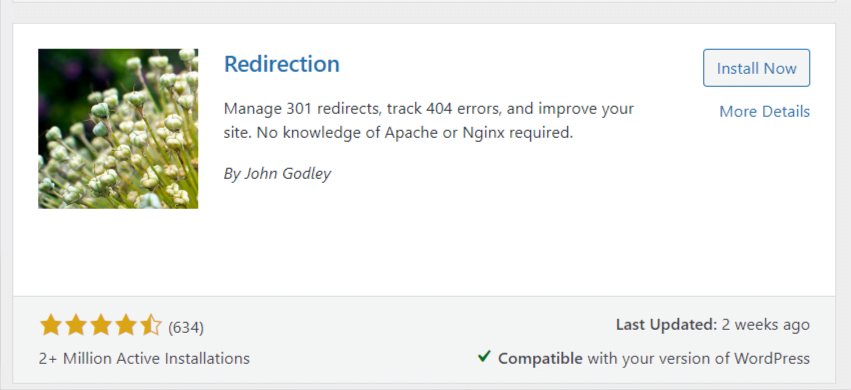
If you want to change your site’s URL or permalink structure, go to WordPress admins and hover on Settings; in the menu, click Permalink. Then, select your preferred URL pattern from the available options and click save.
Here are a few points to notice in the image below:
WordPress has a help page for adding more custom variables. You can customize the URL with more variables with the custom tags.
However, assuming you want to change the URL slug for a single post.
In that case, open the particular post you want to edit its URL in the WordPress editor. On the sidebar panel, click the hyperlink after the label “URL.” See the image below.
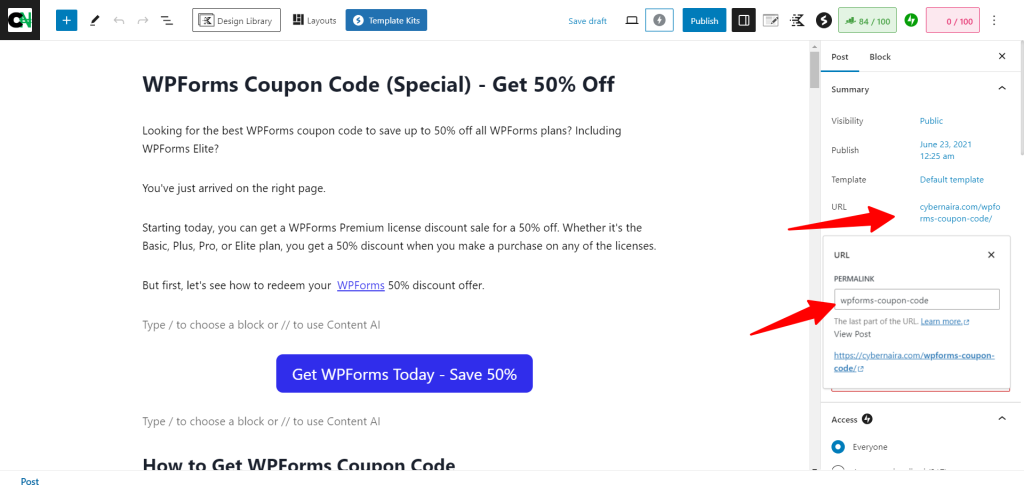
In the open panel, edit the slug and click the close (X) button when you’re done.
Remember to update the post to allow the changes to take effect. Since you’ve set up the 301 redirects above, the old URL will now redirect to the new one when people visit the former link anywhere on the web.
Conclusion.
The best WordPress permalink structure for SEO will improve user experience and search engine ranking.
However, as I said in this post, the best URL structure for your site will depend on your content type. Using %postname% after the domain name is ideal if your content is non-time-sensitive. You can add the category base tag to help users learn more about content.
For sites publishing time-sensitive information like politics, celebrity news, and sports, adding post dates and other timestamps can add more value to the content and help users and search engines learn more about the content’s relevance to search queries.