

Hosting decisions get more expensive to get wrong as your business grows. A slow checkout page, a site that buckles during a traffic spike, or a migration that goes sideways can cost you real revenue, not just a bad afternoon.
That is why a Cloudways promo code like this is worth a closer look if you are running a small or mid-sized business on WordPress.
For a limited time, Cloudways is offering new customers 40% off their hosting plan for four months, along with unlimited free expert-led migrations.
I moved WPrBlogger to Cloudways earlier this year, so I am writing from the perspective of someone who’s used the platform under real traffic, not just read the sales page.
If you’re running a business site where uptime, performance, the ability to add team members without handing out full admin access, and responsive support matter, Cloudways is worth serious consideration.
This discount breaks down those priorities and focuses on them.
What the Cloudways Summer Discount Includes
The unlimited migration detail matters more than it might first appear.
If you run an agency with dozens or hundreds of clients’ websites, Cloudways handles the technical heavy lifting for each one, at no extra cost.
How to Claim Cloudways 40% Discount
Step1: Click through using this link: Get 40% Off Cloudways. The link should automatically apply the TREAT26 discount code, as shown in the image below. But it’s always a good thing to confirm it before you complete the signup.
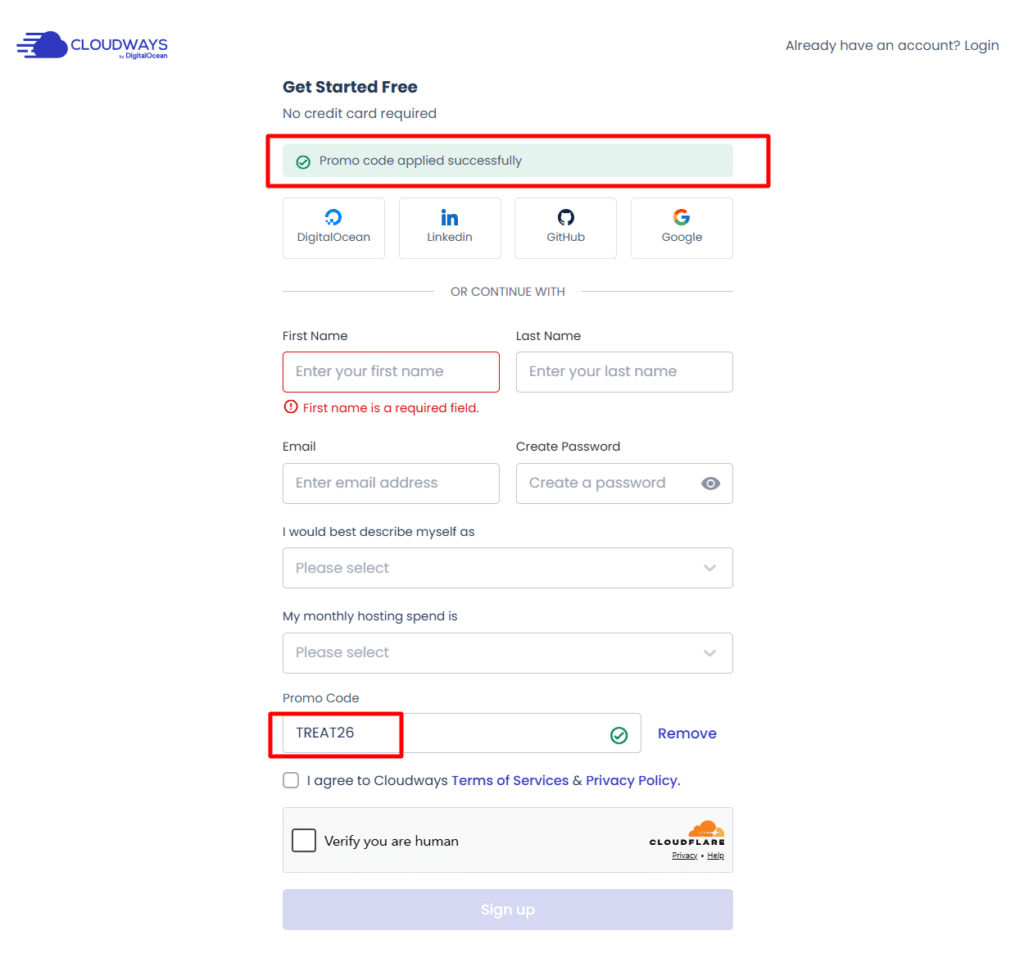
Step 2: Agree to the Cloudways terms of service, check the Cloudflare security box to prove you’re human, and hit the sign-up button. So take a moment to complete this process.
Step 3: Complete your account setup by walking through the verification process. Cloudways needs to confirm a few things from your end, such as your email account, mobile number, and general account onboarding process.
Step 4: Choose your cloud provider and server size based on your current traffic and expected growth. You can also choose your preferred data center on this page.

Step 5: Deploy your application. Cloudways lets you host several apps, including WordPress, Joomla and custom PHP. WooCommerce, and Laravel. This flexibility makes Cloudways one of the best web hosts for B2B, Dev teams, and marketing agencies.
You can also choose your hosting stack depending on your web application. Cloudways Flexible offers Hybrid and LightningStack options, both perfect for a WordPress blog. Autonomous is fully managed WordPress hosting, where Cloudways takes server management off your plate completely.

Veloxity (Node.js hosting) is for hosting your Node.js application.
If you are migrating an existing site, request one of the free expert-led migrations rather than moving it manually
NOTE:
The 40% OFF for 4 months Cloudways offer runs until October 31st, 2026. That gives you time to compare plans and choose the right server size instead of rushing into a decision.
Why Cloudways Hosting Matters for Small Business Owners
Budget hosting works fine until it does not. As soon as your site starts getting real traffic, whether from an ad campaign, a product launch, or organic growth, shared hosting resources get stretched thin fast.
You end up sharing server capacity with hundreds of unrelated sites, and when one of them spikes, yours can slow down through no fault of your own.
Cloudways runs on cloud infrastructure instead of a single shared server. You choose the underlying server provider (DigitalOcean, Vultr, Linode, AWS, or Google Cloud), and Cloudways manages the server layer so you are not stuck doing manual server admin.
That combination gives growing businesses room to scale without switching to managing raw infrastructure yourself.
At 40% off for four months, you get a meaningful runway to test that performance difference against your actual traffic and workload, not just a demo environment.
There is also a cost angle worth thinking through beyond the discount itself. Downtime and slow load times have a direct dollar cost for a business site, whether that shows up as abandoned checkouts, lost leads from a contact form, or a client who bounces off a slow portfolio page.
A hosting upgrade is rarely just a technical decision. It is closer to an infrastructure investment, and evaluating it that way changes how you think about the four-month discount window.
Instead of asking whether the monthly price is low enough, ask whether the performance and reliability gains pay for themselves in retained revenue once the discount period ends.
Top Cloudways Features That Matter for Growing Businesses
Built-In Caching and CDN Integration
Cloudways ships with a built-in caching layer (Varnish, Redis, and Memcached) and integrates directly with Cloudflare Enterprise.
For a business site, that means faster page loads for visitors, no matter where they are. This directly improves conversion rates and reduces bounce rates on product and service pages.
Auto-Scaling on Higher-Tier Plans
Traffic spikes are unpredictable: a press mention, a seasonal sales push, a viral social post.
Cloudways offers vertical auto-scaling on its Autonomous plans, so server resources adjust automatically to handle spikes instead of your site crashing or slowing to a crawl at the worst possible moment.
Staging Environments
Testing a plugin update, a redesign, or a new checkout flow on a live business site is risky.
Cloudways includes one-click staging environments, so you can test changes safely and push them live only after you confirm nothing breaks.
Team Collaboration and Access Controls
As a business grows, more people work on the site, such as developers, marketing team, and virtual assistants.
Cloudways lets you add team members with specific role-based permissions instead of giving everyone full admin access. This helps with security and task delegation when more than one person is involved.
Free SSL and Dedicated Firewalls
Every Cloudways server includes free SSL certificates, and paid security add-ons like dedicated firewalls and bot protection are available for businesses handling customer data or online payments.
That is a meaningfully different security posture than most budget shared hosts offer by default.
24/7 Live Chat Support with Real Response Times
Support quality is one of the most underrated factors in hosting. Cloudways offers 24/7 live chat, and in my own experience, the responses come from people who understand WordPress specifically, not a generic support script.
For a business owner without an in-house developer, responsive support matters when something breaks outside business hours.
Transparent, Usage-Based Pricing
Unlike many hosts that lock you into rigid tiers with hidden overage fees, Cloudways pricing scales with the server resources you use.
You don’t pay for headroom you don’t need, and upgrading as you grow is a straightforward plan change, not a full migration.
Server-Level Backups with Custom Scheduling
Automated, on-demand, and offsite backups are included. You control the frequency and retention period rather than being stuck with whatever a shared host defaults to.
For a business site with regular content updates or order data, being able to set backups to run more frequently and store them for longer reduces how much you stand to lose if something goes wrong.
Choice of Cloud Infrastructure Provider
Not every business has the same priorities. Some care most about raw price, others about a specific data center region for compliance or latency reasons.
Cloudways lets you choose from five major cloud providers instead of locking you into one, so you can match the underlying infrastructure to what your business needs instead of accepting a one-size-fits-all setup.
Other Web Hosting Coupon Deal
If the Cloudways 40% for 4 months offer isn’t right for you right now, here are some current hosting deals you may like.