

If you’re trying to choose between managed hosting and shared hosting, you’re probably stuck on one big question: Is managed hosting really worth paying more for, or is shared hosting good enough?
I’ve seen this confusion many times, especially with beginners.
On paper, both options, “host your website,” promise high uptime and a fast and secure platform.
But once you look under the hood, they’re very different, not just in price, but in responsibility, management, performance, and long-term growth.
At the simplest level:
That sounds simple. However, the real difference becomes apparent in the level of control you have, the amount of work you must do yourself, and how your site performs as it grows.
If you’re starting a personal blog on a tight budget, shared hosting might be all you need. If you’re running a business website, an e-commerce store, or a blog that’s getting serious traffic, managed hosting can save you time, stress, and even money in the long run.
In this guide, I’ll break down:
By the end, you’ll know exactly which one between managed hosting vs shared hosting fits your situation, and why.
What Is Shared Hosting?
Shared hosting is the most common and affordable type of web hosting. If you’ve ever bought a basic hosting plan for a new blog or small website, chances are it was a shared hosting plan.
Let’s break down what that really means.
How Shared Hosting Works
With shared hosting, your website lives on a single server alongside many other websites.
All of you share the same server resources, such as CPU, RAM, storage, and bandwidth.
Think of Shared hosting like living in an apartment building. Everyone has their own unit, but you all share the same building infrastructure.
If one neighbor starts using too much electricity or water, it can affect others.
The same thing happens with shared hosting. If another site on your server gets a sudden traffic spike or runs heavy scripts, your site’s performance can slow down.
For small sites, this usually isn’t a big issue. But as traffic grows, those limitations become more noticeable.
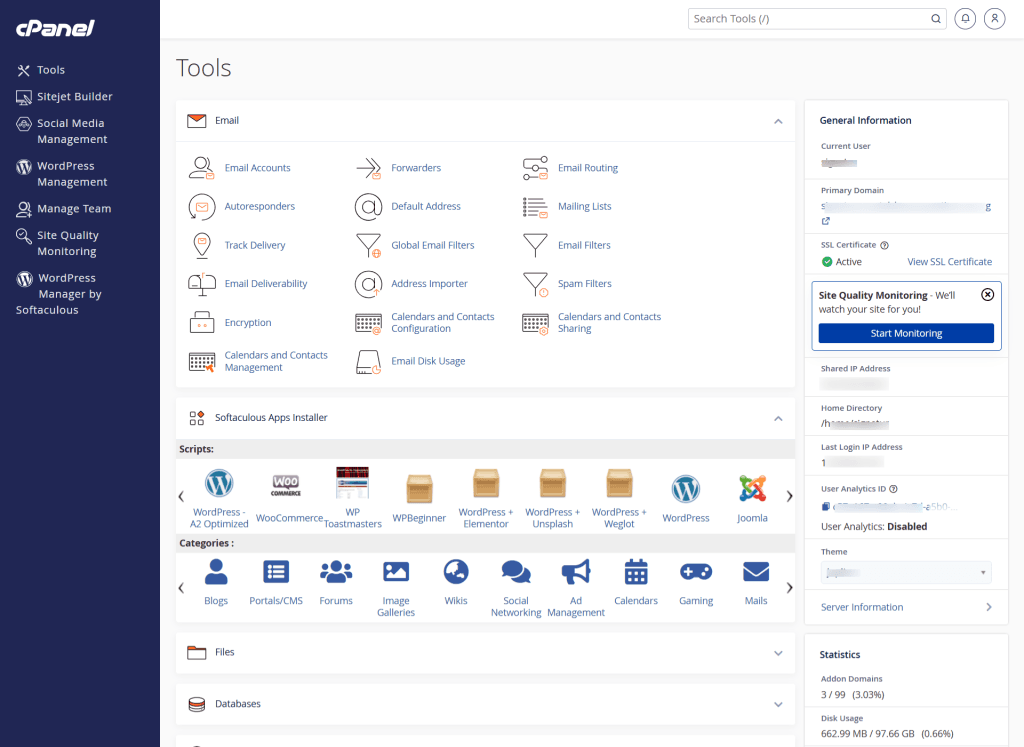
Most shared hosting providers offer cPanel, which lets you manage your website files, email accounts, domains, SSL certificates, DNS records, scripts, backups, cron jobs, and PHP settings.
This cPanel availability gives you more raw control over your hosting environment.
If you like being hands-on or need flexibility (such as creating custom email accounts or manually editing files), cPanel makes that easy.
But for beginners, cPanel can feel overwhelming. There are many options in cPanel, but not all are necessary for running a simple WordPress site.
Here is how a typical cPanel interface looks.
What You’re Responsible For on Shared Hosting
One important thing to understand is this: with shared hosting, the provider provides space on a server, but most website or server management is still your responsibility via cPanel.
Depending on the host, you may need to handle:
Some hosts include basic tools, but in many cases, you’ll need to install plugins or configure settings yourself.
For example, if you’re using the LiteSpeed Caching plugin on a LiteSpeed Server, and want to enable Object Cache, either with Memcached or Redis, you’ll need to configure the setting yourself. This include starting the application in your cPanel and configuring the setting in LiteSpeed.
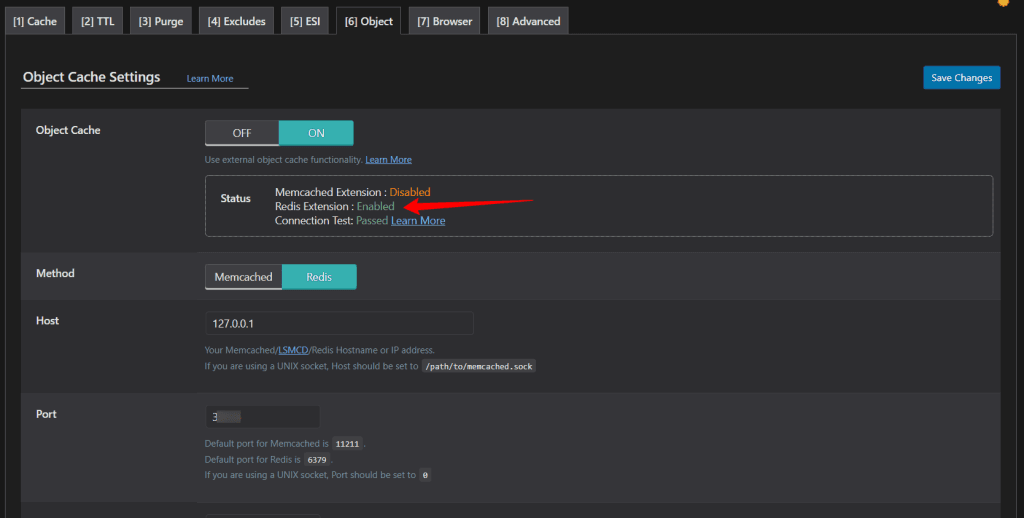
If you’re comfortable learning these things, shared hosting can work just fine. If not, it can feel overwhelming.
Pros of Shared Hosting
Cons of Shared Hosting
What Is Managed Hosting?
Managed hosting is designed for people who don’t want to deal with the technical side of running a website or simply don’t have the time.
With this type of hosting, the hosting provider doesn’t just give you server space. They actively manage and optimize the environment for you.
In many cases, when people say “managed hosting,” they’re referring to managed WordPress hosting.
That means the entire server setup is optimized specifically for WordPress sites.
Let me break it down.
How Managed Hosting Works
Instead of placing your site on a crowded server with minimal oversight, managed hosting providers create a more controlled environment.
The server is configured for performance, security, and stability. Resources are handled more carefully, and in many cases, accounts are isolated more securely.
The biggest difference isn’t just the server setup, it’s the service layer.
With managed hosting, the hosting company handles ongoing server maintenance tasks that you would normally handle on shared hosting.
Most managed hosting providers do not use cPanel; instead, they create their own simplified custom dashboard. These custom dashboards usually focus only on what matters for your website, such as:
You won’t usually see raw file manager tools, manual database configuration options, or advanced server settings like you would in cPanel.
That’s intentional.
Managed hosting is designed to remove complexity. The dashboard is simplified so you don’t accidentally break something important.
This makes managed hosting more beginner-friendly, but slightly less flexible for developers who want full server access.
Unlike traditional cPanel, which is similar in most web host, the custom dashboard is unique to the web host’s design. I have used a few managed web hosts. Here is how the Pressable dashboard makes things easier.
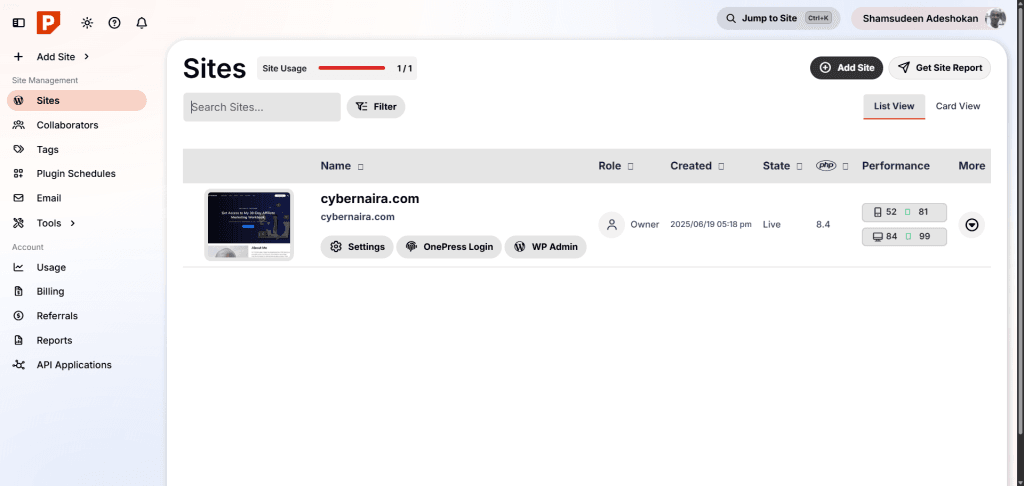
As you can see, the dashboard is clutter free, intutive, and make navigation easier. There are no uncessary features, just what matters to everyday WordPress operations.
What the Hosting Company Handles for You
Here’s where managed hosting stands out. Most managed hosting providers take care of:
That means fewer plugins to install, fewer settings to configure, and fewer technical headaches. If something breaks after an update, support often helps fix it, not just the server, but the application level, too.
Pros of Managed Hosting
Cons of Managed Hosting
Managed hosting is designed for growth, reliability, and convenience. You pay more upfront, but you save time and reduce risk.
Now let’s compare both side by side so you can clearly see how they differ.
Managed Hosting vs Shared Hosting: Side-by-Side Comparison
Now that you understand how both work, let’s put them next to each other so the differences are crystal clear
| Feature | Shared Hosting | Managed Hosting |
|---|---|---|
| Control Panel | Usually cPanel with full server access | Custom dashboard focused on simplicity |
| Price | Low monthly cost | Higher monthly cost |
| Server Resources | Shared with many websites | More controlled and optimized environment |
| Performance | Can slow down during traffic spikes | Optimized for consistent speed |
| Security | Basic protection | Proactive monitoring and stronger isolation |
| Backups | Often manual or limited | Automatic daily backups |
| Updates | You handle most updates | Provider handles core updates |
| Support | General hosting support | Platform-specific expert support |
| Scalability | Limited | Easier to scale as traffic grows |
| Technical Skill Needed | Moderate (you manage more) | Low (provider handles most tasks) |
| Best For | New blogs, hobby sites, low traffic | Businesses, ecommerce, growing sites |
What This Comparison Really Means for You
The table gives you a quick overview, but here’s the bigger picture:
The biggest difference isn’t just speed or security. It is responsibility.
With shared hosting, you manage your website server. With managed hosting, the provider manages most of it for you.
Next, let’s go deeper into the key differences, starting with performance and speed, so you can understand what actually affects your site day to day.
Key Differences Explained in Detail
The comparison table gives you the overview. Now let’s break down what these differences actually mean in real life, especially when your site starts growing.
Performance and Speed
With shared hosting, your website shares CPU, RAM, and bandwidth with many other websites. If one of those sites suddenly gets a traffic spike or runs heavy scripts, it can slow down the entire server.
You might not notice this when your site is small. But as traffic grows, inconsistent performance becomes more obvious.
You may often, or occasionally, receive the JetPack downtime alert notification when your site goes offline. In my experience, this is common when you’re on a shared hosting plan.

Managed hosting works differently. Servers are usually optimized for a specific platform (often WordPress), and caching is handled at the server level.
Managed hosts for WordPress, such as Kinsta, utilize isolated containers, so one customer’s traffic surge or security vulnerability doesn’t drag everyone else down.
And, you often don’t get site goes offline notification from managed WordPress host. This is because most managed host usually utilze server failover technology.
This automatically moves your application to another server in the event of downtime or technical hiccups on the primary server location.
The result?
If site speed affects your revenue, like with ecommerce or affiliate marketing, this difference matters.
Security
Security is another major gap between shared hosting vs managed hosting. Basic protections, such as free Let’s Encrypt SSL certificate, 2FA, Imunify360, Hotlink, and Leech Protection, are in place in a shared hosting with cPanel, but the environment is more open.
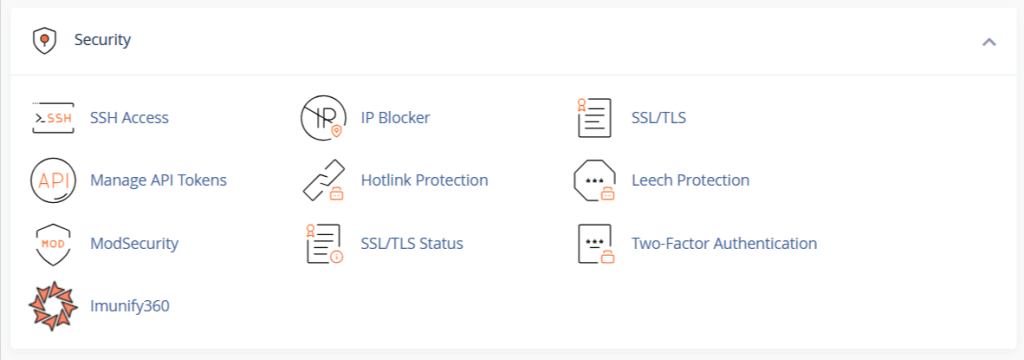
Since multiple sites share the same server, a vulnerable site can sometimes create risk for others.
You’re usually responsible for installing security plugins, setting up firewalls, and monitoring for malware.
Managed hosting providers often take a proactive approach. They monitor traffic, scan for malware, block suspicious activity, and patch server-level vulnerabilities.
Many also provide automatic malware removal if something goes wrong. Kinsta and Pressable, for example, offer free malware or hack removal services if the incident happens on their server.
You can’t find this level of support in a shared hosting plan.
This doesn’t mean shared hosting is unsafe. It just means managed hosting is built with stronger safeguards by default and offer specialized services.
Maintenance and Updates
You typically handle wordpress core updates, plugins, and theme updates, and regular backup yourself.
If you forget to update something, you increase your risk of security issues or compatibility problems.
With managed hosting, core updates are usually automatic. Backups run daily without you touching anything.
Some providers, such as WP Engine, even test updates before pushing them live. With its Smart Plugin Manager, WP Engine create a clone of your site and test updates on it before pushing it to your live site.
If you value convenience and peace of mind, this difference is huge.
Support Quality
Support can make or break your hosting experience.
Shared hosting support with cPanel often helps with server-level issues. If your site breaks due to a plugin conflict, they may tell you it’s outside their scope.
On managed hosting with custom dashboards, support usually helps with both server and application-level issues. Their support teams are often trained specifically in WordPress (or whatever platform they manage).
If your site crashes after an update, they’re more likely to help you troubleshoot it.
For example, Pressable might or will troubleshoot database issues for you, provided you give consent for them to proceed. They can even go as far as helping you clean up a malware infected site, free of charge.
That higher level of expertise and support is part of what you’re paying for, not just the hosting space.
Cost Over Time
Shared hosting is cheaper upfront. That’s clear. But here’s something many people don’t think about.
You may end up paying for premium backup plugin, advanced security tools, caching plugin like WP Rocket, NitroPack, or FlyingPress, and even hire a developer when something break.
Managed hosting includes many of those features in the base price. So while the monthly fee is higher, the long-term cost gap may not be as wide as it looks.
Now that we’ve broken down the technical differences, let’s make this practical.
Who Should Choose Shared Hosting?
Shared hosting isn’t “bad hosting.” It’s just built for a specific type of website owner.
If you fall into one of the categories below, shared hosting might be the smart starting point.
1. Brand-New Bloggers
If you’re launching your first blog and you’re not sure whether it will grow, shared hosting keeps your costs low while you test your idea.
You don’t need advanced infrastructure for a site getting 10–100 visits a day. At that stage, affordable hosting is more important than premium optimization.
You can always upgrade later.
2. Personal or Hobby Websites
Maybe you’re building a portfolio site, a small local club website, simple information site, and or, a personal blog.
If the goal isn’t heavy traffic or online sales, shared hosting is usually enough.
There’s no need to pay for managed services if your site doesn’t require constant performance tuning.
3. Budget-Conscious Site Owners
If keeping expenses low is your top priority, shared hosting wins. For someone starting out, cash flow matters.
Spending three to five times more on hosting before you’re making money from your site doesn’t always make sense.
Shared hosting lets you start small and grow into something bigger.
4. People Comfortable Handling Basic Maintenance
With shared hosting, you’ll need to:
If you’re okay with learning these tasks, or you enjoy the technical side, shared hosting gives you more hands-on control at a lower price.
When Shared Hosting Might Not Be Enough
Shared hosting starts to feel limiting when your site traffic grow quickly, or your site is often slowing down during peak traffic hour. If you’re running a high traffic ecommerce store and downtime start causing you sales.
Also, if you don’t have the time to manage updates and fix security issues. At that point, upgrading becomes less about “luxury” and more about stability.
Shared hosting is a solid starting point. Many successful websites began there.
But if you’re running a business or planning serious growth, you may want something more robust.
Who Should Choose Managed Hosting?
Managed hosting isn’t just for big companies. It’s for anyone who wants fewer technical headaches and more stability as their website grows.
Here’s when it makes sense.
1. Growing Blogs and Content Sites
If your traffic is climbing steadily, shared hosting can start to feel tight.
Pages may load slower during peak hours. You may notice performance dips after publishing new content. That’s often a sign you’re pushing the limits of shared resources.
Managed hosting gives you a more optimized environment that handles growth better. If you’re serious about building long-term traffic, this can protect your momentum.
2. Business Websites
If your website represents your business, downtime isn’t just annoying, it affects credibility and revenue.
Managed hosting adds airtight security features, better uptime stability, real-time automatic backup, and expert level support.
If something breaks, you’re not left troubleshooting alone.
For business owners who don’t want to think about server management, managed hosting removes that burden.
3. Ecommerce Stores
Online stores demand more from hosting.
You’re handling customer sensitive data such as payment, personal and location information. You also manages high plugin usage, and experience traffic spikes during promotions.
Performance and security matter more here than on a basic blog.
Managed hosting often includes server-level caching, tighter security monitoring, and better scaling. That reduces the risk of slow checkout pages or downtime during sales.
4. Non-Technical Site Owners
If you don’t want to deal with plugin conflict, manually backing up your site and database, configuring security features, or performance tweak, manage hosting is the right option.
The provider handles most of the behind-the-scenes work, so you focus on content, marketing, or sales instead of server maintenance.
5. Websites That Can’t Afford Downtime
If your site generates revenue through affiliate marketing, ads serving, digital product sales, eCommerce, or lead generation, every hour your site goes offline costs you money.
Managed hosting environments are built for reliability, especially those with high availability datacenters. That extra monthly cost can easily pay for itself by preventing lost income.
When Managed Hosting Makes the Most Sense
Managed hosting becomes a strong choice when your site is growing consistenly, or your time is more valubale than server maintenance.
Also, when stability in your business matters most than lowest hosting price and when you want professional-level support.
It’s not about “luxury hosting.” It’s about reducing risk and saving time as your site becomes more important to you.
Managed WordPress Hosting vs Shared Hosting
If you’re running a WordPress site — and most website owners are — this is where the comparison gets more specific.
Not all managed hosting is WordPress-focused. Web host like HostPapa and InMotion Hosting, offer managed hosting for other types of hosting such as VPS and Dedicated servers.
But when people talk about managed hosting, they often mean managed WordPress hosting.
So what’s different?
What Makes Managed WordPress Hosting Different?
Managed WordPress hosting is built specifically for WordPress sites. The server environment is configured to run WordPress efficiently. That includes:
WordPress is just one of many applications that can run on a shared hosting with cPanel. The environment isn’t optimized specifically for it.
That doesn’t mean WordPress won’t work on shared hosting, it works fine for small sites. But it won’t get the same specialized attention and services.
Performance Differences for WordPress Users
WordPress relies heavily on PHP processing and database queries. Those resources are divided among many sites hosted on a shared hosting account.
If another site on your server is running heavy scripts, your WordPress site can slow down.
Managed WordPress hosting typically includes, built-in caching, optimized PHP configurations, faster database handling, and built-in Content Delivery Network (CDN), in some case.
Web host without built-in CDN usually integrate with Cloudflare Enterprise solution, which provide advanced security, such as DDoS attack, bruteforce protection, mobile, and image optimization.
This often results in more consistent load times, especially as traffic increases.
Security Differences
WordPress is popular, which also makes it a common target for security attacks.
On a shared hosting account, you’ll usually install security plugins and handle most of the monitoring yourself.
Managed WordPress hosting providers often monitor WordPress-specific threats, automatically block malicious traffic pattern, routinely patch security vulnerability, and offer automatic malware cleanup.
That proactive approach can save you from major headaches.
When Should You Upgrade from Shared to Managed Hosting?
Knowing when to switch can save you time, headaches, and even money. You don’t want to pay for managed hosting too early, but waiting too long can hurt your site’s performance and growth.
Here are the key signs that it’s time to upgrade.
1. Your Traffic Is Growing
If your site is getting more visitors than your shared hosting plan can comfortably handle, performance may start to drop. Pages may load slower, or your site might even go offline during traffic spikes.
Managed hosting is designed to handle higher traffic without slowing down. If you notice consistent growth and frequent server downtime notice, it’s a good time to consider moving to managed hosting.
2. Performance Issues Are Affecting Users
Slow load times frustrate visitors and can hurt SEO. If you see your bounce rate increasing, or site users complaining about delays, your shared hosting may no longer be sufficient.
Managed hosting typically includes server-level caching and optimization, ensuring pages load faster and consistently.
3. Security Concerns Are Rising
Shared hosting is secure enough for most small sites, but as your website grows, you become a more attractive target for attacks.
If you handle sensitive data, run an ecommerce store, or simply want peace of mind, managed hosting adds:
This reduces your risk of downtime or hacked sites.
4. You Don’t Have Time for Technical Maintenance
As your site grows, updates, backups, and security tasks take more time. If you’d rather focus on content, marketing, or sales instead of troubleshooting plugins or server issues, managed hosting saves you that time.
5. Revenue Is Dependent on Your Website
If downtime directly affects your income. For example, through ecommerce sales, affiliate income, or lead generation, investing in managed hosting becomes a smart business decision.
Every hour offline or slow page load can cost you money, and managed hosting minimizes that risk.
Bottom Line on Upgrading
You don’t need to start with managed hosting. For most beginners, shared hosting works perfectly fine.
But once your site starts growing, traffic increases, or performance and security become a priority, moving to managed hosting protects your site, your users, and your business.
Common Myths About Managed and Shared Hosting
There’s a lot of misinformation floating around about hosting. Let’s clear up some of the most common myths so you don’t make a decision based on misconceptions.
Myth 1: “Shared Hosting Is Always Bad”
Truth: Shared hosting is fine for many small sites. It’s affordable, reliable, and works well for blogs, portfolios, and hobby projects.
The only downside is that performance and resources are limited compared to managed hosting. If your site is small and traffic is low, shared hosting can be perfect.
Myth 2: “Managed Hosting Guarantees Instant Speed”
Truth: Managed hosting is optimized, but it doesn’t automatically make your site lightning fast.
Site speed also depends on themes and plugins you use. Image optimization is important, content structure, and external scripts running on your site, all contribute to performance stability.
You also need a caching plugin, if not included with your hosting.
Managed hosting provides a strong foundation, but you still need good site practices.
Myth 3: “You Can’t Scale on Shared Hosting”
Truth: Some shared hosting providers allow upgrades to higher-tier shared plans or VPS plans.
Scaling is possible, but it’s not as seamless as with managed hosting. If you anticipate rapid growth, managed hosting makes scaling easier and more reliable.
Myth 4: “Managed Hosting Is Only for Big Businesses”
Truth: Managed hosting is useful for anyone who values convenience, security, and reliability. Even a small blog can benefit if the owner wants to focus on content instead of website and server maintenance.
Myth 5: “You Can’t Use Certain Plugins on Managed Hosting”
Truth: Some managed hosts restrict poorly coded or high-resource plugins, but most essential plugins work without issues. Restrictions are usually meant to protect site performance and security.
From experience, most managed hosting for WordPress doesn’t allow caching plugins. This is because caching usually comes as a built-in feature.
Clearing up these myths helps you focus on what really matters: your site’s needs, traffic, and how much time you want to spend managing it.
FAQs
Is managed hosting worth it for beginners?
It depends on your priorities. If you’re comfortable managing updates, backups, and security, shared hosting is usually enough to start. Managed hosting makes life easier, but it comes at a higher cost.
Is shared hosting good for SEO?
Yes. Shared hosting doesn’t inherently hurt SEO. What matters more is site speed, uptime, and security, all of which can be managed on a shared plan if you optimize your site correctly. However, managed hosting often makes these optimizations easier.
Can I move from shared to managed hosting later?
Absolutely. Many sites start with shared hosting and upgrade to managed hosting as they grow. Most hosting providers offer migration tools or expert support to make the switch smooth.
Is managed hosting only for WordPress sites?
Not always, but many managed plans are WordPress-specific. There are also managed hosting plans for other platforms like Magento, Joomla, or Laravel. If you use WordPress, managed hosting often offers the most optimized experience.
Why is managed hosting more expensive?
You’re paying for convenience, performance, security, and expert support. Many tasks that you would handle yourself on shared hosting — backups, updates, malware scans, and performance optimization — are included in the managed plan.