

The internet is full of comparison articles written by people who’ve never logged into either Verpex or the Namecheap dashboard, let alone trusted their live sites to both platforms simultaneously. This isn’t one of those articles.
We’ve run real websites on both Namecheap and Verpex, and not just test environments, but actual sites with real traffic. That means the performance numbers, the support stories, and the quiet wins you’ll read about here come from direct experience, not a spec sheet.
So why compare Verpex vs Namecheap specifically? Because they attract the same kind of customer. Someone who wants reliable hosting without enterprise-level pricing, yet they take very different approaches to delivering it.
Namecheap is a household name in the domain and hosting world, having built its reputation over two decades on affordable pricing and sheer brand recognition. Verpex is the newer challenger: a company that’s made speed, support, and global infrastructure its core identity.
Both are legitimate choices. But they’re not equally good for every situation, and the differences that matter most aren’t always the ones listed on their pricing pages.
By the end of this article, you’ll know exactly which host fits your needs. Whether you’re launching your first WordPress site, scaling a WooCommerce store, managing client sites as an agency, or just looking for the most reliable host for your money in 2026
Namecheap vs Verpex: Quick Verdict
Before we go deep, here’s the short version for those in a hurry:
The rest of this article explains exactly why, with the data to back it up.
Namecheap & Verpex: Company Overview
Namecheap
Founded in 2000, Namecheap started as a domain registrar and has grown into a full hosting provider. Today, it’s one of the most recognizable names in the industry, managing over 24 million domains and hosting millions of websites worldwide.
Its strength has always been price. Namecheap consistently undercuts the market on domain registration and entry-level hosting plans. The tradeoff, as we’ll explore, is that some of its infrastructure and support haven’t kept pace with newer, leaner competitors.
Verpex
Verpex launched in 2019, which makes it a relative newcomer. But in the hosting world, being new isn’t a weakness. It means the entire platform was built on modern infrastructure from day one, without the technical debt that older web hosts carry.
Verpex has rapidly built a strong reputation on Trustpilot and other hosting review platforms, particularly for its customer support and consistent uptime. It’s grown by targeting users who feel underserved by the big names.
Hosting Plans & Pricing
Namecheap Shared Hosting Plans
Namecheap’s shared hosting lineup is built around three tiers: Stellar, Stellar Plus, and Stellar Business.
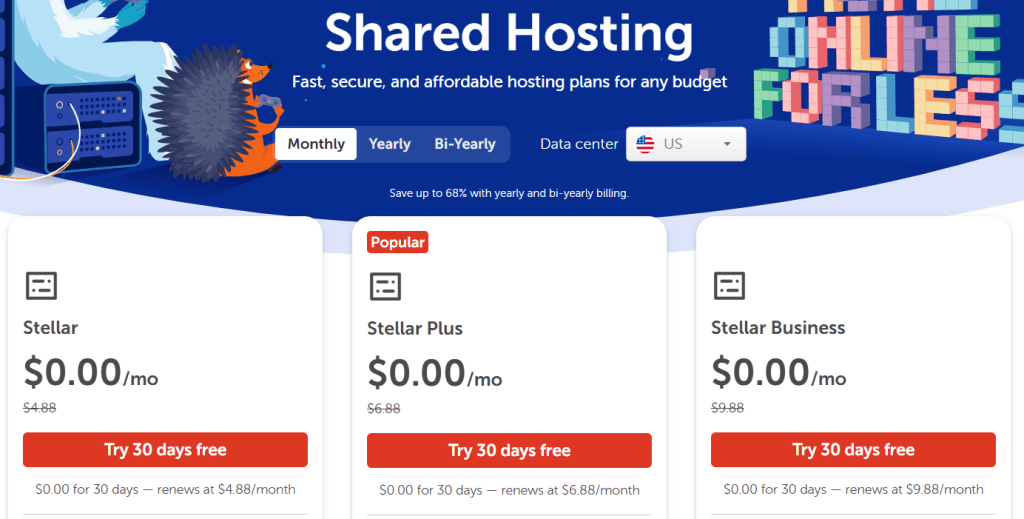
The Stellar plan is the entry-level option, starting at just $1.78/month for the first year after the initial 30-day free trial. It lets you host up to three websites with 20GB of SSD storage, unmetered bandwidth, and 30 email accounts.
That email cap is worth paying attention to. If you’re running a business with multiple staff or departments, 30 accounts fill up faster than you’d expect.
You’d need to upgrade to Stellar Plus or Stellar Business just to get unlimited email, a limit which Verpex doesn’t impose on any of its plans.
Stellar Plus removes those constraints, offering unlimited websites, unmetered SSD storage, and an AutoBackup feature.
This is the plan most users will gravitate toward, and it costs $33.36 in the first year ($2.78/mon), but you renew at $74.88. It strikes the best balance between price and flexibility for small- to medium-sized sites.
The Stellar Business plan is the premium option, starting at $3.98/mon or $47.76 for the first year. It adds 50GB of SSD storage alongside Cloud Storage for improved reliability and is tailored for businesses managing multiple high-traffic websites.
One thing Namecheap deserves credit for is transparency on pricing improvements. Renewal prices under the new Stellar lineup reflect roughly 60% savings compared to the previous plans, and Namecheap has extended its money-back guarantee from 14 days to a full 30 days.
That said, the introductory discount still drops off sharply at renewal. Signing up for Stellar Plus costs $33.36 for the first year, but renews at $74.88 per year, more than double. That’s not unusual in the industry, but it’s something you should factor in upfront.
On storage technology, Namecheap uses SSD across its plans, with the faster cloud-distributed storage reserved for Stellar Business (US datacenter) and all EU and Singapore plans.
It’s a decent setup, but it’s worth noting that Namecheap doesn’t prominently publish its per-account memory or vCPU allocations; you have to dig through their knowledge base to find those figures. That lack of upfront transparency makes it harder to compare plans at a glance.
Verpex Shared Hosting Plans
Verpex keeps things clean with three tiers: Bronze, Silver, and Gold. All plans come with a 90% off discount when you sign up.
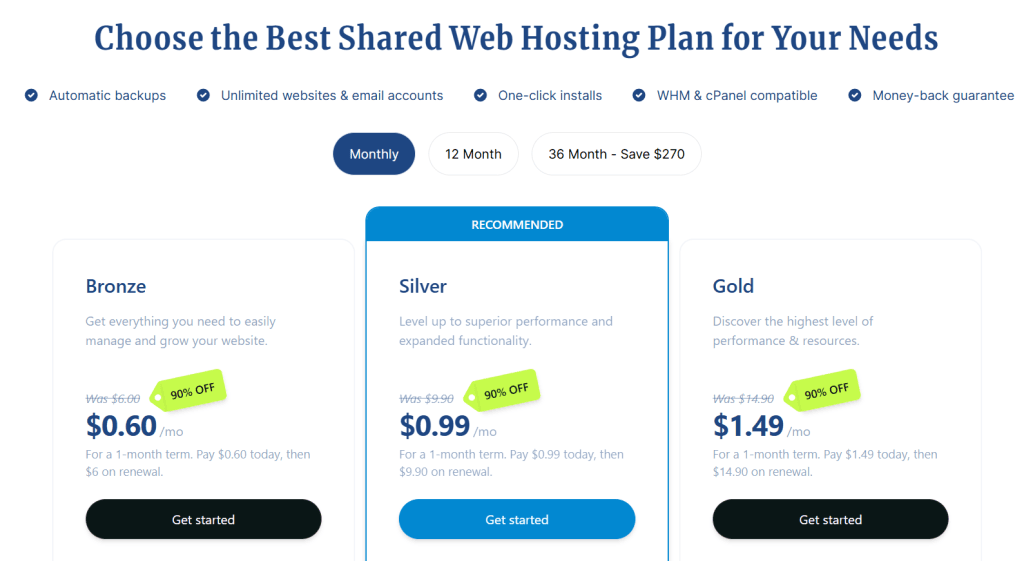
What immediately stands out is how openly Verpex presents its resource allocations right on the pricing page. The Bronze plan (1 website, 30GB NVMe SSD) includes 1GB of RAM and 1 vCPU.
Silver (100 websites, 50GB NVMe SSD) bumps that to 2GB RAM and 2 vCPU. Gold (unlimited websites, 100GB NVMe SSD) matches Silver’s compute resources but doubles the storage.
Every plan includes unlimited email accounts, unlimited databases, and daily backups — no tier-gating on the basics.
The difference in storage technology matters here, too. Verpex uses NVMe SSD across all plans, which means it is meaningfully faster than standard SSD for read/write operations.
This isn’t just a spec on paper; it translates directly into faster database queries, quicker WordPress admin load times, and snappier overall site response times.
Renewal pricing on Verpex is straightforward: Bronze at $6/month, Silver at $10/month, Gold at $15/month. These aren’t the cheapest sticker prices in the industry, but they’re honest. What you pay at renewal isn’t dramatically different from what you’d expect.
The SSL Story: A Real Differentiator
This is where one of the most meaningful practical differences between the two hosts’ lives lies, and it’s one that most comparison articles gloss over entirely.
Verpex includes free Let’s Encrypt SSL certificates on all plans, installed at the server level and renewed automatically. You don’t think about it; it just works. Namecheap takes a different approach: it bundles up to 50 PositiveSSL certificates (its own product) free for the first year, installable via cPanel’s SSL AutoInstall tool.
After that first year, you’re looking at a paid renewal, around $12/year per certificate at the basic tier.
For a site owner running one website, that’s manageable. For someone managing 10, 20, or 30 domains on a Stellar Plus plan, that adds up quickly, and it introduces an unnecessary renewal headache.
There’s also no option to install a free Let’s Encrypt certificate at the server level on Namecheap, which might be a surprise if you are used to it being standard in most shared hosting plans.
However, this does not mean you are required to pay for SSL in the long term.
If you use Cloudflare as your CDN, you can generate a Cloudflare Origin Certificate and install it manually inside cPanel.
When combined with Cloudflare’s Full (Strict) SSL mode, this setup keeps traffic encrypted from the visitor to Cloudflare and from Cloudflare to your Namecheap server.
It works reliably and avoids paying for SSL renewal. The trade-off is that it requires manual configuration and is not as seamless as native server-level support for Let’s Encrypt.
Features Side-by-Side
Here’s a direct comparison of what each host includes at the plan level:
| Feature | Namecheap | Verpex |
|---|---|---|
| Storage | SSD (NVMe on Business/EU/SG) | NVMe SSD on all plans |
| Free SSL | PositiveSSL (1 yr), then paid | Let’s Encrypt, free forever |
| Email Accounts | 30 (Stellar), unlimited on Plus/Business | Unlimited on all plans |
| Free Domain | Annual plan (1 yr) | Annual plan (1 yr) |
| Free Migration | Yes | Yes |
| Redis | ❌ | ✅ |
| WP Toolkit | ❌ | ✅ |
| CDN | Clearly listed on the pricing page | Third-party integration |
| AI Website Builder | Sitejet | Sitejet |
| LiteSpeed Server | ✅ | ✅ |
| RAM/vCPU disclosed | Requires research | Clearly listed on pricing page |
| Money-back | 30 days | 30 days |
Performance & Speed
Uptime: Both Deliver on Their Promise
Let’s start with the most fundamental question in hosting: will your site stay online?
Honestly, I’ve been hosting WordPress sites with Namecheap since 2015 and with Verpex since 2022, and downtime hasn’t been an issue with either web host. Both web host kept their promise of 99.99% uptime guarantee.
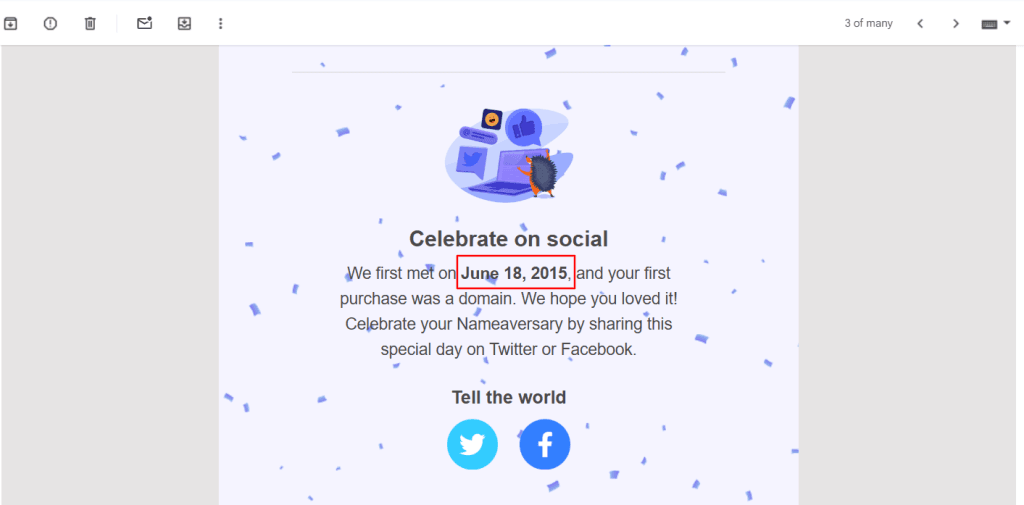
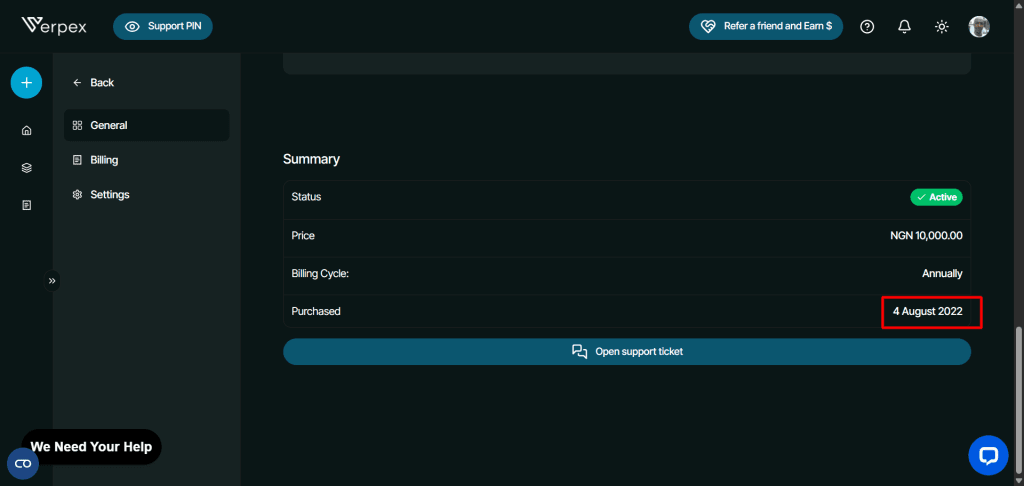
Namecheap advertises 100% uptime on its Stellar plans, backed by a service credit policy, while Verpex guarantees 99.99% uptime on its Silver and Gold plans and 99.50% on its Bronze plan. In practice, both hosts have delivered on those promises in real-world use.
This is worth stating plainly. A lot of hosting comparison articles manufacture downtime drama to make one host look worse than it is. If the sites stayed online, they stayed online, and that’s the honest experience here with both providers.
Where the performance story becomes more interesting, and more differentiated, is in speed, not availability.
Server Technology: Same Foundation, Different Execution
Both Namecheap and Verpex run on LiteSpeed Web Server, which is a genuinely strong foundation.
LiteSpeed outperforms Apache and Nginx in most shared hosting scenarios, particularly for WordPress, thanks to its built-in caching layer and efficient handling of concurrent requests.
So on pure server software, neither host has an edge over the other. The storage layer is where they diverge.
Verpex runs NVMe SSD across every plan in its lineup. Namecheap uses standard SSD on its Stellar and Stellar Plus plans, with faster storage available on Stellar Business and its EU and Singapore datacenter options.
NVMe isn’t a marketing term. It delivers significantly faster read/write speeds than conventional SSDs, which means quicker database queries, faster WordPress admin operations, and reduced server response times under load.
For most small personal sites, this difference won’t be dramatically visible. For WooCommerce stores, membership platforms, or any site with heavy database activity, it can be.
Speed and Load Times: The Honest Answer
Here’s something most Verpex vs Namecheap comparison articles won’t admit: raw page load speed is heavily dependent on how well a site is optimized – caching configuration, image compression, plugin load, theme efficiency, and whether third-party performance tools like Cloudflare or Quic.Cloud CDN is in the stack.
Two WordPress sites on the same server can have wildly different load times purely based on how they’re built and configured. Attributing speed differences entirely to the host, without controlling for those variables, produces misleading conclusions.
What the host does control meaningfully is Time to First Byte (TTFB). The time between a browser making a request and receiving the first byte of a response from the server.
This is a direct measure of server responsiveness, and it’s what I address next.
Real-World TTFB Test: Namecheap vs Verpex
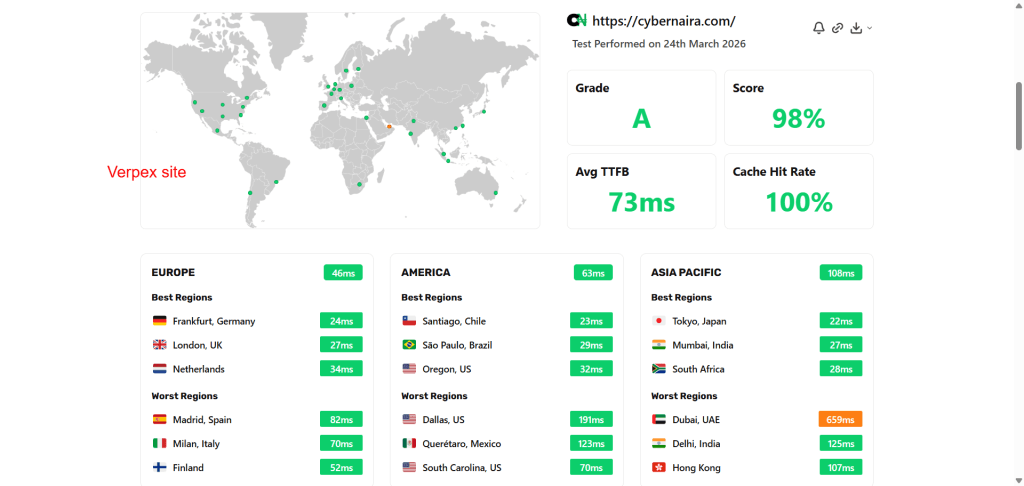
We ran a live TTFB test on both sites using SpeedVitals across 40 global locations. Here’s what the data actually shows.
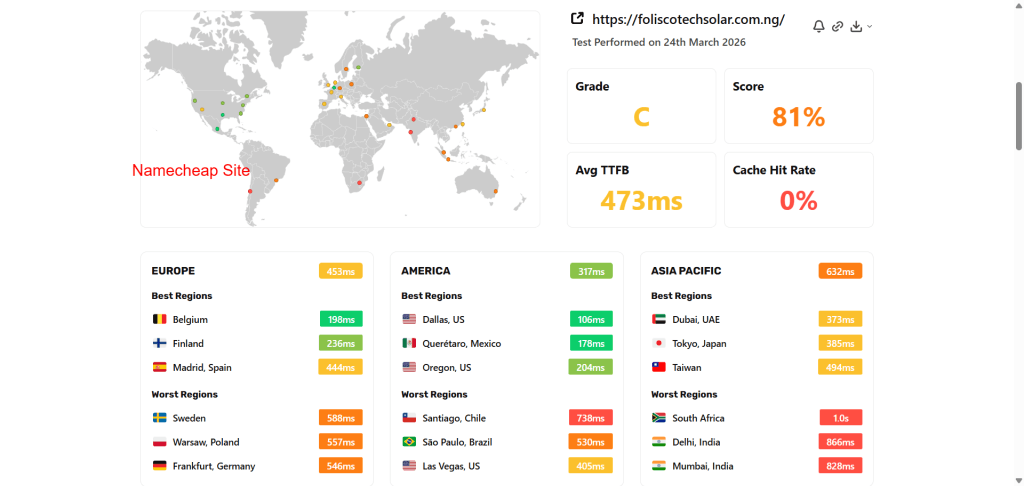
Namecheap site — US datacenter, served via Cloudflare CDN:
Verpex site — Singapore datacenter, served via Quic.cloud CDN:
At face value, the gap looks enormous — 73ms versus 473ms is a difference that would be remarkable even between a budget and a premium host. But the most important number on the Namecheap result isn’t the TTFB, it’s the 0% cache hit rate.
This means the SpeedVitals ttfb test hits the origin server directly on every request, bypassing Cloudflare’s edge cache entirely. The test essentially measured the raw server response time without the CDN in place.
Under normal real-world traffic conditions, with Cloudflare’s cache warmed and serving cached responses from its edge nodes, TTFB figures for the Namecheap site would look dramatically different.
The Verpex site, by contrast, recorded a 100% cache hit rate, meaning Quic.cloud CDN was fully engaged on every test request. It served cached content from edge locations close to each test node.
That’s why Frankfurt gets 24ms, and Mumbai gets 27ms despite the origin server sitting in Singapore. The CDN is doing exactly what it should.
So what does this data actually tell us? A few things worth unpacking:
First, CDN cache configuration matters enormously, and a misconfigured or cold-start CDN can make any host look worse than it is.
The Namecheap test result reflects a real gap in how the two sites were configured at the time of testing, not necessarily a fundamental difference in raw server capability.
Second, Verpex’s Quic.cloud integration appears tighter and more reliable at maintaining cache consistency across global test nodes. That 100% cache hit rate across 40 locations is impressive and suggests the CDN layer is working exactly as intended.
Third, and perhaps most importantly, Verpex’s datacenter spread gives it a structural TTFB advantage regardless of CDN.
With nine datacenter locations, including Singapore, India, Australia, London, Central Europe, Canada, and Mexico City, Verpex can place your origin server closer to your primary audience from the start.
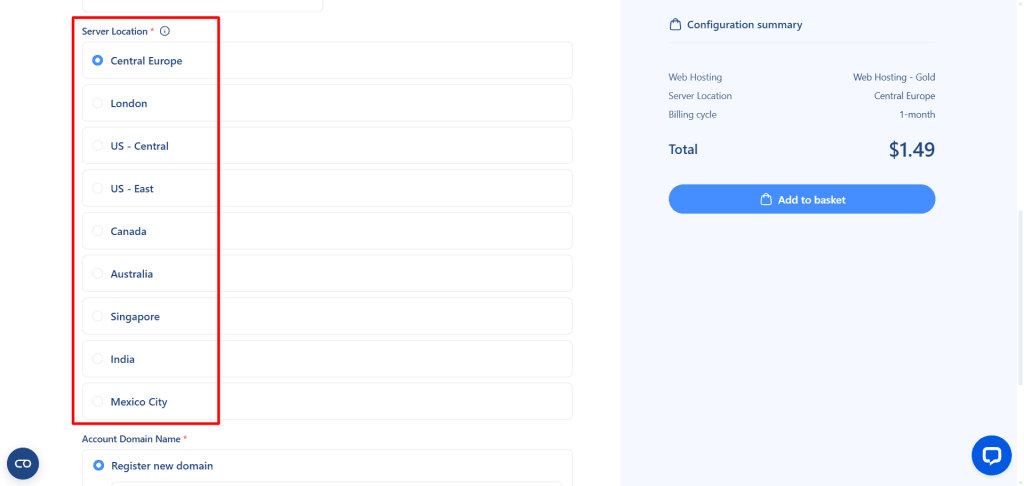
Namecheap offers US, UK, and Singapore, with EU access requiring a two-year plan commitment.
For businesses with a clearly regional audience outside North America, that flexibility is a genuine and practical edge.
The honest summary: on the day of testing, with real live sites and real CDN configurations, the Verpex site delivered significantly faster global TTFB.
Some of that gap reflects CDN cache state rather than raw hosting performance, but the difference in cache hit rate is a meaningful data point about how each setup performs in the real world.
Ease of Use & Setup
Getting Started: Namecheap Wins on First Impressions
For a first-time user, the onboarding experience matters more than most hosting companies acknowledge.
Confusion at setup kills confidence early, and a rocky start colours how you feel about a host for months afterward.
Namecheap has a clear edge here. From the moment your payment goes through, the path to a live site is remarkably straightforward, particularly if your domain is also registered with Namecheap, which is common given that domain registration is where most Namecheap users start.
DNS configuration requires updating it in your domain registrar account, cPanel is accessible within minutes of signup, and WordPress installs via Softaculous in under two minutes. There’s very little friction between paying and having a working site.
Verpex’s experience is smooth in almost every respect, except for one genuinely puzzling step.
During my sign-up, Verpex required manual payment verification by submitting proof of payment before the account could be activated, even though the system had already processed the payment and sent a receipt to my email.
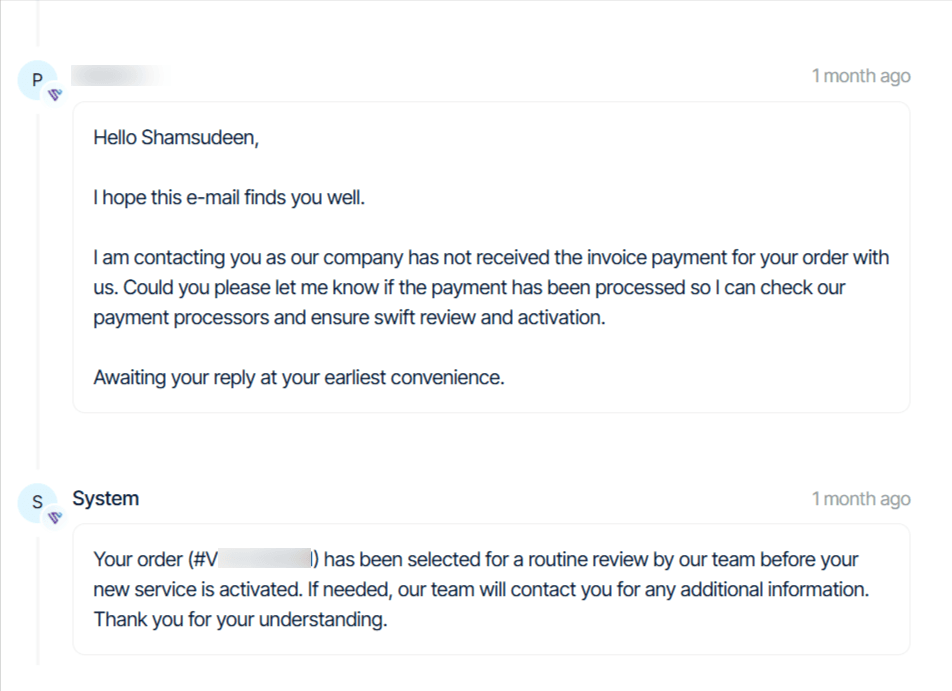
It’s worth noting this may not reflect how Verpex operates for every customer, and could simply be a one-time verification step triggered by my specific account or payment method.
Nevertheless, it’s not a dealbreaker, but it’s a friction point that is worth knowing about before you sign up.
Once past that hurdle, everything else about Verpex’s onboarding is well-executed.
cPanel: Familiar Interface, Different Toolsets
Both web hosts use cPanel, so the core experience — managing files, databases, email accounts, DNS records, and one-click installs — is familiar territory for anyone who has used shared hosting before.
The learning curve for newcomers is the same on both platforms.
Where they diverge is in what’s layered on top of cPanel, and that’s where the day-to-day experience of managing a WordPress site starts to feel noticeably different.
Namecheap provides WordPress management through WordPress Manager by Softaculous — a capable and widely used tool that handles installations, updates, backups, and cloning. It gets the job done, and most users will find it perfectly adequate.
Verpex gives you both WordPress Manager by Softaculous and WP Toolkit, and the way you manage WordPress through the two tools differs significantly.
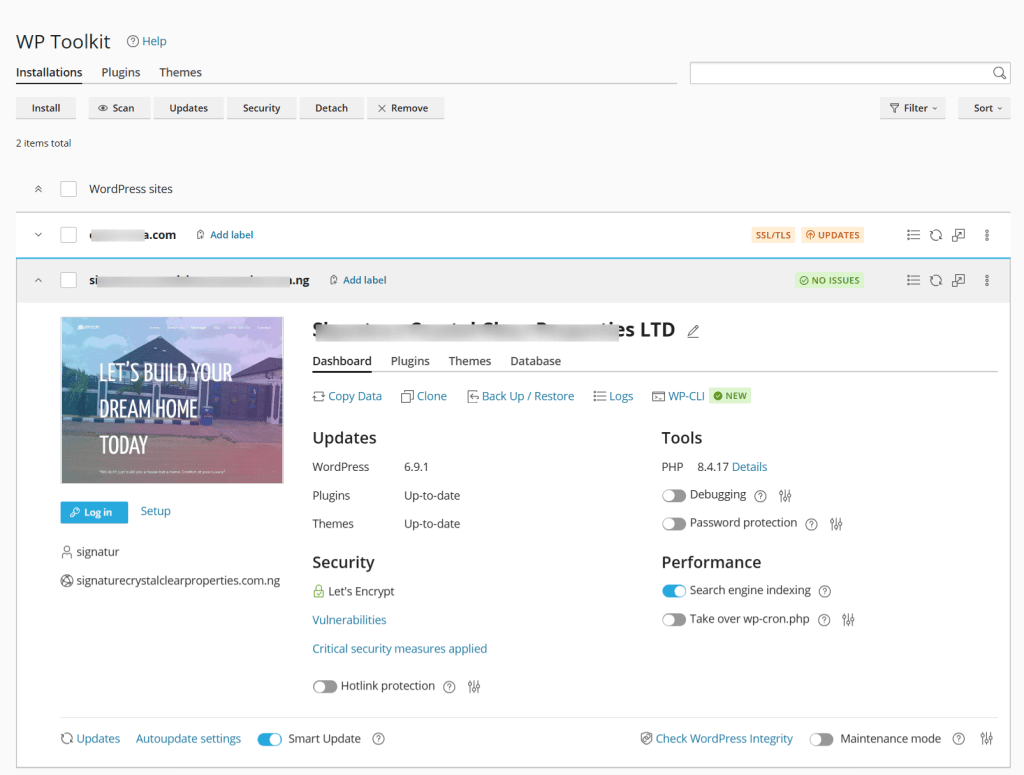
WP Toolkit is a more sophisticated interface that lets you manage installations, selectively apply updates, clone sites, create staging environments, run security scans, and manage plugins and themes, all from a single, well-designed dashboard without ever leaving cPanel.
Having both tools available means Verpex caters to casual users who are comfortable with Softaculous and to developers or power users who want the deeper control that WP Toolkit provides.
Namecheap’s absence of WP Toolkit isn’t critical for someone running a single personal blog. But for anyone managing multiple WordPress installations — an agency, a developer, or a site owner who runs several projects — it’s a real workflow difference.
Softaculous Premium Plugins: A Bonus Worth Knowing About
One feature both hosts share that often flies under the radar is access to premium plugins bundled through Softaculous.
As you can see in the screenshot below, these include tools such as SpeedyCache Pro, SiteSEO Pro, Loginizer Pro, Pagelayer Pro, GoSMTP Pro, SocialFeeds Pro, and more, all installable directly from the WordPress management interface.
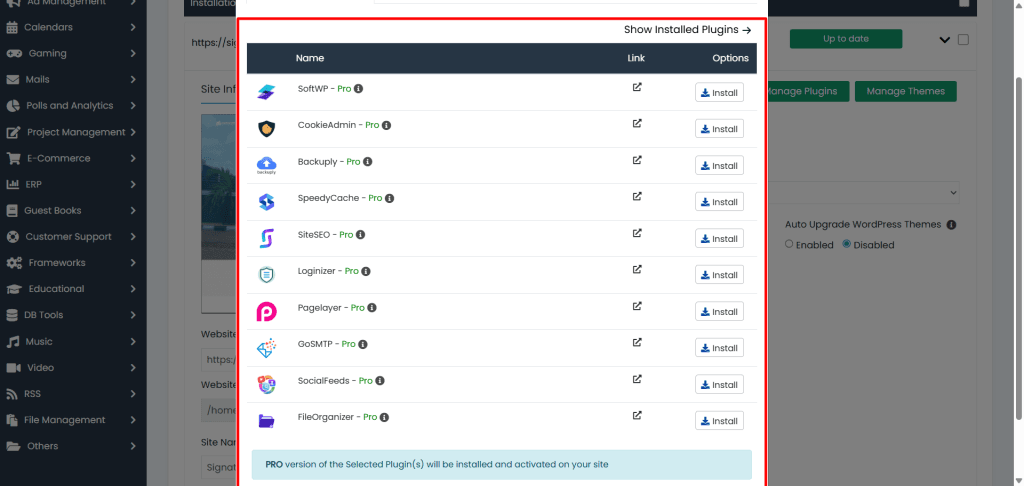
These aren’t stripped-down trial versions; they’re fully functional Pro licenses available for free for a defined period, some up to a year.
For a new site owner, this alone can save a meaningful amount on plugin costs in the first year. Both Namecheap and Verpex offer this through their Softaculous integrations, so neither has an advantage in this area.
Redis and Caching: A cPanel Difference That Matters for WordPress
Inside cPanel, one of the most consequential differences between the two hosts is the presence, or absence, of Redis.
On Verpex, Redis is available as an object cache directly from within your hosting account, enabling persistent in-memory caching that dramatically reduces database load on dynamic WordPress sites.
Combined with LiteSpeed Cache, it gives WordPress a highly efficient two-layer caching stack.
On Namecheap shared hosting, the Redis service is simply not available. It’s offered on Namecheap’s VPS and dedicated server plans, but shared hosting users have no access to it, regardless of which Stellar plan you’re on.
For a standard WordPress blog or brochure site, this won’t be noticeable. For WooCommerce stores, sites with logged-in users, or any installation generating a high volume of dynamic database queries, the absence of Redis Object Cache is a tangible performance ceiling.
Migration: Equally Good on Both
If you’re moving an existing site to either Namecheap or Verpex, the free migration service delivers on its promise.
Communication speed and turnaround were comparable across both, and in both cases, the migration was handled cleanly without data loss or configuration issues.
This is one area where neither host has a meaningful edge; both handle it well, and neither charges extra for it.
Security
On security, Namecheap and Verpex share a broadly similar foundation, which is reassuring because it means neither host leaves you exposed at the infrastructure level.
Verpex and Namecheap run on CloudLinux with CageFS isolation, which means each hosting account is sandboxed from other accounts on the same server. A compromised site on a neighbouring account cannot affect yours.
Both include ModSecurity, a web application firewall that filters malicious HTTP requests before they reach your site.
They provide Two-Factor Authentication for cPanel access, IP blocking, Hotlink Protection, Leech Protection, and SSH access. Both allow you to select your PHP version directly from cPanel — an important capability for WordPress compatibility and security patching.
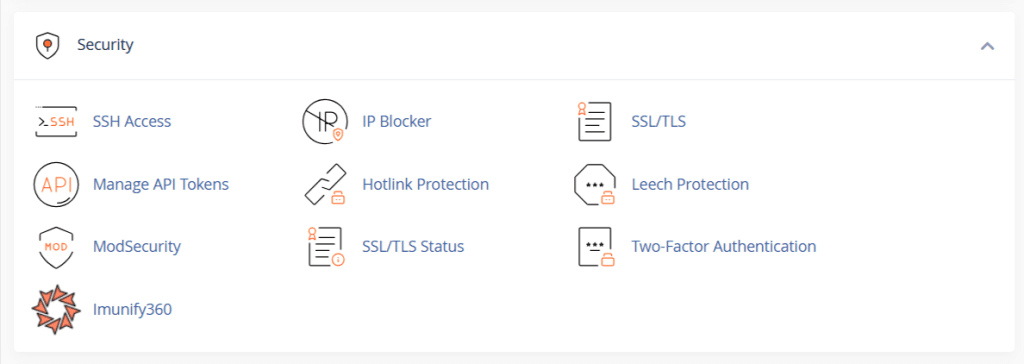
Imunify360, the industry-leading real-time malware scanner and intrusion detection system, is available on both platforms and directly visible in the cPanel security panel.
It runs continuously in the background, scanning files for known malware signatures, blocking suspicious traffic patterns, and alerting you to threats without requiring any manual configuration.
One thing worth being clear about: beyond these built-in tools, security is largely in the user’s hands. The host provides the instruments; it’s the site owner who decides whether and how to deploy them.
WP Toolkit vs Softaculous
This is where the two hosts diverge in a meaningful, practical way, and the difference is best understood not as one host being more secure than the other, but as one offering a smarter interface for managing WordPress security.
Both hosts allow you to apply WordPress-specific security hardening measures from within cPanel.
You can block access to xmlrpc.php, forbidding PHP script execution in the wp-includes and wp-content/uploads directories, disabling file editing from the WordPress dashboard, turning off pingbacks, blocking author scans, restricting access to sensitive files like wp-config.php, and more.
These are well-established hardening practices that meaningfully reduce a WordPress site’s attack surface.
On Namecheap, these measures are applied through WordPress Manager by Softaculous as a checklist. You select the measures you want to apply and hit Apply. It works, and for users who know what each option does, it gets the job done efficiently.
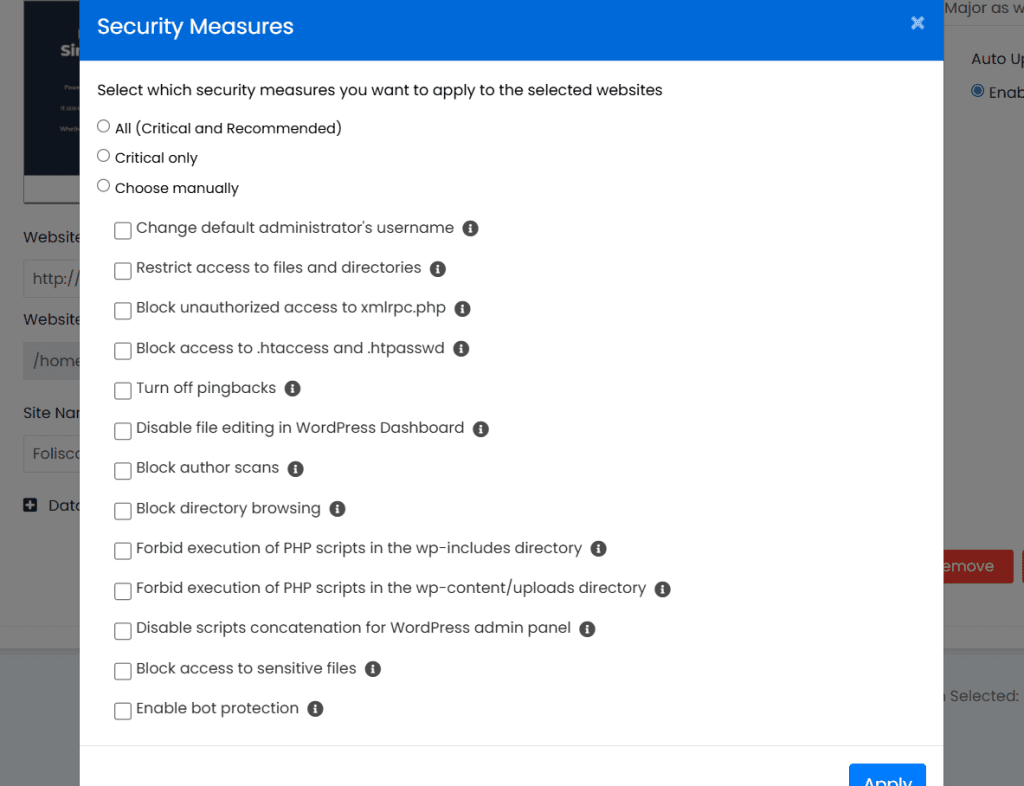
On Verpex, WP Toolkit takes a more sophisticated approach.
Rather than presenting a blank checklist, it runs a security audit of your existing installation and returns a status report. It shows you which measures are already in place and flags the ones that aren’t with warning indicators.
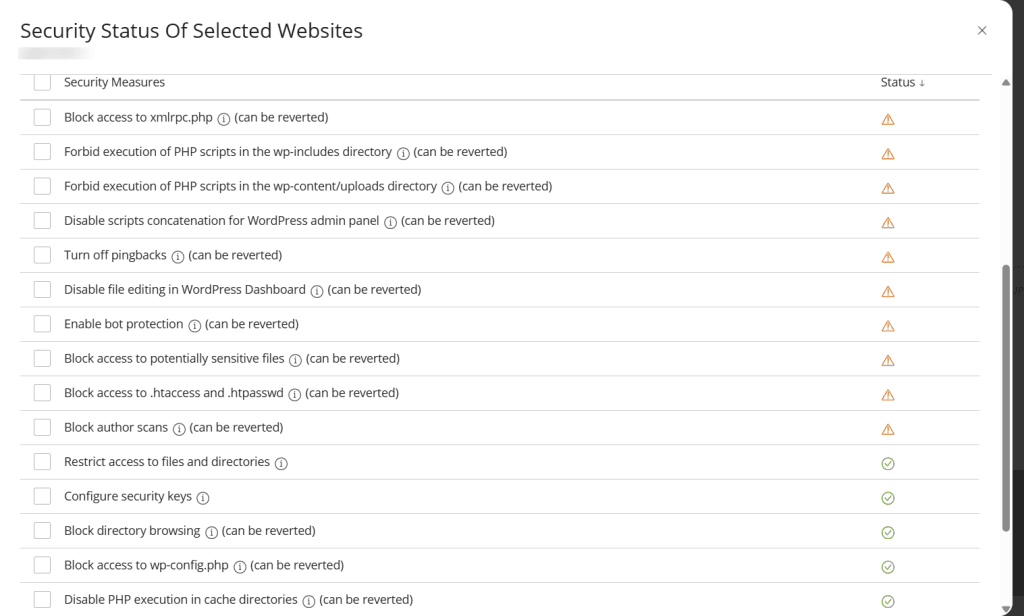
You can see at a glance exactly where your site’s vulnerabilities are before you act. It’s a proactive posture rather than a reactive one, and for users managing multiple WordPress installations, it’s considerably more useful than working through a checklist blind.
Both Softaculous and WP Toolkit also let you choose between applying all critical and recommended measures at once, critical measures only, or selecting them manually, so the level of control is comparable.
The difference is in how clearly each tool surfaces what actually needs attention.
Support and Overall User Experience
When something breaks, or when you simply need clarification, support quality becomes more important than feature lists.
Both Verpex and Namecheap offer 24/7 support, but the experience can feel slightly different depending on what you need help with.
I have engaged with their customer support on many occasions.
Honestly, both Verpex and Namecheap offer excellent customer support. They’re responsive, dedicated, and efficient in solving WordPress-related issues.
One thing I notice is that Verpex offers multiple channels – live chat, email tickets, and phone support.
Namecheap offers live chats and email tickets only. Although I don’t have that need to call, you may need to verify if phone support is a priority.
There is no clear winner in terms of availability. Both web hosts are accessible at any time.
Who Is Each Host Best For?
Choosing between Namecheap and Verpex isn’t simply a matter of one being better than the other. It comes down to what you’re building, how technical you are, and what you’re optimising for. Here’s how to think about it.
Best for Total Beginners: Namecheap
If you’re launching your first website and you want the path from payment to live site to be as frictionless as possible, Namecheap is the more sensible starting point. The entry price is lower, which reduces the financial risk of a first hosting purchase.
More importantly, if you register your domain with Namecheap, which is a natural first step given that domain registration is what most people know Namecheap for, DNS configuration is essentially easier to manage.
There’s no digging through nameserver settings or waiting for propagation across unfamiliar panels. Everything lives in one place.
The onboarding experience reinforces this. From payment to cPanel to a working WordPress installation is a smooth, well-signposted journey that doesn’t assume prior knowledge of hosting.
For someone who just wants a site online without a steep learning curve, that matters more than NVMe storage or Redis support.
Best for WordPress Performance: Verpex
For users who are serious about WordPress performance and want to extract the maximum speed from their hosting stack, Verpex has a structural advantage that’s difficult to match on Namecheap shared hosting.
The reason comes down to how the full technology stack fits together.
When you add Quic.cloud CDN, the LiteSpeed Cache plugin, and Redis to the Verpex LiteSpeed server stack, you get a complete, tightly integrated performance ecosystem: the CDN, the server software, the caching plugin, and the object cache are all designed to work together.
The TTFB results we recorded earlier, an average of 73ms globally with a 100% cache hit rate, are a real-world demonstration of what that stack delivers when properly configured.
Namecheap runs LiteSpeed web server too, and LiteSpeed Cache works well on it. But without Redis on shared hosting, the object caching layer is missing.
That gap is manageable for simple blogs or brochure sites, but it becomes increasingly relevant as a site grows in complexity. More plugins, more dynamic content, more database queries. The ceiling is lower, and you’ll hit it sooner.
Best for WooCommerce, Membership, and eCommerce: Verpex
The same logic applies with even more force for WooCommerce stores. eCommerce sites are inherently database-heavy.
Every product page, cart update, session, and checkout generates database queries that accumulate quickly under real traffic. Redis object caching absorbs much of that load by storing frequently accessed data in memory rather than hitting the database on every request.
Without it, a busy WooCommerce store on shared hosting relies entirely on page-level caching, which cannot cache logged-in users or dynamic cart content by its nature.
The combination of Redis, NVMe SSD, LiteSpeed Cache, and Quic.cloud CDN on Verpex makes it a considerably stronger platform for eCommerce.
If your store is your livelihood and performance directly affects conversions, the hosting stack underneath it deserves serious consideration. Verpex’s stack is meaningfully better equipped for that workload on shared hosting.
Best for Agencies and Developers: Verpex
For agencies managing multiple client sites or developers who want fine-grained control over their WordPress installations, Verpex is the stronger platform.
WP Toolkit alone justifies this. The ability to manage, update, clone, audit, and harden multiple WordPress installations from a single cPanel interface is a genuine workflow improvement over relying solely on Softaculous WordPress Manager.
Add SSH access, Git support, Redis, staging environment capability, and transparent resource allocation per plan, and Verpex is clearly built with technical users in mind.
Namecheap is not without developer-friendly features; SSH, Git, and Softaculous are all present, but the absence of WP Toolkit and Redis on shared hosting means agencies doing serious WordPress work will bump into limitations that Verpex doesn’t impose.
Best for Users Who Want Global Audience Reach: Verpex
If your audience is spread across multiple regions — or concentrated in a market outside the US and UK — Verpex’s nine datacenter locations give you a genuine advantage in server placement that Namecheap cannot match at the same plan level.
Being able to host your site in India, Australia, Mexico City, or Central Europe without upgrading to a two-year plan is a flexibility that directly translates into better TTFB for your target audience.
For Namecheap, EU datacenter access requires a two-year commitment, a significant restriction if you’re not ready to lock in that long.
Best for Budget-Conscious Site Owners: Namecheap
If your primary constraint is cost and you’re running a straightforward site, such as a blog, portfolio, or small-business landing page, Namecheap’s entry-level pricing is hard to argue with.
The Stellar plan gets you online for less per month than any comparable Verpex plan, and for simple use cases, the performance difference between the two hosts will be minimal in practice.
The tradeoff is the SSL renewal cost after year one, the 30-account email cap on the base plan, and a less capable WordPress management toolset. But for a site owner
Pros & Cons
Namecheap Pros
Namecheap Cons
Verpex Pros
Verpex Cons
FAQs
Which host is better for beginners?
Both are beginner-friendly because they use cPanel and offer one-click WordPress installation. Namecheap may feel slightly simpler at the entry level, especially if you are already using it for domain registration. Verpex remains easy to use but also includes more performance-oriented tools that may benefit users planning to grow.
Does Namecheap offer Redis on shared hosting?
No. Redis is not available on Namecheap shared hosting plans. Verpex includes Redis as part of its shared hosting stack, which can improve performance for dynamic WordPress applications.
Can I host multiple websites on Verpex and Namecheap?
Yes. Namecheap’s Stellar plan allows up to three websites at the entry level. Verpex’s Bronze plan allows one website, but higher plans support multiple or unlimited sites. If multi-site hosting is your priority at the lowest tier, Namecheap offers more flexibility.
Is WP Toolkit better than Softaculous?
They serve similar purposes but are structured differently. WP Toolkit (included with Verpex) provides centralized WordPress management, visibility into vulnerabilities, and structured multi-site oversight. Softaculous (used by Namecheap) is fully capable and includes staging, cloning, backups, and update management, but it feels more utility-focused. For one or two sites, both work well. For managing many installations, WP Toolkit may feel more streamlined.
Conclusion
Verpex and Namecheap both deliver capable shared hosting, but they approach the market from slightly different angles. Namecheap builds its shared hosting around affordability, entry-level flexibility, and infrastructure stability.
The ability to host three websites on the Stellar plan, the use of enterprise-grade hardware, and the inclusion of Softaculous for WordPress management make it a practical choice for small projects and growing beginners.
With the addition of SuperSonic CDN on annual plans and the option to use Cloudflare for SSL beyond the first year, it remains competitive and adaptable.
Verpex, on the other hand, leans more toward performance consistency and management structure.
NVMe storage across plans, Redis Object Cache availability, clearly defined resource allocations, and WP Toolkit integration create an environment that feels more optimized for users managing multiple WordPress sites or performance-sensitive projects.
Neither host is objectively superior in all categories. Namecheap offers more flexibility at the entry tier for multi-site setups. Verpex offers stronger technical transparency and performance tooling.
If your priority is entry-level flexibility and brand familiarity, Namecheap is a logical choice. If your focus is performance headroom, structured WordPress management, and long-term simplicity, Verpex may align better.
The right decision ultimately depends on how you plan to use your hosting, not just today, but as your website grows.