

On the WordPress.org plugin repository, there are more than 1,100 SEO plugins for WordPress blogs at the time of writing this post. Before you finish reading this post, I’m sure that figure might have increased.
Let’s be honest; no one has time to search 53 pages for the best WordPress SEO plugins for their blog. We’re all busy with the core aspects of our digital and personal lives.
To save you time and trouble, I did the initial research. I tested, validated, and compiled a list of WordPress optimization plugins for any blog – big or small.
No matter the size of your blog, this list contains a plugin that’s helpful in some way.
Which Plugin is Used in WordPress for SEO?
Several SEO plugins are used in WordPress; Yoast SEO is one of the most popular by pure download count. The All in One SEO plugin by Syed Balkhi is another popular SEO plugin.
However, since SEO is beyond content optimization alone, other plugins are also categorized as SEO plugins. This list will include plugins for image optimization, speed, performance, user experience, etc.
With that out, let’s dive in…
Best SEO Plugins for WordPress Blogs
These SEO plugins offer a range of features and functions for WordPress blogs. Their features overlap, and any of them can do the job.
It comes down to your preferences and the free features available, especially if you want to try the free version before upgrading to a paid license.
1. All-in-one-SEO

For many reasons, All-in-one-SEO is one of the best SEO plugins for WordPress. It has over 3 million active installations, is easy for beginners to use, and makes optimization simple.
Configuring the plugin is also straightforward. The setup wizard walks you through the process.
The free version is ideal and enough for beginner WordPress bloggers, but if you want more optimization features, the Pro version is worth every cent.
It will save you from installing many other WordPress optimization plugins. AIO SEO works seamlessly with most WordPress blogs and business websites.
Whether it’s an e-commerce store, blogs, portfolio websites, etc, every WordPress blog can use the All-in-one SEO plugin.
AIO SEO Top Features
The plugin includes advanced SEO features such as local SEO, a robots.txt editor, WooCommerce SEO, IndexNow, Crawl Cleanup, and Google Search Console integration.
It also integrates with other plugins like MemberPress and WooCommerce, and you can easily assign proper attributes (no follow, do follow, sponsored, and UGC) to your outgoing links.
AIO SEO Pricing
2. Yoast SEO

Another popular WordPress plugin is Yoast SEO. It has more than 5 million active installations and counting.
Like AIO SEO, Yoast offers lite and premium versions of its WordPress SEO plugin. The lite version is ideal and enough for most beginner bloggers.
Yoast SEO is beginner-friendly, easy to set up, and allows you to optimize your content and blog for better search engine visibility.
Yoast SEO Top Features
Yoast Pricing
Starts at $99/yr (excluding VAT)
3. RankMath

RankMath is a major contender for the best SEO plugin for WordPress. The plugin offers many features and has crossed the 1 million ( as of writing) download mark.
Like other SEO plugins, Rank Math SEO offers a lite version and a premium version.
The lite version includes helpful SEO tools that let you handle most on-page SEO tasks.
Rank Math’s lite version offers more features than Yoast’s free version; you can integrate Rank Math with Google Trends and track keyword positions.
The setup wizard guides you through the configuration process, so you don’t have to guess your way around necessary SEO settings.
Rank Math Top Features
Rank Math Pricing
4. MonsterInsights

Not an SEO plugin, MonsterInsights lets you integrate Google Analytics with the WordPress dashboard. This lets you view your traffic and user data from the WordPress admin dashboard.
The best part is that MonsterInsights simplifies the Google Analytics data so you can understand which metrics to focus your resources and time on.
The plugin tracks website metrics such as website visits, top-performing keywords, landing pages, etc.
The lite version offers basic features; to experience the plugin’s full potential, you need the pro version. MonsterInsights has been downloaded more than 3 million times.
MonsterInsights Top Features
MonsterInsights Pricing
5. Broken Link Checker
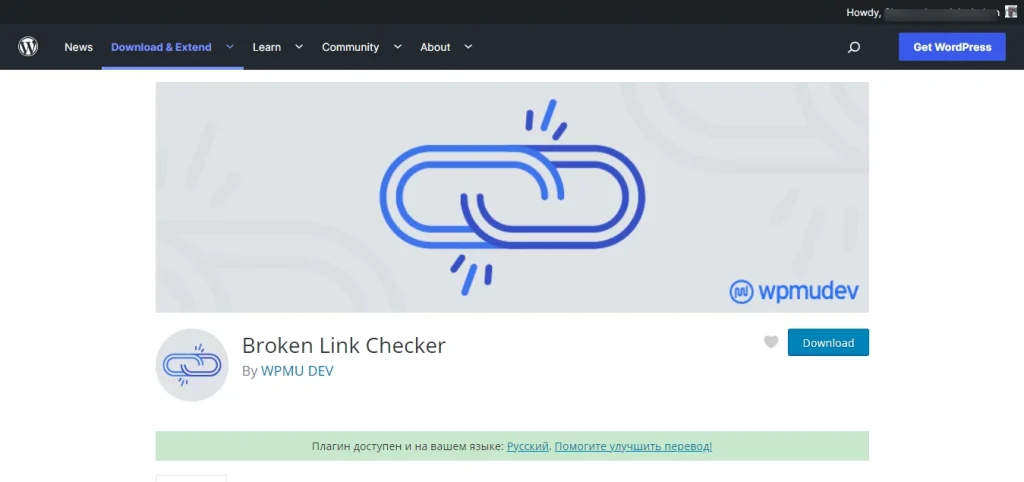
On-page optimization involves several WordPress SEO checks, and links are one of them. SEO isn’t only about content or ensuring your pages are optimized; you also need to confirm your links aren’t leading to dead or broken pages.
Broken links hurt search engines and user experience, so you must check the status of your internal links from time to time.
If you have a website with several hundred pages, manually finding broken links could be tedious and time-consuming.
You need a plugin that scans your website pages and detects 404 error codes. One of the best link status checkers is the WordPress Broken Link Checker.
This plugin lets you detect, manage, and fix broken internal links on your website. It also detects externally broken or non-responsive links. This lets you fix them quickly, set up redirects, or unlink them.
Broken Link Top Features
Broken Link Pricing
- Free
6. WP Rocket

Page speed and performance are critical parts of an SEO strategy; the faster a page loads, the higher its conversion rate. Caching is one way to improve page speed.
WP Rocket is the best WordPress cache plugin on the market. No other plugin comes close in setup, page speed improvement, or instant boost.
The plugins offer many optimization features that work straight out of the box. You don’t need any technical SEO knowledge to configure it.
The only downside to the WP Rocket plugin is that there is no free version.
WP Rocket is a premium-only plugin. However, there is a 14-day money-back guarantee if you’re unhappy with its performance.
You must request a refund within 14 days of your purchase, and you will receive your money back.
The plugin helps with page caching, browser caching, cache preloading, database cleanup, minification, mobile caching, GZip compression, etc.
WP Rocket Top Features
Check this article to learn the best WP Rocket configurations.
WP Rocket Pricing
FAQ – WordPress SEO Plugins
What are SEO plugins?
SEO plugins are scripts, code, or modules developed to extend the functionality of the core WordPress blogging software. They add features and functions to the content management system, so you can do more with your website. Some WordPress SEO plugins are developed to perform specific SEO tasks, while others can perform multiple complex tasks, such as JetPack.
Which free SEO plugin is best for WordPress?
Does WordPress need an SEO Plugin?
The short answer is no. You don’t need an SEO tool to run a WordPress blog. However, this assumes you know more about coding and are comfortable editing core files. SEO plugins make your task easier, simplify complex blog management, and help you increase efficiency and productivity.
Can I use 2 SEO plugins?
Don’t use two SEO plugins meant for the same task. Doing so will hurt your site’s usability and performance, and compatibility issues might break your blog.
Conclusion
SEO plugins in WordPress are indispensable tools that streamline on-page optimization, guide you in the right direction, and ensure you check all the necessary boxes.
Aside from entering your meta keyword and image alt text, SEO plugins like RankMath and AISEO do much more.
For example, these tools help with schema structure; they provide hundreds of relevant schemas you can use to better describe a page’s content to search engines. They also handle redirects, which are essential for preserving link juice and improving user experience for dead pages or links on your site.
Whatever your needs for a WordPress SEO plugin, this post offers excellent options for different users.

Hi Shamsudeen,
I’ve used Yoast for years on several sites but with a newer blog of mine, I went with RankMath and love it. I may change my others to it as well in the coming year. Thanks for the review of these important plugins for WordPress sites.
Hi, Lisa,
Thanks for reading through and sharing your thoughts. Like you, I’ve been a fan of Yoast for years, but in my new blog projects, I tested RankMath, which seems like a better choice. Though, I’m still looking around and seeing how it compares to Yoast.
Thanks for coming.
Hi Shamsudeen,
I use Rankmath on my blogs and can proudly say that it is the best WP SEO plugin, I’ve ever used. You disclosed the must have list of WordPress plugins that may take any blogger’s graph to the success level.
Hi, Nitin,
Thanks for sharing voice here. Glad you find this list helpful.