

If you’ve spent any time trying to speed up a WordPress site, you’ve run into both names. WP Rocket and NitroPack sit at the top of nearly every list of performance plugin recommendations.
Both will make your site faster. But they’re built on entirely different philosophies, and that difference matters a lot depending on who you are and what you’re trying to accomplish.
This comparison of WP Rocket vs NitroPack is for any business owners, freelancers, or performance optimization agencies who need to make a real decision, not just collect marketing specs.
We’ll cover hosting compatibility, ease of use, performance behavior, image optimization, CDN, Google Fonts, database tools, analytics, and pricing. By the end, you’ll know which one fits your workflow and your budget.
Quick Overview: What Each Plugin Actually Is
WP Rocket is a premium WordPress caching plugin. You buy a license, install it like any other plugin, and it handles caching, file optimization, and delivery improvements from within your WordPress dashboard. There’s no free version. You pay upfront.
NitroPack is a cloud-based performance service. Yes, it installs as a WordPress plugin, but the actual optimization happens on NitroPack’s servers.
It intercepts your pages, runs them through its optimization engine (caching, minification, image compression, CDN delivery), and serves the optimized version to visitors. It offers a free plan with limited resources, as well as paid tiers.
That free-versus-premium structure shapes how most people first encounter each tool. NitroPack’s free plan lets you test the service on a real site with no credit card required. It supports up to 5,000 monthly pageviews and 1GB of CDN bandwidth.
It’s a genuine test environment, not a crippled demo, but it does place a “Powered by NitroPack” badge in your site’s footer until you upgrade. For a client site or any professional project, that badge needs to go, which means upgrading to a paid plan.
WP Rocket has no free plan and no trial. You’re buying on faith, though they do offer a 14-day money-back guarantee.
For users who want to see results before committing any budget, NitroPack’s free plan is a meaningful advantage. For anyone already confident in what WP Rocket delivers, the lack of a free tier is barely a concern.
This difference matters most for first-time buyers or freelancers evaluating tools before recommending them to clients.
Hosting Compatibility
Winner: NitroPack (for ease); WP Rocket (for compatibility breadth)
WP Rocket works on Apache, Nginx, LiteSpeed, and Windows servers. It is a WordPress CMS specific caching plugin.
For most mainstream WordPress hosting environments, it plays well out of the box.
If your host has a built-in cache system, WP Rocket auto-detects it and disables its cache for compatibility.
NitroPack, being a cloud-based solution, works across most CMS and custom-built websites.
One thing I appreciate about NitroPack during testing is the guidance towards configuring cache synchronization with a host that offers a built-in optimization stack, such as Varnish.
While WP Rocket auto-detects the hosting environment and adjusts accordingly for compatibility, NitroPack notifies you of host detection and provides guidance towards cache synchronization compatibility.
These little steps can mean a lot if you’re a beginner or someone without deep performance-optimization know-how.
Cloudflare Integration
Winner: Tie (both handle cache sync well, through different paths)
Both plugins integrate with Cloudflare, but they get there differently.
With NitroPack, cache synchronization is handled by following their instruction, which you’ll find in your account dashboard under “Integration”.
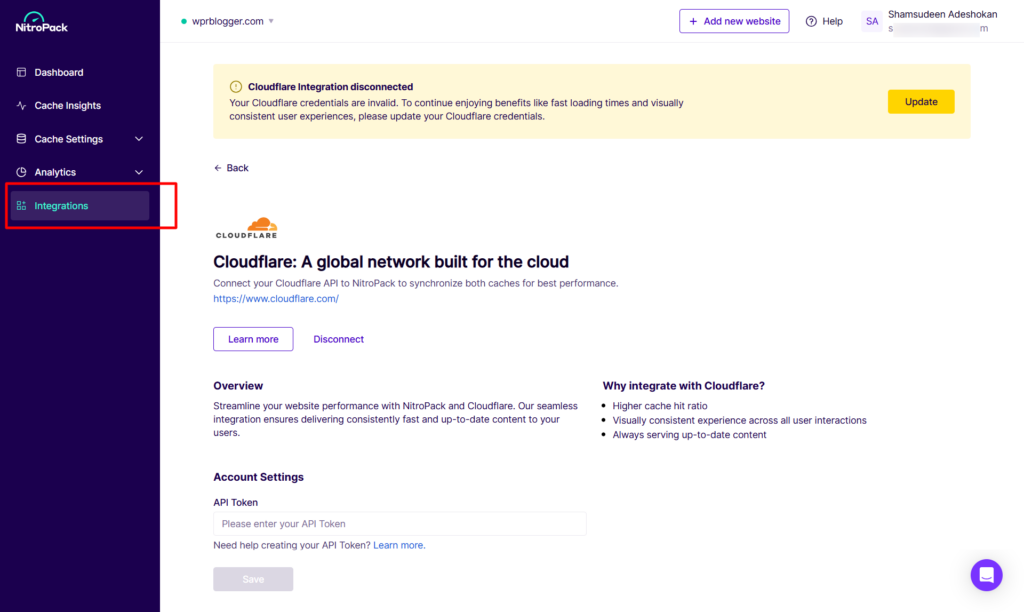
Once configured, cache clears, and updates propagate consistently across platforms. It’s a documented process that most users get through without escalating to support.
WP Rocket has two recommended paths for Cloudflare users. The first is its own Cloudflare add-on under the Add-ons tab, which connects via your Cloudflare Global API key, account email, and Zone ID.
The add-on only works with the Global API key.
Other Cloudflare API token types are not supported, and if your site uses Cloudflare Enterprise via a host integration, such as Cloudways, rather than a direct account, you may not be able to access that key at all.
The second path, and the more straightforward one, is using WP Rocket alongside the official Cloudflare WordPress plugin. With this combination, cache purges trigger automatically when you update or publish a page.
The two plugins communicate cleanly, and Cloudflare’s cache stays in sync with WP Rocket’s without any manual intervention. If you’re already using or planning to use the Cloudflare plugin on your WordPress site, this removes the purge compatibility concern entirely.
For Cloudflare users who prefer the WP Rocket add-on route, there’s some setup involved. For those using the Cloudflare WordPress plugin, it just works.

Ease of Use
Winner: WP Rocket
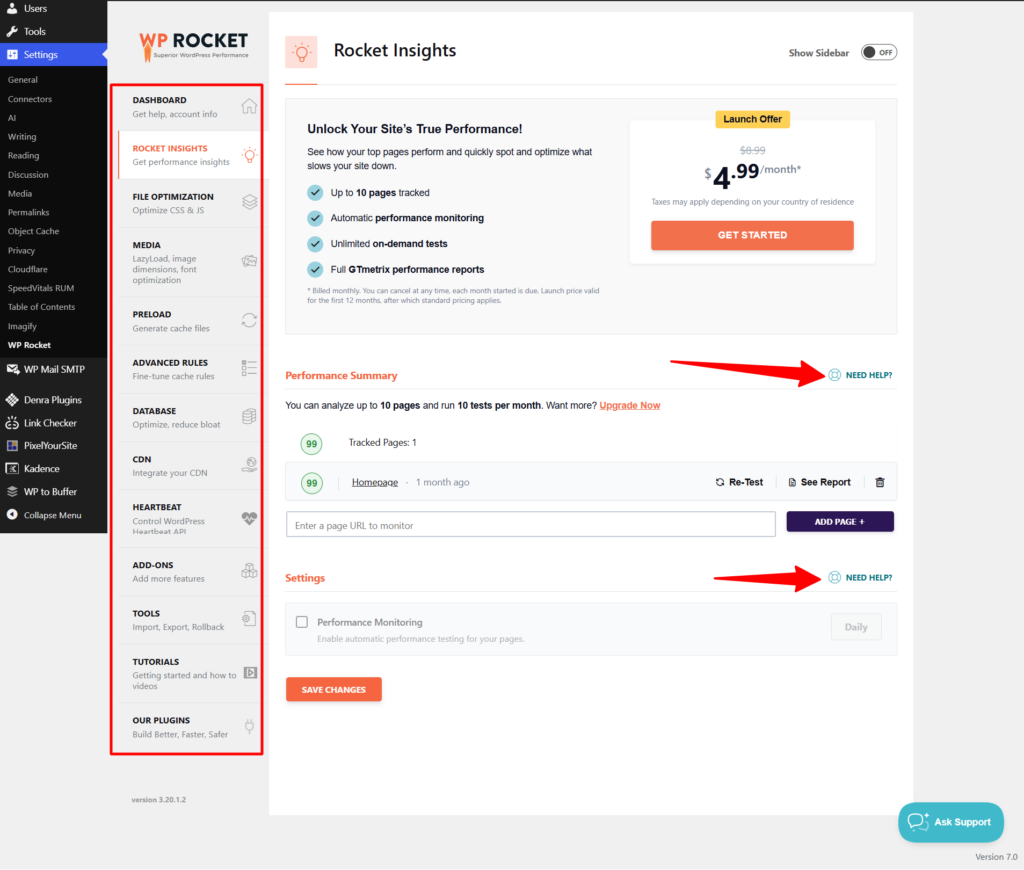
This is where WP Rocket’s single-plugin approach genuinely shines. Everything lives in one dashboard. The settings are organized into clear tabs: Cache, File Optimization, Media, Preload, Advanced Rules, Database, and Add-ons.
Most options include short, plain-English descriptions and a “need help” button that explains what each setting does and when to enable it.
For a freelancer handing off a site to a non-technical client, or an agency that needs to train junior staff on a tool, clarity matters.
NitroPack’s interface/settings are more involved. The optimization modes (Ludicrous, Strong, Medium, Standard, and Custom) provide presets, but the individual settings for caching, CSS, JavaScript, image optimization, and fonts require more technical know-how compared to similar settings in WP Rocket.
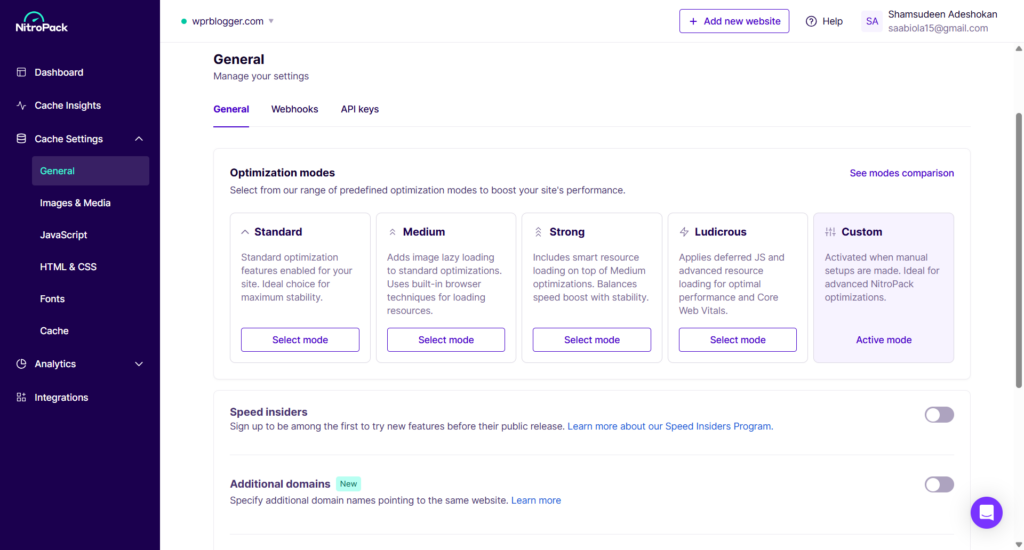
There’s more to configure, more to understand, and more surface area for things to go wrong. Experienced developers will appreciate the granularity. Users who want to install and forget will find WP Rocket easier to live with.
One more point: WP Rocket’s tab count is meaningfully smaller. Fewer settings to walk through means fewer decisions to second-guess.
Performance: Aggressive vs. Controlled
Winner: Depends on your tolerance for side effects
NitroPack is the more aggressive optimizer. In its higher optimization modes, it attacks JavaScript and CSS assets more assertively than WP Rocket does by default.
For raw PageSpeed scores, NitroPack often has the edge. But that aggressiveness has a real cost.
For every JavaScript or CSS setting you enable in NitroPack, you need to test your site thoroughly on desktop and mobile, logged in and logged out, in multiple browsers. NitroPack’s optimization can break things that look fine on a blank test page.
A real example: NitroPack’s Font Subsetting feature, which strips unused symbols from font files to reduce their size, can cause heading styles to degrade visibly.
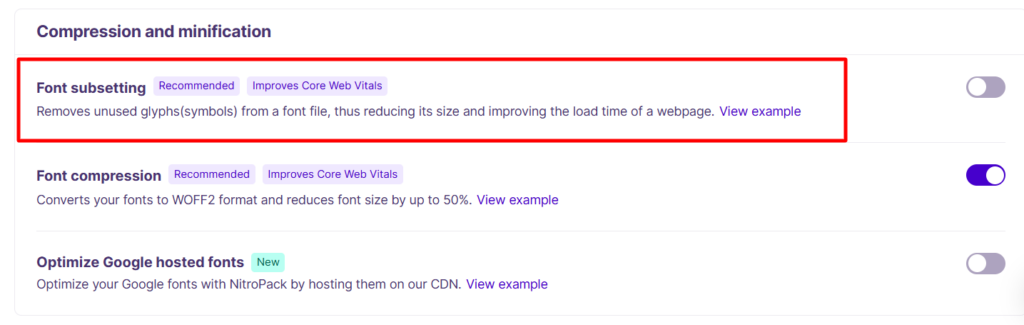
An H3 that should appear in a deep, distinct black can render as a noticeably lighter, less defined shade because the subset removed the weight data the font rendering engine relied on. That’s the kind of side effect that slips through initial testing and annoys you (or your client) weeks later.
WP Rocket is more conservative. Its JS deferral, CSS optimization, and file minification are designed to work with the broadest range of themes and plugins without requiring per-site debugging. It’s not perfect.
I’ve experienced FOUC (Flash of Unstyled Content) issues caused by WP Rocket’s JS deferral conflicting with Kadence block icon rendering, for example. But those edge cases are easier to diagnose and fix because WP Rocket’s settings are more predictable.
If you’re optimizing a client’s site and don’t have time to run exhaustive testing after every tweak, WP Rocket’s measured approach is safer. If you’re chasing scores on a site you control and understand deeply, NitroPack’s ceiling is higher.
Image Optimization
Winner: NitroPack
This is one of the clearest feature gaps between the two plugins.
WP Rocket handles lazy loading for images, sets missing image dimensions to reduce Cumulative Layout Shift, and supports lazy loading for CSS background images and iframes. What it does not do is compress or convert images.
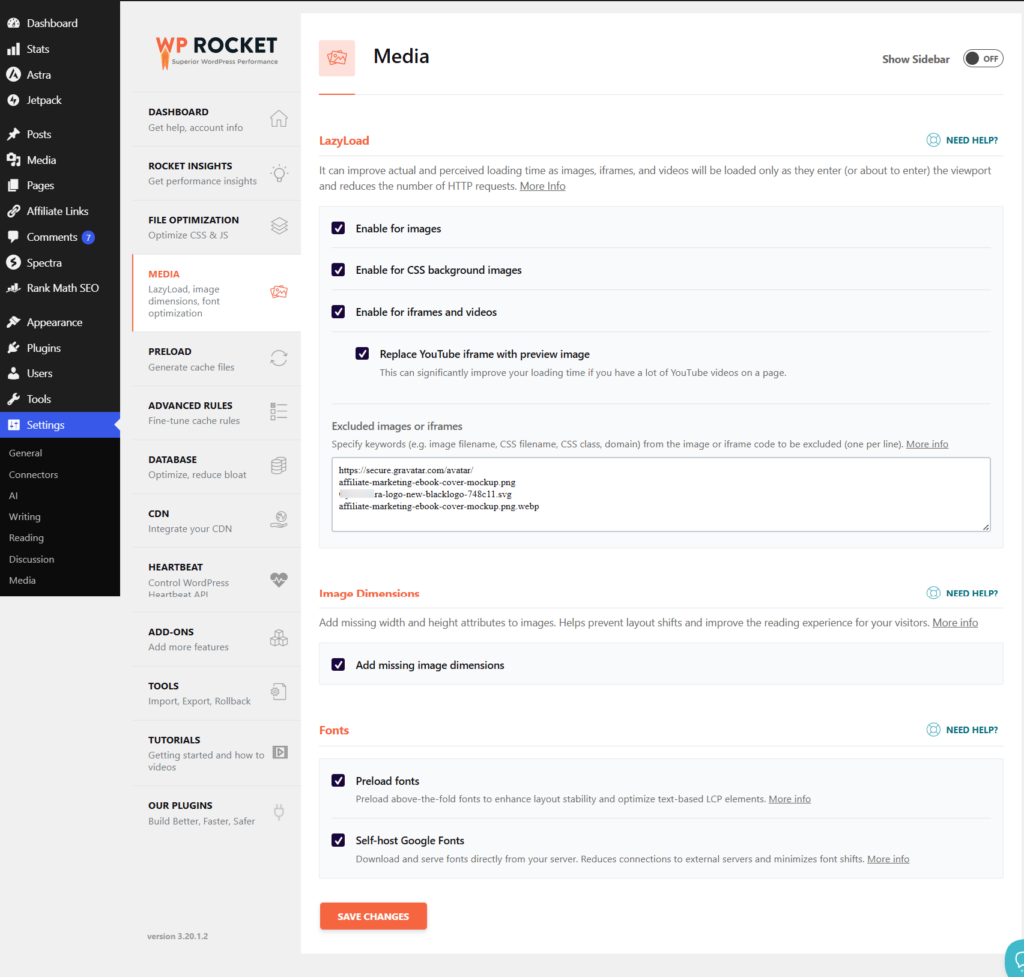
If you install WP Rocket and your images are 2MB JPEGs, they’ll still be 2MB JPEGs, just loaded lazily. For full image optimization, you need a separate plugin, such as Imagify (from the same team behind WP Rocket) or ShortPixel.
NitroPack handles image optimization end-to-end. It compresses images, converts them to next-gen formats (WebP), applies adaptive image sizing based on the visitor’s device, and serves everything from its own CDN.
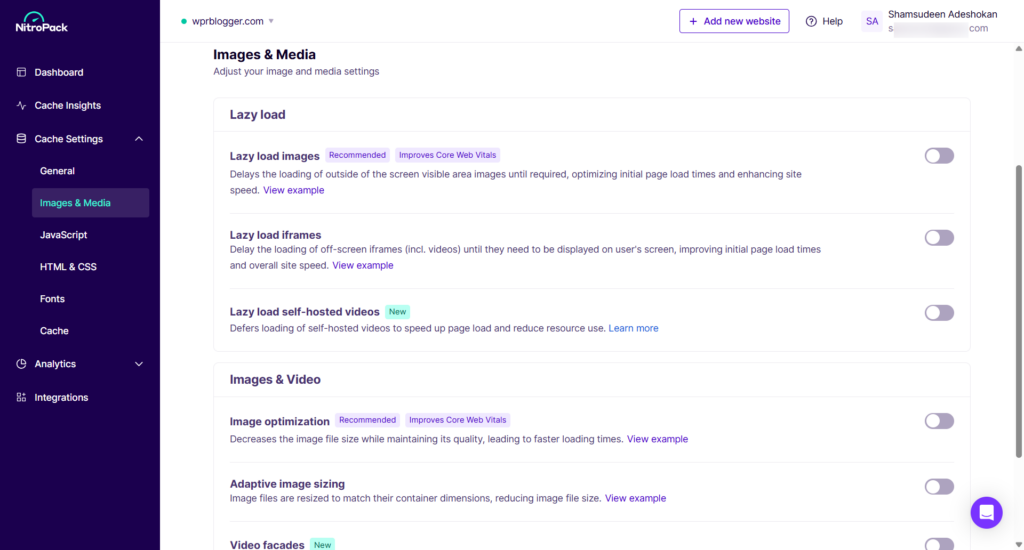
You install NitroPack and your images are automatically optimized, with no additional plugin needed.
For a small business owner or freelancer who wants a single tool to handle the full stack, NitroPack’s image pipeline offers a meaningful advantage. For WP Rocket users, the gap is partially bridgeable with Imagify, but that’s still an additional plugin and an additional subscription to manage.
CDN (Content Delivery Network)
Winner: NitroPack (for depth); WP Rocket is improving
NitroPack’s built-in CDN, powered by Cloudflare, is a core part of how it works. When NitroPack optimizes your pages, it serves the resulting assets (scripts, stylesheets, images, fonts) from its own global CDN.
This is included in every paid plan, with bandwidth varying by tier: 8GB on Stater, 25GB on Plus, 270GB on Pro, and 250GB on Agency. The CDN isn’t an add-on you connect to. It’s the delivery layer NitroPack runs on by default.
WP Rocket has a CDN service called RocketCDN, powered by BunnyCDN, with over 120 edge locations.
A free CDN plan is included with WP Rocket as of version 3.22, covering 3 pages with no bandwidth cap across 10 edge locations. The paid RocketCDN Pro plan covers full coverage and features.
WP Rocket is also compatible with third-party CDNs like Amazon CloudFront, MaxCDN, and KeyCDN, and you can configure a pull CDN in the Content Delivery tab.
The comparison here isn’t flattering for WP Rocket’s native CDN. NitroPack’s CDN covers your entire site by default and is deeply integrated with its optimization pipeline.
Assets are already processed before they hit the CDN, so delivery is both fast and optimized.
WP Rocket’s 10 edge locations with free RocketCDN is a thin network compared to NitroPack’s Cloudflare 300+ edge presence (without extra cost), and the 3-page limit on the WP Rocket + RocketCDN free tier makes it a preview, not a solution.
If you’re using WP Rocket and want serious CDN coverage, you’ll pair it with Cloudflare or another provider. That’s a reasonable approach, but it’s one more integration to manage.
Google Fonts: Local Hosting vs. NitroPack’s CDN
Winner: WP Rocket (for privacy and performance control)
WP Rocket includes a built-in option to host Google Fonts locally, meaning the font files are downloaded from Google’s servers and served directly from your own domain instead. NitroPack takes a different approach: it hosts Google Fonts on its own CDN.
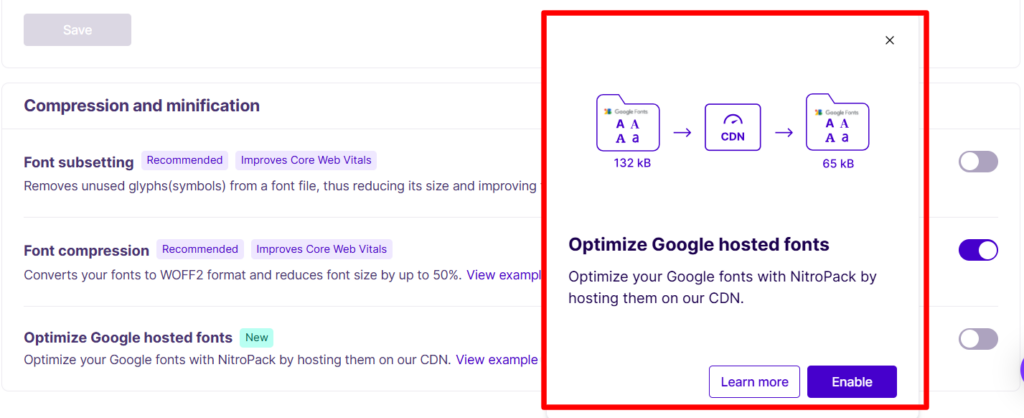
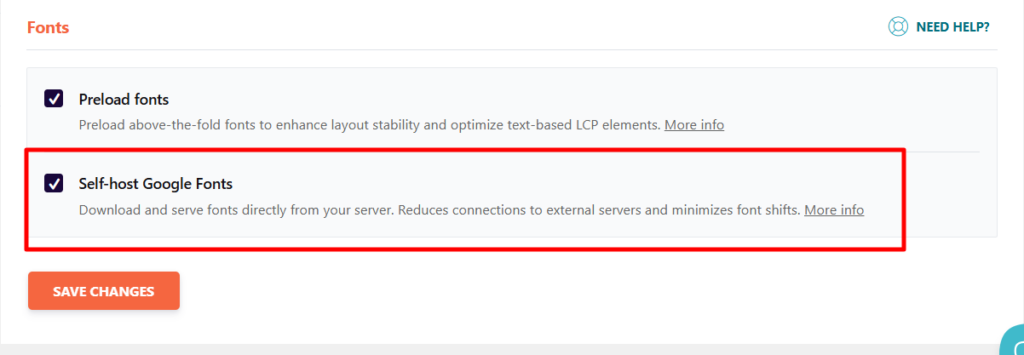
On the surface, both approaches remove the direct Google CDN request from your visitor’s experience. But the details matter.
Hosting Google Fonts locally has become the recommended approach for several reasons.
First, performance: self-hosted fonts eliminate the need for a separate DNS lookup and a connection to an external domain.
Studies show self-hosted fonts load 200–500ms faster on average than fonts served from Google’s CDN, with the advantage growing on slower mobile connections.
Second, privacy and legal compliance: in January 2022, a German court ruled that using the Google Fonts API in a way that sends visitor IP addresses to Google’s servers violated GDPR. Self-hosting removes that third-party data transfer entirely, so your visitors’ browsers never contact Google.
Third, control: you decide when and how the font files update, with no risk of Google silently changing a font variant that affects your typography.
NitroPack’s approach of serving Google Fonts from its own CDN removes the Google dependency, which addresses the GDPR concern to a degree. But it replaces one third-party CDN dependency with another.
Your visitors’ requests are routed to NitroPack’s servers rather than Google’s. For users already on NitroPack’s paid plans, that’s probably acceptable. But it does mean your font delivery is tied to NitroPack’s service availability and infrastructure.
WP Rocket’s local hosting approach is more self-contained and offers the clearest path to GDPR compliance, with no ongoing third-party dependencies.
Database Optimization
Winner: WP Rocket, and this is a significant one
WP Rocket includes a dedicated Database tab with tools to clean up post revisions, auto-drafts, trashed posts, spam comments, transients, and other database overhead. You can schedule automatic cleanups to run regularly.
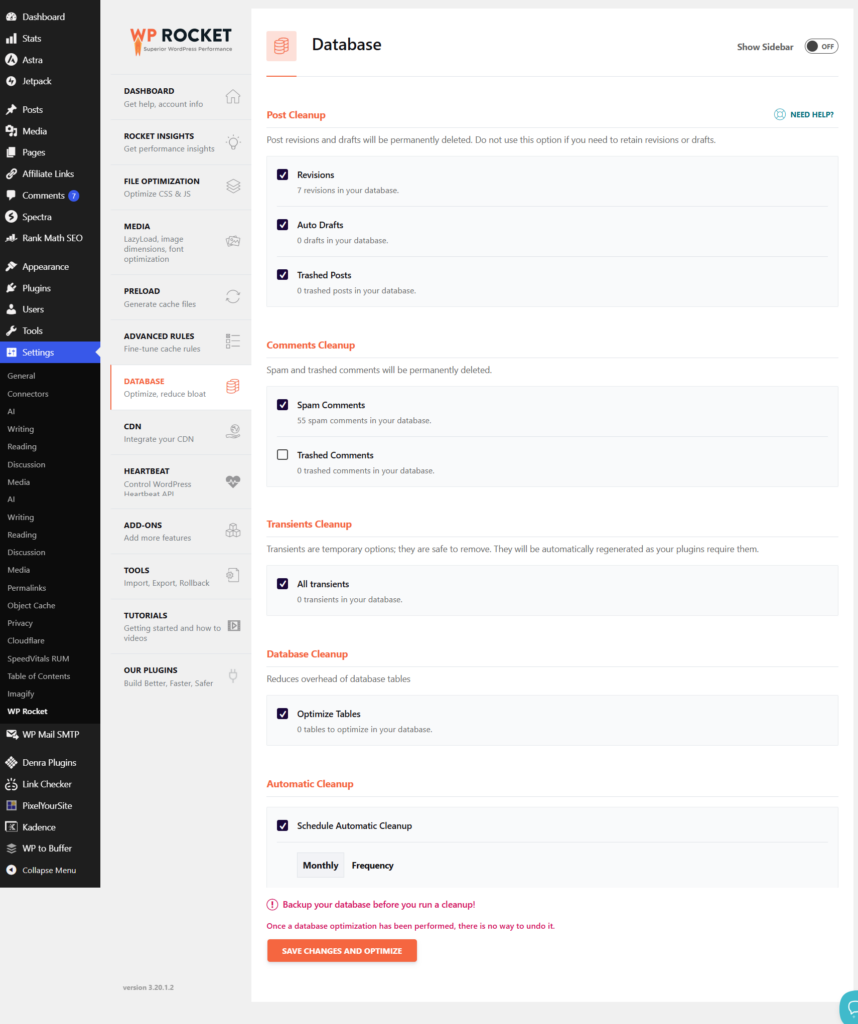
This keeps your WordPress database lean over time without requiring any additional tools.
NitroPack has no database optimization features. It doesn’t clean revisions, doesn’t touch transients, and has no scheduled cleanup tools.
If you’re running NitroPack and your database is bloated from years of accumulated post revisions and expired transients, you’ll need to install a separate plugin. WP-Optimize is the most common recommendation to handle that work.
That’s an important caveat for NitroPack users: you’re adding plugin weight to handle something a competing tool includes natively.
For sites that have been running for a few years, database cleanup has a meaningful impact on query performance and overall site speed. An optimizer that ignores the database is leaving real performance on the table.
Analytics and Performance Reporting
Winner: NitroPack (for visibility)
WP Rocket doesn’t include any performance analytics. It recently launched Rocket Insights, a built-in performance hub powered by GTMetrix that monitors key pages, flags which WP Rocket features to enable based on current results, and lets you retest after making changes.
This is a welcome addition, but it’s a monitoring, performance testing, and guidance tool, not a caching analytics layer. It tells you what to do, not what’s happening with your cache.
NitroPack goes further. Its dashboard gives you visibility into how your site is being cached, which resources are being served from its CDN, what’s been optimized, and how those optimizations affect your performance metrics.
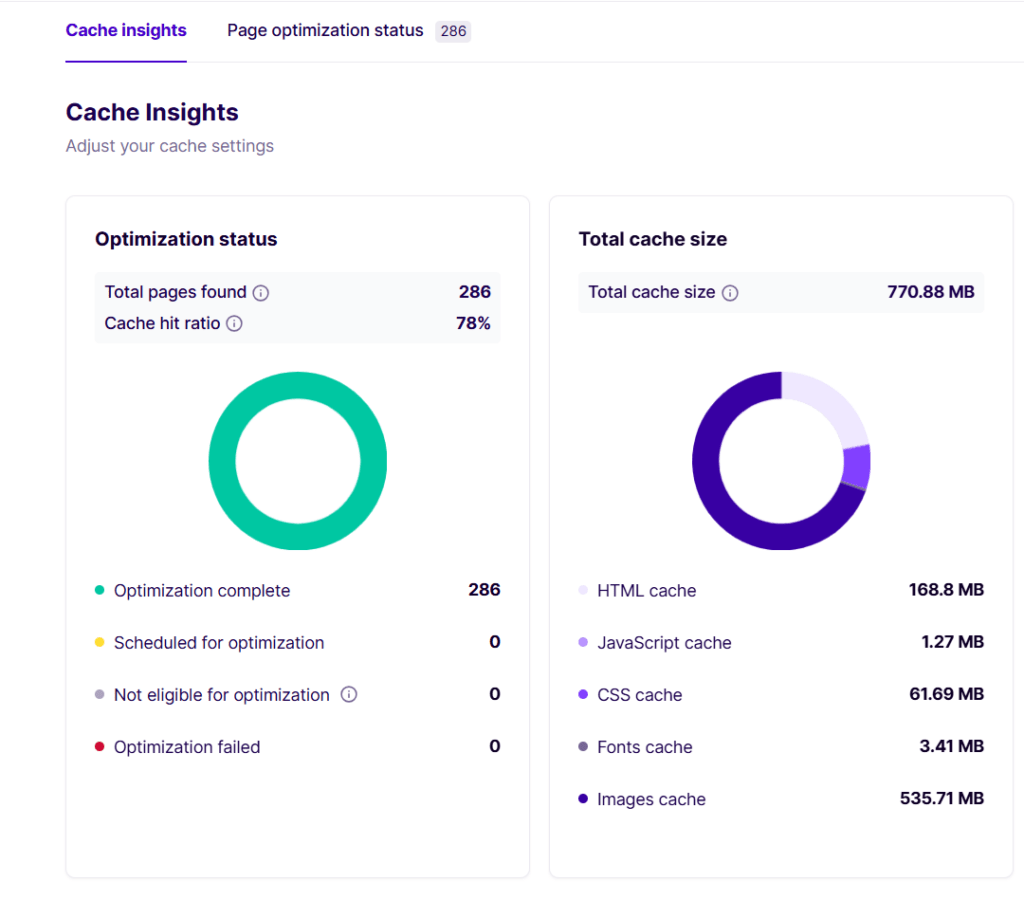
For site owners who want to see the numbers behind their speed improvements, that visibility is genuinely useful. And because NitroPack operates on pageview and bandwidth tiers, it provides a bird’s-eye view of resource usage.
That said, this isn’t a weakness on WP Rocket’s side in a way that should change your decision. WP Rocket is built as a WordPress plugin with a single-site dashboard model.
Deep analytics infrastructure would be a significant departure from what it is and how it’s priced. NitroPack, as a cloud service with per-pageview and per-bandwidth pricing, has both the architectural basis and the business-model incentive to give you more data.
Expecting WP Rocket to match NitroPack’s analytics is like expecting Cloudflare’s free plan to match Datadog’s monitoring depth. Different tools, different scopes.
Pricing
Winner: WP Rocket (for most use cases)
The pricing structures of these two tools are radically different, and it matters a lot depending on how many sites you manage and how much traffic they get.
WP Rocket Pricing
WP Rocket uses an annual, per-license model. All features are available on every plan. You’re only paying for the number of sites and priority support:
| Plan | Price (Regular) | Sites Covered |
|---|---|---|
| Single | $59/year | 1 site |
| Plus | $119/year | 3 sites |
| Multi-50 | $299/year | 50 sites |
| Multi-100 | $399/year | 100 sites |
| Multi-500 | $599/year | 500 sites |
WP Rocket occasionally runs promotional sales offering discounts up to 40%. Check out our dedicated WP Rocket discount page for the latest offers.
Licenses renew annually at full price after the first year. Every plan includes full access to all features: caching, file optimization, database cleanup, Rocket Insights, and RocketCDN, with no feature gating by tier.
NitroPack Pricing
NitroPack charges monthly (or annually with two months free) based on pageviews and bandwidth cap.
| Plan | Monthly Price | Annual (equiv./mo) | Pageviews/mo | CDN Bandwidth |
|---|---|---|---|---|
| Free | $0 | — | 5,000 | 1GB |
| Starter | $8/mo | $7/mo | 8,000 | 5GB |
| Plus | $22/mo | $18/mo | 40,000 | 25GB |
| Pro | $99.99/mo | $83.01/mo | 540,000 | 270GB |
| Agency | $275/mo | $229/mo | 400,000 | 250GB |
Note: Pro covers 3 sites, and the Agency plan allows up to 10 sites.
NitroPack also uses a tiered feature system. Some features, such as Font Subsetting, dynamic queue, and Google Tag Manager optimization, are available only on higher plans. WP Rocket gives you everything on every plan.
What the Numbers Mean in Practice
For a freelancer or site owners managing 3 client sites, WP Rocket’s Plus plan costs $119 per year. The NitroPack Pro plan, which also supports 3 sites, costs $83.01 per month on an annual billing plan.
That’s $996.12/yr, but with a 5% CYBERNAIRA discount code, you get this plan for $946.31 in the first year.
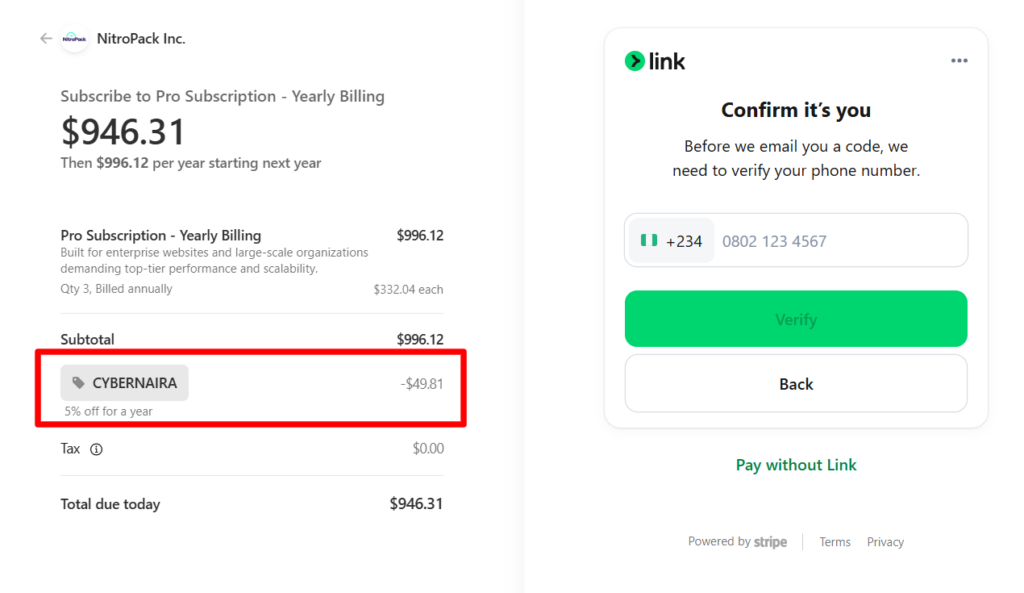
However, for a single-site owner on a budget, NitroPack’s free plan offers real value that WP Rocket simply can’t match. And for high-traffic single sites where NitroPack’s CDN and image optimization do the most work, the cost can be justified by what you’re getting.
But for anyone managing multiple sites, which describes most freelancers and agencies, WP Rocket’s per-license model is significantly cheaper. And the absence of a meaningful built-in CDN isn’t really a dealbreaker, since you can use it with a free Cloudflare account.
Feature Comparison at a Glance
| Feature | WP Rocket | NitroPack |
|---|---|---|
| Free plan | ✗ | ✓ (5K pageviews/mo) |
| Pricing model | Annual license (per site) | Monthly subscription (per pageviews) |
| Database optimization | ✓ Built-in | ✗ Requires a third-party plugin |
| Image compression | ✗ (lazy load only) | ✓ Full compression + WebP |
| Built-in CDN | Limited (RocketCDN, 10 locations) | ✓ Global CDN included |
| Google Fonts local hosting | ✓ | ✗ (served via NitroPack CDN) |
| Analytics/reporting | Rocket Insights (guidance-focused) | ✓ Cache + resource analytics |
| Cloudflare cache sync | ✓ Via Cloudflare WP plugin or add-on | ✓ Via Varnish cookie setup |
| All features on all plans | ✓ | ✗ (tiered features) |
| Ease of use | ✓ Simpler dashboard | More configuration required |
Who Should Use WP Rocket
WP Rocket is the better fit if you:
Who Should Use NitroPack
NitroPack is the better fit if you:
Final Verdict
WP Rocket and NitroPack aren’t direct substitutes. They’re different approaches to the same problem.
WP Rocket is the more practical, cost-efficient choice for most site owners, freelancers, and agencies. It’s predictable, easier to manage across multiple sites, includes tools NitroPack doesn’t (database optimization, local Google Fonts), and gives you every feature at every price point.
Its conservative optimization approach means fewer surprises after install.
NitroPack is the more powerful single-site tool. If you run one site and want to maximize performance with the least manual configuration, and you’re comfortable with monthly SaaS pricing, NitroPack delivers more out of the box. Its free plan alone makes it worth testing before spending money.
For freelancers and agencies: go with WP Rocket and pair it with Cloudflare for CDN. For single-site owners who want an all-in-one performance service and don’t mind the ongoing subscription, NitroPack earns its price.