
Starting an online store with WooCommerce is exciting, but choosing the right theme can make or break your success.
A good WooCommerce theme doesn’t just make your website look beautiful; it affects how fast your pages load, how easy it is for customers to shop, and even how well your store ranks on Google.
With so many themes out there, it’s hard to know which ones are worth your time and money. That’s why I’ve put together this list of the best WooCommerce themes — free and premium themes — based on experience. These themes are fast, SEO-optimized, mobile-friendly, and simple to customize.
Whether you’re just getting started with WooCommerce or ready to scale, these themes can help you build a store that feels professional and performs like one.
What to Look for in a WooCommerce Theme
If you check WordPress.org for the best themes for a WooCommerce store, chances are, you will get over 2 thousands results. As you can see, that’s a lot of options to review.
You and I don’t have all the time in the world to go through them one by one to figure out the best one for your use case.
So, how do you filter results quickly and narrow down your options? Here are the main things you should check for before hitting “buy”, “download”, or “activate”:
Speed & Performance
A fast-loading site keeps people engaged. If the theme is heavy, with bloated code or excessive animations, your pages may lag. That can drive visitors away, especially on mobile.
I suggest setting up a demo or test site with the theme and testing its performance with minimal website resources.
Then, use speed and performance testing tools, such as PageSpeed Insights, to identify theme-related bottlenecks.
You don’t need to fix things here. The idea is to see how the theme performs straight out of the box.
This will give you a good idea of what to learn about potential performance issues down the road.
Mobile Responsiveness
More than half of e-commerce traffic worldwide comes from mobile devices. The theme must look and behave well on phones and tablets – menus, product grids, images, and buttons should adapt smoothly.
My advice is to check your website on a mobile device to see how it loads from a user’s perspective. Click around and see how different website elements respond to clicks.
SEO Friendliness
Your theme should generate clean HTML, use proper heading structure, and support schema markup. Poorly coded themes can undermine your SEO efforts from the outset.
Some modern themes include hosting Google Fonts locally, lazy loading, and the ability to flush the cache. This helps your overall SEO, resulting in better search ranking.
Customization Flexibility
You’ll want to tweak layouts, fonts, colors, and product page styles.
Good themes support page builders (such as Elementor, Gutenberg, and Beaver Builder) or come with their own options panel. Child theme support matters, too.
The more flexibility and customization freedom the theme allows, the better you can design a unique website.
Built-in WooCommerce Features
Look for themes that provide strong product page layouts, quick view, product filters, sale badges, and cart/checkout styling.
A theme that anticipates e-commerce needs saves you plugin clutter. At the very least, core WooCommerce features should be built in and not sold as separate products.
Regular Updates & Support
An outdated theme is risky. It might conflict with new WordPress or WooCommerce versions.
Active developer support and frequent updates ensure compatibility and security.
If the theme has been abandoned or has not received updates for a while, that could be a red flag.
Compatibility with Plugins & Extensions
You’ll likely use plugins for SEO, social proof, payment gateways, shipping, and more. The theme should play well with those, not break things.
Editor’s Pick: Top 3 WooCommerce Themes
| Rank | Theme | Why It Stands Out |
|---|---|---|
| #1 | Divi | Perfect for anyone who wants more creative control. It includes thousands of premade designs, patterns, and WooCommerce extensions. |
| #2 | Astra | Lightweight, lightning-fast, and incredibly flexible. Astra is one of the easiest themes to set up and customize for any type of online store |
| #3 | Kadence | Clean, fast, and beginner-friendly. Kadence offers dedicated WooCommerce extension (ShopKit)making it easier to build professional WooCommerce store. |
All three themes are fast, mobile-friendly, and updated regularly — making them reliable choices for any WooCommerce store.
1. Astra

Astra is one of the fastest and most flexible WooCommerce themes available for your online store. It’s lightweight, loads in under a second, and provides you with plenty of design freedom without requiring code changes.
The theme works perfectly with popular page builders, including Elementor, Beaver Builder, Spectra, and Gutenberg, so you can design product pages exactly how you want them.
One of the things I like about Astra is its beginner-friendliness. It comes with ready-made store templates that you can import with one click.
These demos already have polished product grids, banners, pricing, and checkout pages. All you have to do is replace the content and go live.
Astra also offers advanced WooCommerce controls, including off-canvas sidebars, dropdown carts, infinite scroll, quick view, shop-card layouts, a modern cart, and grid or list layouts.
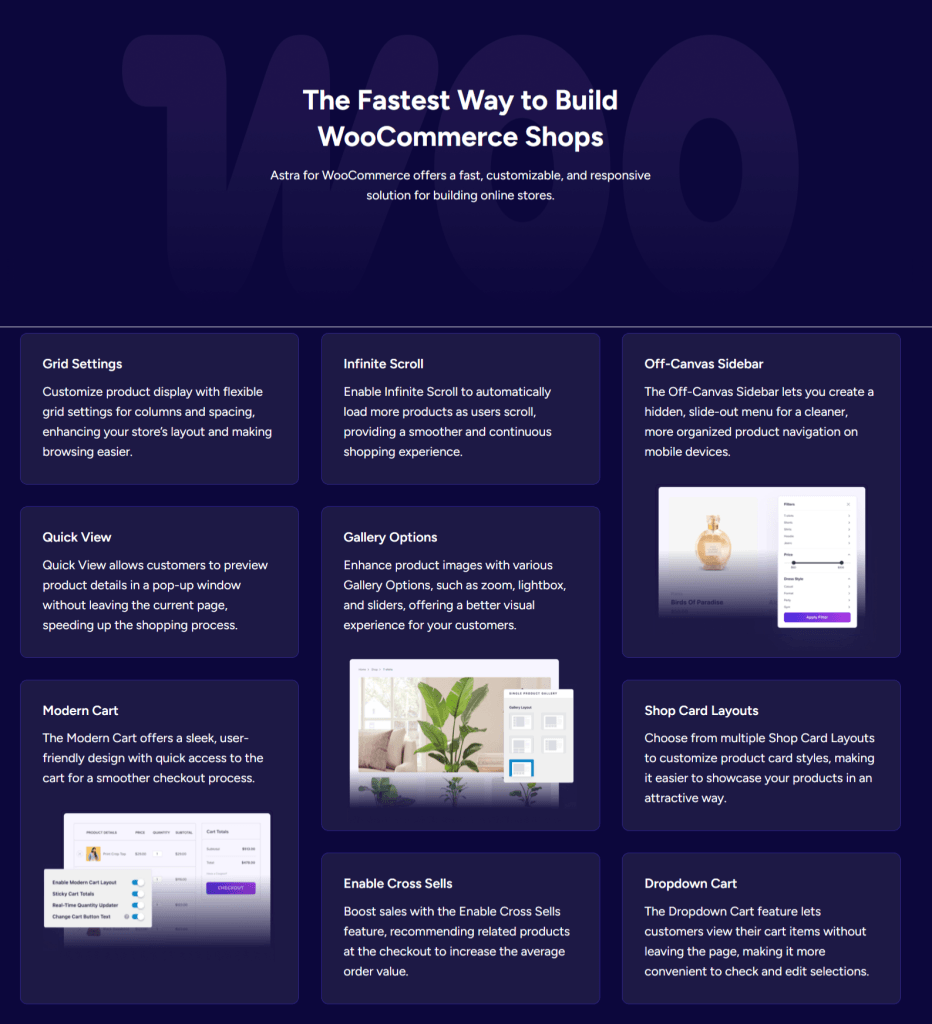
It’s built with SEO in mind, featuring support for schema markup, hosting Google Fonts locally, font preloading, and inline CSS and JavaScript files. This helps your product pages load more quickly and improve search visibility.
Astra also integrates with tools like LearnDash, LifterLMS, and Easy Digital Downloads, great if you plan to sell digital products or online courses alongside physical items.
Top Features
Pros
Cons
Price: The Astra free version is available; Astra Pro starts at $69/year or $319 for lifetime use.
2. Flatsome

Flatsome has been one of the top-rated WooCommerce themes for years. It combines professional design with a powerful drag-and-drop page builder, allowing you to create your dream store effortlessly.
Whether you’re selling fashion items, electronics, or home décor, Flatsome gives your shop a clean, modern look that instantly conveys a professional image.
What makes Flatsome stand out is its built-in UX Builder, a front-end page builder designed specifically for WooCommerce.
You can visually edit product pages, banners, sliders, and category layouts in real-time. It’s fast, intuitive, and gives you complete control over your store’s design —something you don’t get with most themes.
Flatsome also includes dozens of pre-designed layouts and page sections, making it easy to launch a store quickly.
It’s optimized for performance and mobile devices, so your customers get a smooth shopping experience on any screen size. Plus, it supports lazy loading and optimized image delivery to improve WooCommerce site speed.
The theme also supports multi-vendor marketplaces, catalog mode, and live search, which helps shoppers find products instantly.
Its long history of updates ensures it remains compatible with the latest versions of WordPress and WooCommerce, a significant advantage for store owners looking for long-term reliability.
Top Features
Pros
Cons
Price: $59 (one-time payment) on ThemeForest, includes lifetime updates and 6 months of support.
3. OceanWP
OceanWP is one of those themes that fits nearly every kind of website, but it’s especially great for WooCommerce stores. It’s lightweight, fast, and fully responsive, which means your shop will look great on desktops, tablets, and smartphones.
OceanWP also integrates seamlessly with Elementor and other page builders, providing you with the flexibility to design product and checkout pages that perfectly match your brand.
One of OceanWP’s biggest strengths is its deep WooCommerce integration. You can customize nearly every part of your online store. From the product gallery and “Add to Cart” button style to the cart pop-up and checkout layout.
It even includes built-in features such as native cart pop-ups, floating add-to-cart bars, and product quick views. These small details make a significant difference in enhancing your customers’ shopping experience and increasing conversions.
OceanWP is SEO-friendly, translation-ready, and optimized for speed right out of the box. You can start with one of its many pre-built WooCommerce demos, which cover various industries, including fashion, technology, beauty, and furniture.
And if you want more control, the premium extensions unlock advanced features such as sticky headers, pop-up login windows, and more layout options.
Overall, OceanWP is a strong choice for anyone looking for complete creative control without compromising speed or performance.
Top Features
Pros
Cons
Price: A free version is available; OceanWP eCommerce Pro starts at $39/year or $151 for a lifetime license.
4. GeneratePress
GeneratePress is one of the fastest and most reliable themes for WooCommerce stores. It’s built with clean, lightweight code and prioritizes performance above all else.
The theme loads quickly, even on slower connections, which helps reduce bounce rates and boost conversions — two key factors in e-commerce.
What sets GeneratePress apart is its flexibility.
It doesn’t come bloated with flashy effects or unnecessary scripts. Instead, it provides a solid foundation that you can customize however you want.
It works seamlessly with both Gutenberg and popular page builders, such as Elementor or Beaver Builder, allowing you to create product pages that reflect your store’s personality.
When you activate WooCommerce, GeneratePress unlocks several store-specific features, including customizable product columns, cart layouts, and checkout options.
You can hide or rearrange elements, such as product titles, prices, and breadcrumbs, without needing to modify the code.
It also supports sticky navigation, off-canvas panels, and advanced typography options to keep your store clean and user-friendly.
GeneratePress is SEO-optimized and responsive, so your store looks sharp and loads quickly on every device.
It’s one of those themes that “just works,” making it perfect for anyone who wants a professional store without complications.
Top Features
Pros
Cons
Price: A free version is available; GeneratePress Premium starts at $59/year or $149 for the GeneratePress One license.
5. Divi
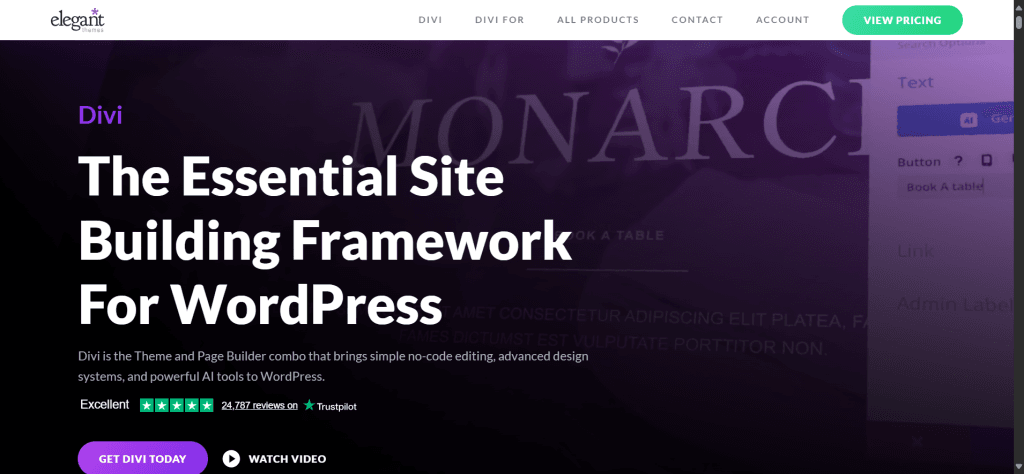
Divi by Elegant Themes isn’t just a theme; it’s a complete design framework that includes its own drag-and-drop page builder.
If you value creative freedom and visual editing, Divi provides you with total control over the appearance and feel of every aspect of your WooCommerce store. You can edit your product pages, category layouts, and even the checkout page in real time with its visual builder.
Divi is ideal for store owners who value design flexibility and customization. It comes with hundreds of professionally designed templates, including layouts explicitly made for WooCommerce. You can customize every element — product images, buttons, pricing, grids, and banners — without needing coding skills.
The live visual editing experience allows you to see changes as you make them, saving time and enabling you to design with confidence.
Divi also includes advanced features like split testing, which helps you test different designs to see which converts better.
Performance has been a major focus in recent updates. The theme now loads faster, and it’s optimized for SEO and mobile responsiveness.
Whether you’re running a small boutique or a large online store, Divi gives you everything you need to make your shop stand out.
Top Features
Pros
Cons
Price: Starts at $89/year or $249 lifetime (includes Divi Theme, Builder, Extra, and Bloom plugins).
6. Neve

Neve by ThemeIsle is a lightweight and modern theme built for speed, flexibility, and ease of use. It’s a perfect fit for WooCommerce stores that want a clean, professional look without compromising site speed.
The theme loads incredibly fast and scores high on Google PageSpeed Insights, which is a significant advantage if you prioritize SEO and conversions.
One of the standout features of Neve is its simplicity in setup. You can launch your store quickly using one of its many ready-made templates.
The WooCommerce starter sites look sleek and cover a variety of industries, from fashion and gadgets to beauty and furniture. Each design is responsive and built to display products beautifully on any device.
Neve also works seamlessly with Elementor, Gutenberg, and Beaver Builder. You can easily customize your product pages, change headers and footers, and even tweak checkout layouts.
It’s also AMP-ready (Accelerated Mobile Pages), which helps your store load faster on mobile. Something that makes a noticeable difference in the shopping experience.
If you upgrade to Neve Pro, you unlock additional features, including WooCommerce Booster, which provides control over cart layouts, quick view, sticky cart, and product gallery styles.
It strikes a great balance between simplicity and advanced features, making Neve a reliable option for both beginners and growing e-commerce stores.
Top Features
Pros
Cons
Price: The Neve free version is available; The Pro version starts at $69/year.
7. Storefront
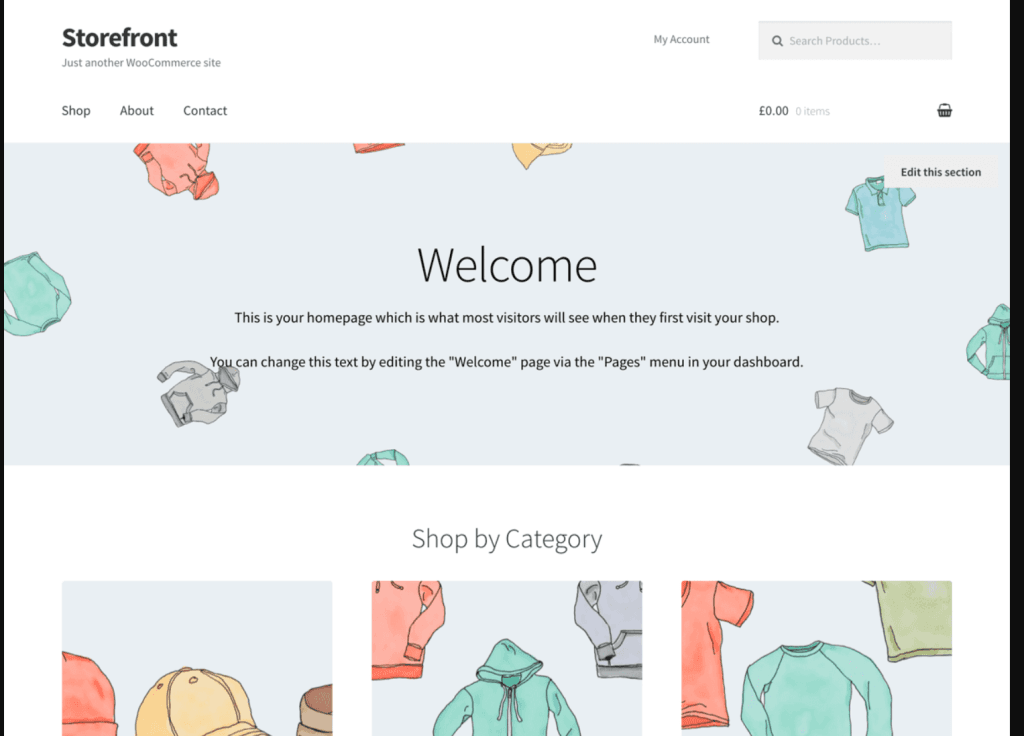
Storefront is the official WooCommerce theme, created by Automattic —the same company behind WordPress.com and WooCommerce. That alone gives it an edge, and it’s built to work perfectly with WooCommerce right out of the box.
If you want a reliable, lightweight, and straightforward theme that won’t break with updates, Storefront is one of the safest choices you can make.
Storefront keeps things simple. It doesn’t come with unnecessary design elements or complicated options. Instead, it provides a fast, clean foundation for your online store.
Because it’s developed by WooCommerce, every update and feature works seamlessly with the latest versions of WooCommerce. You don’t have to worry about plugin conflicts or broken layouts.
The theme features a minimalist yet professional design with a strong emphasis on usability and speed. You can customize the header, footer, colors, and typography using the WordPress Customizer.
It also works seamlessly with the most popular page builders, allowing you to create unique product pages. While the Storefront theme design may look plain at first, it’s intentionally made that way to give you a blank canvas you can easily adapt to your brand.
For users who want more design flexibility, WooCommerce offers official Storefront extensions that add features like mega menus, sticky navigation, hero sections, and parallax scrolling. These add-ons make it easy to expand the design without sacrificing stability or performance.
Top Features
Pros
Cons
Price: Free to use; paid extensions available individually or in a Storefront Bundle starting at $69/year.
8. Botiga

Botiga by aThemes is one of the most polished and modern WooCommerce themes available today. It’s designed for a clean, minimal eCommerce store theme that puts products front and centre.
Whether you sell fashion, cosmetics, gadgets, or digital products, Botiga gives your store a professional look with a lightweight design that loads fast and works flawlessly on mobile devices.
Botiga’s biggest strength lies in its simplicity and conversion-focused design. Everything about it — from typography and spacing to product layouts and checkout pages — is optimized for a smooth user experience.
The theme features multiple product card styles, gallery options, and checkout layouts, allowing you to easily customize your store without coding.
It’s fully compatible with Elementor and Gutenberg, making it beginner-friendly and easy to customize. You can adjust colors, layouts, and typography through the Customizer or build pages visually using your preferred page builder.
Botiga also supports advanced WooCommerce features, such as product quick view, sticky add-to-cart buttons, and AJAX product filters, which enhance the shopping experience.
The Pro version unlocks additional customization tools, including product swatches, mega menus, and advanced header/footer options. It also includes performance features like lazy loading and optimized scripts, helping your store stay fast even as your catalog grows.
Top Features
Pros
Cons
Price: There is a free version available; Botiga Pro starts at $63/year or $599 lifetime license for the Agency plan.
9. Shopkeeper
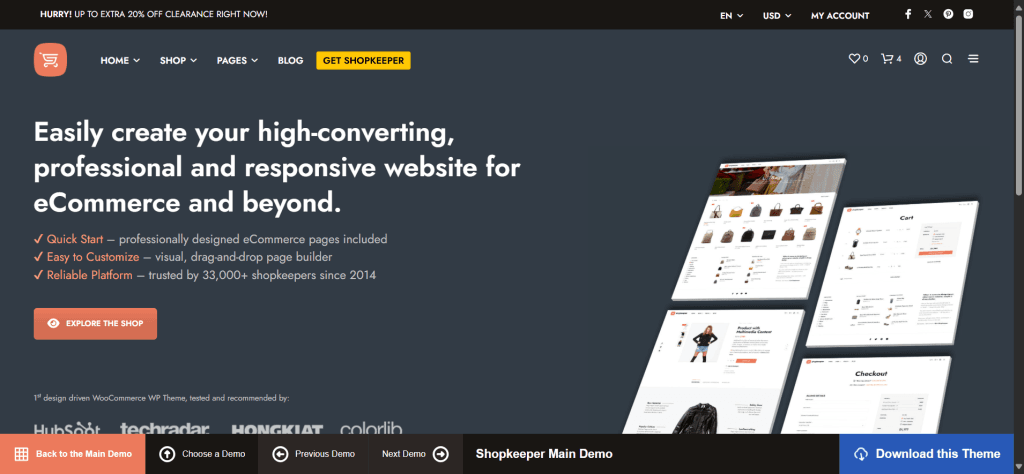
Shopkeeper is one of the most elegant and best-selling WooCommerce themes on ThemeForest. It’s built for store owners who want a professional design that makes their brand look high-end without needing a designer.
Whether you’re selling clothing, electronics, home goods, or digital downloads, Shopkeeper helps you present your products beautifully with strong visuals and a modern layout.
The theme comes with several pre-built store demos and product page styles, which you can import with just a few clicks. It’s designed to work seamlessly with the built-in WPBakery Page Builder, allowing you to easily customize every aspect of your store without requiring code modifications.
The layout is fully responsive, meaning your store will look just as good on phones as it does on desktop screens.
Shopkeeper also focuses on conversions and usability. It includes features like product image zoom, quick view, AJAX cart, flexible catalog mode, and pre-styled checkout pages. These little details make the shopping experience smooth and professional.
If you sell digital products, Shopkeeper supports digital downloads out of the box. No extra WooCommerce plugins needed.
Another reason Shopkeeper remains popular is its long-term reliability. It’s been around since 2014, consistently updated, and maintained by a dedicated team. This means you don’t have to worry about broken updates or outdated features. It simply works.
Top Features
Pros
Cons
Price: $59 (one-time payment) on ThemeForest, includes lifetime updates and 6 months of support.
10. Hestia Pro

Hestia Pro is a clean, one-page WordPress theme from ThemeIsle, ideal for small business websites and online stores built with WooCommerce. It combines professional design with fast performance, making it a solid choice if you want your website to look sharp and load quickly.
The theme’s biggest strength is its modern Material Design style, inspired by Google’s design language.
Everything looks neat, minimal, and easy to navigate, making it perfect for creative entrepreneurs, agencies, and startups that want to showcase their products or services on a sleek website.
Hestia Pro integrates seamlessly with WooCommerce, giving you stylish product grids, category pages, and checkout layouts right out of the box.
You can also pair it with page builders like Elementor or Beaver Builder to easily customize sections, create landing pages, and adjust layouts without code.
Speed optimization is another major plus. Hestia Pro utilizes lightweight code and adheres to SEO best practices, which helps your store rank higher on search engines.
It’s also fully compatible with major caching and optimization plugins, such as Perfmatters, WP Rocket, and LiteSpeed Cache.
If you’re building a small eCommerce site or a professional service page with WooCommerce integration — for example, a photography business selling prints or a clothing brand selling limited products — Hestia Pro gives you a great balance between looks, flexibility, and performance.
Top Features
Pros
Cons
Price: $69 per year (or $199 for lifetime access) on ThemeIsle.
11. Phlox Pro

Phlox Pro is a powerful and multipurpose WordPress theme built to work seamlessly with Elementor.
It’s not just designed for online stores; it’s ideal for any type of website, from creative portfolios to corporate sites. However, its WooCommerce integration makes it an excellent choice for building beautiful, conversion-focused e-commerce stores.
What stands out about Phlox Pro is its massive library of pre-built demos. It comes with over 190 ready-made templates, including dozens of stunning eCommerce layouts.
Whether you’re selling fashion, electronics, beauty products, or digital downloads, you can import a complete store design in minutes and tweak it to fit your brand.
Phlox Pro offers you comprehensive design control within Elementor. You can customize every part of your site — header, footer, product grid, cart, and checkout pages — with the page builder.
It also includes advanced animations, parallax scrolling, and dynamic content features, letting you create a premium shopping experience for your customers.
Performance-wise, Phlox Pro is optimized for speed and built with SEO-friendly code. The theme supports lazy loading, minified scripts, and image optimization to ensure smooth page loads, even with high-quality visuals.
It’s perfect for anyone who loves design freedom and wants to build a WooCommerce store that feels custom-made, without needing to hire a developer.
Top Features
Pros
Cons
Price: $59 (one-time payment) on ThemeForest, including lifetime updates.
12. Kadence

Kadence is a lightweight and highly customizable WordPress theme built for speed, flexibility, and ease of use. It’s perfect for WooCommerce store owners who want modern designs, fast load times, and deep control over how their shop looks and performs, all without needing to touch code.
What sets Kadence apart is its beginner-friendly interface and AI-powered website builder. You can build a professional online store in a few minutes using its AI capabilities, drag-and-drop header and footer builder, intuitive customizer settings, or the pre-built starter templates.
The classic templates are beautiful, mobile-responsive, and optimized for conversions, which is exactly what an online business needs.
Kadence integrates seamlessly with WooCommerce, offering advanced controls like custom product page layouts, sticky add-to-cart buttons, product galleries, and distraction-free checkout options.
You can even set conditional headers or banners that show different messages to logged-in users or during special promotions.
Performance is a top priority with Kadence. It’s built with lightweight code and utilizes only the resources required for each page, enabling your store to load in under a second on most modern hosting providers. This makes a big difference for both user experience and SEO.
For design flexibility, Kadence works perfectly with popular page builders. But even without them, the built-in customization and Kadence Block options are enough for most people to create a beautiful store that reflects their brand.
Top Features
Pros
Cons
Price: Kadence free version is available; Kadence Pro starts at $79/year or $219 for lifetime access.
WooCommerce Themes Comparison Table
| Theme | Starting Price (USD) | Free Version | Best For | Page Builder Compatibility | Performance | Notable Features |
|---|---|---|---|---|---|---|
| Astra | $69/year | ✅ Yes | Fast, flexible stores of any size | Elementor, Beaver Builder, Gutenberg | ⭐⭐⭐⭐⭐ | Lightweight, SEO-friendly, 100+ templates, WooCommerce controls |
| Flatsome | $59 (one-time) | ❌ No | Fashion, lifestyle, and creative stores | Built-in UX Builder | ⭐⭐⭐⭐ | Custom page builder, live product editing, modern design |
| OceanWP | Free / $54/year (Pro) | ✅ Yes | Feature-rich eCommerce stores | Elementor, Beaver Builder, Gutenberg | ⭐⭐⭐⭐ | Deep WooCommerce integration, pop-ups, quick view, mega menus |
| Storefront | Free | ✅ Yes | Simple and clean stores | Gutenberg | ⭐⭐⭐⭐ | Built by WooCommerce, reliable, minimalist |
| Divi | $89/year | ❌ No | Visual design and marketing-focused stores | Built-in Divi Builder | ⭐⭐⭐ | Visual drag-and-drop builder, A/B testing, custom checkout |
| Neve | Free / $99/year (Pro) | ✅ Yes | Lightweight stores, small businesses | Elementor, Gutenberg, Beaver Builder | ⭐⭐⭐⭐⭐ | AMP-ready, fast, responsive starter sites |
| GeneratePress | $69/year | ✅ Yes | Modern stores for professionals and agencies | Elementor, Gutenberg | ⭐⭐⭐⭐ | Sticky headers, video backgrounds, WooCommerce widgets |
| Blocksy | Free / $69/year (Pro) | ✅ Yes | Modern, block-based WooCommerce stores | Gutenberg, Elementor | ⭐⭐⭐⭐⭐ | Fast, dark mode, custom shop layouts, conditional headers |
| Botiga | Free / $69/year (Pro) | ✅ Yes | Clean, minimalist online stores | Gutenberg, Elementor | ⭐⭐⭐⭐⭐ | Product filters, sticky add-to-cart, beautiful typography |
| Hestia Pro | $69/year | ❌ No | One-page WooCommerce stores and small businesses | Elementor, Beaver Builder | ⭐⭐⭐⭐ | Material Design style, SEO optimized, fast loading |
| Phlox Pro | $59 (one-time) | ❌ No | Highly visual, design-heavy stores | Elementor | ⭐⭐⭐⭐ | 190+ templates, parallax effects, advanced animations |
| Kadence | Free / $79/year (Pro) | ✅ Yes | Fast, modern WooCommerce stores | Gutenberg, Elementor, Beaver Builder | ⭐⭐⭐⭐⭐ | Header builder, sticky add-to-cart, conditional headers |
Key Takeaways
FAQs About Best WordPress Themes
What is the best free WooCommerce theme?
If you’re looking for a solid, free WooCommerce theme, Astra, Blocksy, and Kadence are your top options. They load fast, look professional, and include built-in WooCommerce templates. You can always upgrade to their premium versions later for more features.
Which WooCommerce theme is best for beginners?
Kadence and Neve are ideal for beginners. Both have user-friendly interfaces, ready-made templates, and visual editors that make setup simple — no coding skills are needed.
Are premium WooCommerce themes worth it?
Yes, if you want advanced design control, faster support, and more WooCommerce tools. Premium themes like Flatsome, Divi, and Astra Pro offer better customization, performance optimization, and long-term updates.
What makes a WooCommerce theme “fast”?
A fast WooCommerce theme uses lightweight code, minimal scripts, and optimized images. Themes like Astra, Kadence, and GeneratePress are designed to load quickly, even with numerous products or images.
Can I switch WooCommerce themes later?
Yes, but it’s best to back up your website first. When you switch, double-check your product pages, menus, and widgets to ensure everything is up to date. Sometimes you’ll need minor adjustments to match the new layout.
Conclusion
The right WooCommerce theme can make a significant difference in how your online store appears and functions. If you want a fast, flexible theme that’s easy to set up, go with Astra, Kadence, or GeneratePress.
For creative control and stunning visuals, Flatsome and Divi are great choices.
Every theme on this list is designed to work seamlessly with WooCommerce, load quickly, and display well on any device. Your choice really comes down to your style, budget, and how much customization you want.
Select one that aligns with your goals, install it, and begin building. You can always fine-tune and grow as your store expands, but getting started with a solid, reliable theme is the best first step.