
I signed up for Hostinger’s Unlimited plan, which includes access to its AI builder, Horizons, and used the chance to test-drive it. I wanted to see whether it could build working sites and apps for people without a technical background.
I’ll be upfront: I’m not a big fan of no-code AI site builders. I use AI heavily in my day-to-day business, but I don’t hand website building over to it entirely, at least not yet. After seeing what Horizons can do, though, I’m planning to build a few working apps with it.
This review covers what I learned along the way: the wow, the expected, the not-so-good, and everything in between.
In August 2026, Hostinger merged its classic Website Builder and Horizons into one product called AI Builder. It has two modes: Manual (drag-and-drop) and Agentic (chat-based, the vibe coding experience Horizons is known for).
Everything below was done in Agentic mode, so when I say Horizons, I mean that.
Hostinger AI Builder

Hostinger Horizons (now the Agentic mode of Hostinger AI Builder) built a working full-stack app in about 14 minutes from a single prompt. The app had sign-ups, voting, comments, and an admin dashboard. Hosting, database, and domain are bundled, which makes it fast and beginner-friendly.
Price: 2.99
Price Currency: USD
Operating System: Web-Based
Application Category: BusinessApplication
4.1
What Is Hostinger AI Builder (Formerly Horizons)?
Hostinger’s AI Builder is a no-code agentic web app builder. You describe what you want in a chat, and an AI agent writes the code, sets up the backend, and publishes the result to Hostinger hosting. You are not dragging blocks around. The AI does the building, and you steer it with follow-up messages.
Two things set it apart from a typical AI site generator.
First, it builds the backend and frontend. The database, user accounts, file storage, and application logic all run on its own infrastructure, not through third-party services.
Second, the code is real. The Code tab shows a standard React project, and paid plans let you download the code in Agentic mode. Hostinger positions it for websites, portfolios, stores, booking systems, CRMs, client portals, membership sites, and small SaaS tools.
However, it can only build web apps. It does not produce native iOS or Android apps.
Building My First AI Site With Horizons
Out of curiosity, I started with a simple prompt for a photography website: no backend, just a portfolio to showcase a freelance lifestyle photographer’s work. Here is the exact prompt:
Build a portfolio website for a freelance lifestyle photographer. Use a color palette of Soft Sand as the base, with Terracotta and Charcoal for text and buttons. The image style should be candid and cinematic, with warm, sun-drenched environments and authentic couples and family interactions. Communication style be friendly, focusing on storytelling and real-world results. Specifically, structure the Portfolio to highlight client testimonials alongside visual project outcomes.Instead of building immediately, Horizons asked a couple of questions with answer options, such as how visitors should work with the photographer through the site. Your answers steer the features it includes.
I like this because it shows the tool is thinking about usability and business operations, not just generating pages.
The “Completed actions” panel is also worth noting. The photography site took 7 actions, and you can expand the list to see what the AI did at each step. That helps if you want to correct something specific, because you can point the AI to the exact section or action to change.
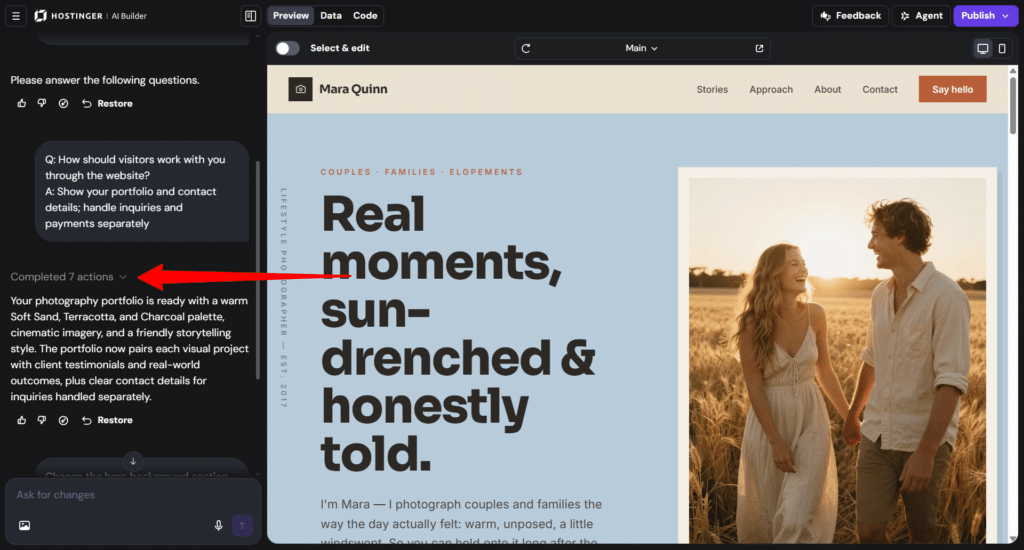
There are also Restore and Undo buttons on each step, and a “Select & edit” toggle in the preview that lets you click an element to change it or leave a comment for the AI to apply.
The result matched the brief: a Soft Sand base with Terracotta and Charcoal accents, a cinematic hero section, and a portfolio structure that pairs testimonials with visual project outcomes.
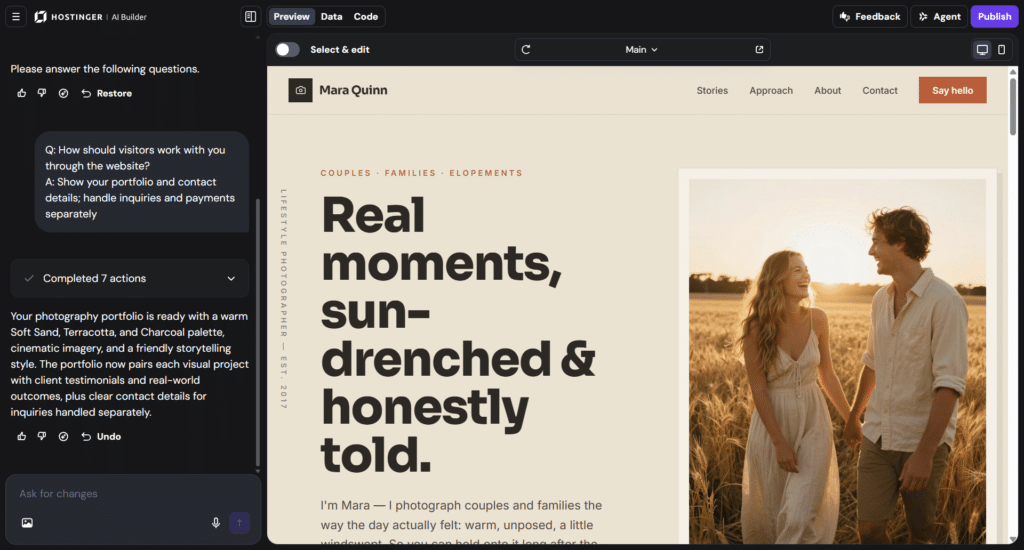
I asked for one small edit: change the hero section background color to blue. The AI did, and you can watch the final output in the short video below.
Building a Full-Stack App: BoardLoop
Since the first site was simple, I tried something with real database functionality: a public feature request board called BoardLoop, with user registration, idea submission, voting, comments, an admin role, and more.
The Agentic AI builder prompt box allows a maximum of 2,000 characters, so I kept the prompt short and precise. I could have split the work into stages with more context for each, but I wanted to see how Horizons handles a complex task in one go.
Here is the exact prompt:
Build a full-stack app called BoardLoop, a public feature request board. Use a real backend with database, auth, and file storage, no mock data.
AUTH: Email/password signup with full name, login, logout, password reset by email, persistent sessions, clear validation errors. Protected routes for Submit, Profile, My Ideas. Profile page to edit name and avatar and delete account with all data.
ROLES: Users edit or delete only their own content. Admins change any idea's status and delete any idea or comment. First registered user becomes admin.
IDEAS: Form with title (5-100 chars), description (20-1000 chars), category (Feature, Improvement, Bug, Integration, Other), optional image (JPG/PNG, max 2MB). Client and server validation. Authors can edit or delete their ideas.
VOTES: One upvote per user, removable, enforced by a database unique constraint, updating instantly.
COMMENTS: Logged-in users comment, and edit or delete their own. Show name, avatar, timestamp.
STATUS: Open, Under Review, Planned, In Progress, Completed, Declined, as colored badges. Admin only.
BROWSING: Guests can browse; login required to submit, vote, or comment. Idea cards show title, category, status, votes, comments, author. Search, filter by category and status, sort by Most Voted, Newest, Most Discussed, pagination. Detail page with comments.
ADMIN: Dashboard with total users, ideas, votes, comments, an ideas table with status change and delete, and recent signups.
DATABASE: Tables profiles, ideas, votes, comments with foreign keys, cascade deletes, row-level security.
EXTRAS: Toasts for key actions, email to author on status change, responsive design, light/dark toggle, loading and empty states, 8 seed ideas with sample comments and votes.
List anything I must configure myself.
The first draft took about 14 minutes and 28 actions, counting from the moment I clicked submit. It came out well enough that I couldn’t think of anything to change.
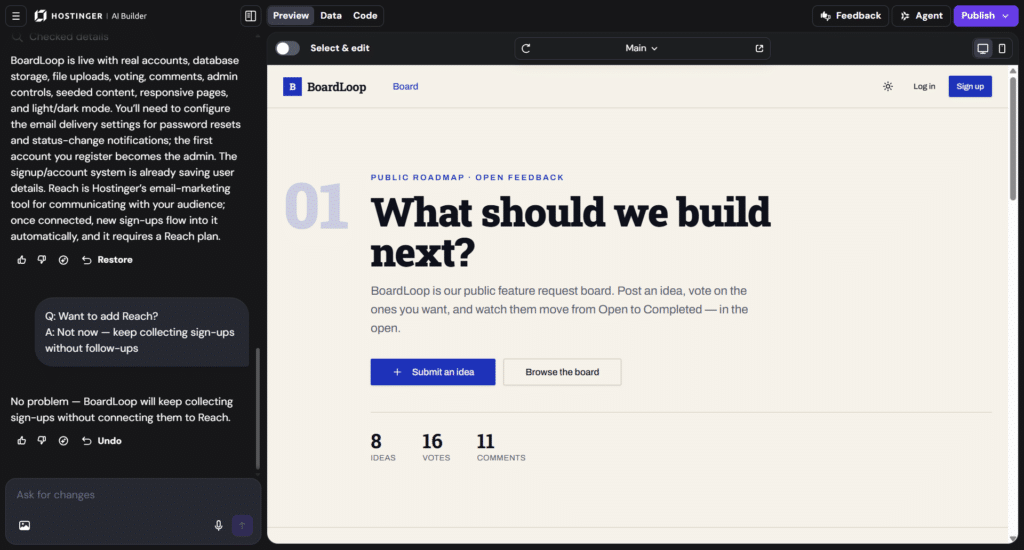
It included sign-up and login, protected pages, an idea submission form, voting, comments, an admin dashboard, light and dark modes, and seeded content (the homepage showed 8 ideas, 16 votes, and 11 comments).
I tested the login flow, submitted ideas, and worked through the main features, and they worked.
You also don’t need a third-party database tool like Supabase or Firebase. The backend is built in.
Hosting, a custom domain, backend and database management, and file storage all live in one place. This is one advantage of Hostinger AI Builder for people without development knowledge.
What Didn’t Go as Planned: The Admin Account
My prompt said the first registered user should become the admin. I registered an account and expected to be the admin. I wasn’t. When I opened the Data tab, three sample accounts I never created already existed, and one of them held the admin role.
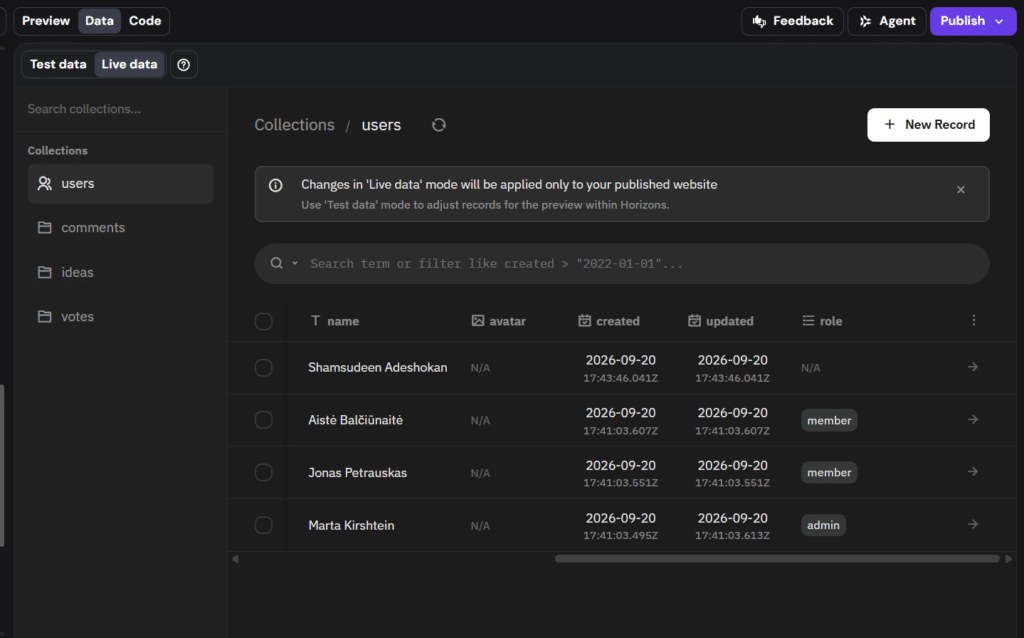
The cause is that my prompt asked for both a first-user-becomes-admin rule and seed data. To create sample ideas, comments, and votes, Horizons had to create sample authors first.
Those accounts were created a couple of minutes before mine, so the “first user” rule made a fake account admin. My own account had no role assigned at all.
I fixed it by editing the records by hand in the Data tab. Note that the Data tab has two modes: Test data (used by the in-builder preview) and Live data (used by your published site).
I made the change in Live data, and the two datasets are separate. If you plan a similar prompt, add a line such as “seed accounts must be regular members, and the first real signup becomes admin.” Horizons followed both instructions literally and didn’t flag the conflict.
Two More Things to Know
How Many AI Credits Did It Use?
This is what people ask me most, so here are my actual numbers. I did not touch the app between builds (except for the hero section color change), so the difference is clean:
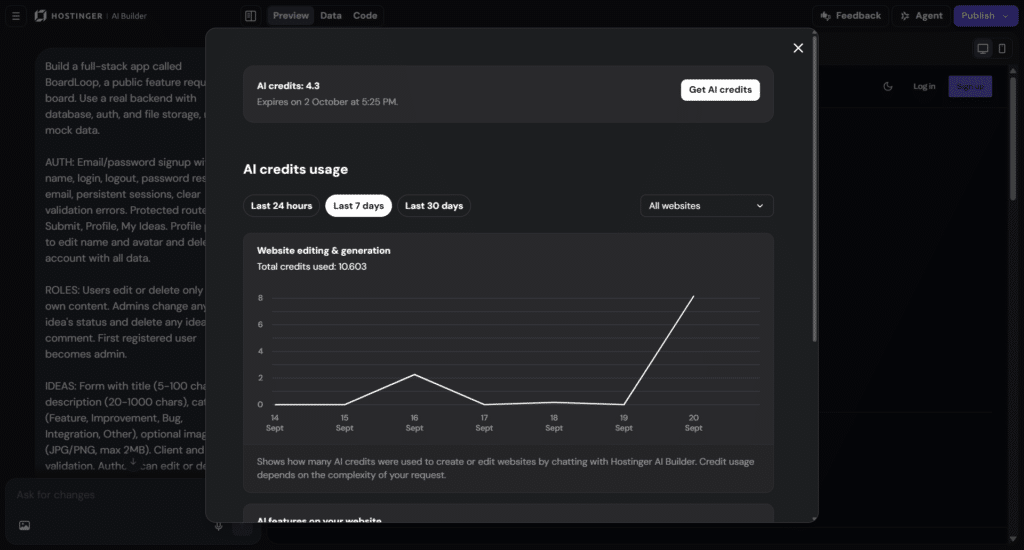
Is that a lot? Hostinger’s own guidance is that a simple business site usually takes 5 to 10 credits, and a more complex web app takes 15 or more on average.
Both of my builds came in under those figures. Hostinger also says its upgraded AI architecture reduces retries and credit usage, which may be part of it, though I can’t verify that.
I’d keep this in perspective for three reasons:
- It’s two data points: Both were one-shot builds with one minor revision.
- Iteration is where credits go: In credit-based builders generally, the first generation is often the cheapest part. Costs climb through debugging loops, vague follow-up prompts that trigger rebuilds, and larger projects where each edit carries more context.
- Credits aren’t comparable across platforms: One tool’s credits, another’s messages, and a third’s tokens measure different things. The fair comparison is cost per finished app, not cost per credit.
Some ways to stretch your balance:
One more point matters more than the per-build cost. The included credits are a one-time gift, not a monthly refill, and they expire with your first hosting plan. Treat the 15 credits (for the Unlimited plan) as a starter allowance.
Based on my two builds, that covers roughly one BoardLoop-sized app plus a couple of small sites, with little room for revisions. The good thing is that you can buy extra credits through the “Get AI credits” button inside the builder without upgrading your hosting plan.
Hostinger AI Builder Features
Hosting
Hosting comes with Horizons (Hostinger AI Builder), so you don’t need to host your AI-built project elsewhere. The same Hostinger infrastructure that powers its regular hosting serves your published site, and SSL and the hCDN are configured automatically.
Publishing is one click, and a live URL is generated immediately. Every plan includes a custom domain free for the first year.
NOTE:
If your hosting plan expires and isn’t renewed, your project becomes inaccessible, and all data is permanently deleted. You can export your code and self-host it elsewhere, but I don’t yet know how the built-in database and stored files move with that export. So, ask support before you build a business on it if you’re hoping to move your project someday.
Pricing
Since Hostinger AI Builder is part of its hosting plan, it shares the same hosting price. This means you pay for hosting and get access to the AI Builder.
Hosting plans are billed upfront on a 48-, 24-, 12-, and 1-month promotional term and come with a 30-day money-back guarantee. For reference, the price below is the 48-month discounted price.
Hostinger changes promotions often, so check the current price.
| Plan | Promo price | 48-month total | Renews at | AI credits included |
|---|---|---|---|---|
| Premium | $2.99/mo | $143.52 | $10.99/mo | 5 |
| Unlimited | $3.99/mo | $191.52 | $16.99/mo | 15 |
| Cloud Startup | $7.99/mo | $383.52 | $25.99/mo | 15 (plus 20 Hostinger Agent credits) |
Things to know:
Hostinger AI Builder Pros and Cons
Pros
Cons
Final Verdict
I went in skeptical and came out impressed. For a first draft, BoardLoop was strong. It handled accounts, roles, voting, comments, uploads, and an admin dashboard from a single 2,000-character prompt, and the whole thing cost about half of what Hostinger’s own estimates suggest for an app of that complexity.
The bundled hosting, domain, and backend remove the part of vibe coding where beginners usually get stuck. It isn’t magic. The admin mix-up shows you still need to check what the AI built, especially roles and permissions.
Credits are the real constraint, so plan your prompts and read the renewal price before you sign up.
Horizons is a good fit for creators, small businesses, and anyone validating an MVP who wants a working app without stitching together five tools.
If you need a native mobile app, strict control over database rules, or a guaranteed easy exit with your data, look elsewhere or test the export first. I’ll be building a few more apps with it.