

WordPress 7.0 is scheduled for release on May 20, 2026, and it’s not a routine update.
For the first time in WordPress history, AI is being built directly into the core platform. Not as a third-party plugin bolted on from the outside, but as native infrastructure available to every WordPress site.
If you’ve ever felt overwhelmed by AI tools and weren’t sure how they fit into your WordPress workflow, this update changes the conversation. Here’s everything you need to know as a beginner.
What’s Actually New: AI Is Now Part of WordPress Core
Before WordPress 7.0 AI features, using AI with WordPress meant installing separate plugins from different developers. Each has its own API keys, settings pages, and quirks. It was fragmented and messy.
WordPress 7.0 solves this with three new core components working together:
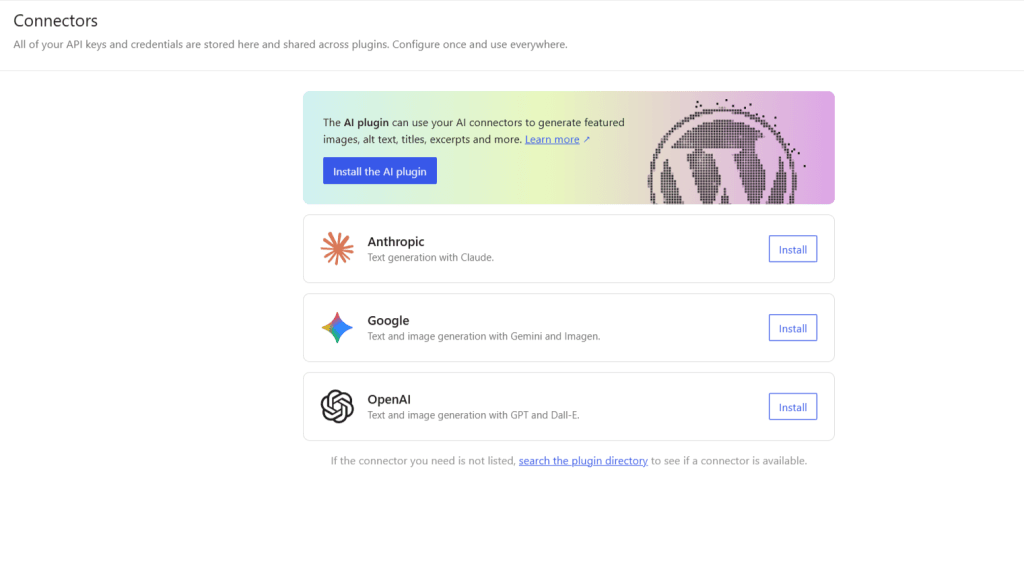
The Connectors API is a centralized screen in your WP-Admin (Settings → Connectors) where you connect your AI provider once—Claude, ChatGPT, or Google Gemini. Every compatible plugin on your site automatically inherits that connection.
No more entering the same API key in five different plugin settings.
The WP AI Client is a shared PHP library now built into WordPress core. It gives plugin developers a single, standardized way to talk to AI services.
What does this mean for you?
AI-powered plugins will work more consistently across your site, cause fewer conflicts, and become easier to set up.
The Abilities API is the most forward-looking piece. It creates a structured map of what your WordPress site can do. Its content, its blocks, and its registered capabilities, so that AI tools can understand and interact with your site intelligently.
This is what will eventually enable AI-assisted editing and automation within WordPress itself.
The AI Experiments Plugin: Where the Features Live
The infrastructure is in core, but the actual AI features you can use today live in a free official plugin called AI Experiments, published on wordpress.org/plugins/ai/ and maintained by the WordPress AI team itself.
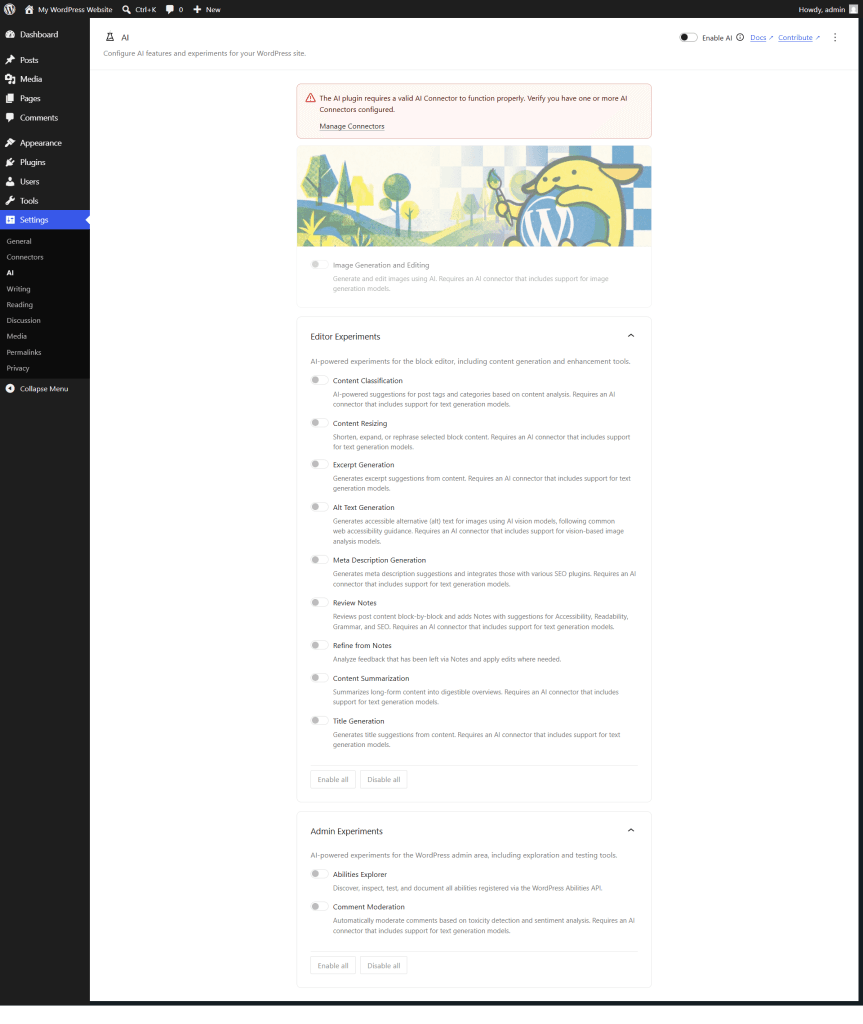
Once installed and connected to an AI provider, it gives you a suite of opt-in features inside the block editor and admin area:
Editor Features (inside the post editor):
Admin Features:
Every feature is opt-in. You toggle on only what you want to use, and nothing runs automatically without your action.
How to Set It Up (Step by Step)
Setting this up on a live WordPress 7.0 site involves three steps:
Step 1: Update to WordPress 7.0.
The stable release drops on May 20, 2026.
Warning!
Do not update your production site before then. If you want to test early, use a staging environment or WordPress Playground (note: Playground has limitations — see below).
Step 2: Go to Settings → Connectors in the WordPress admin.
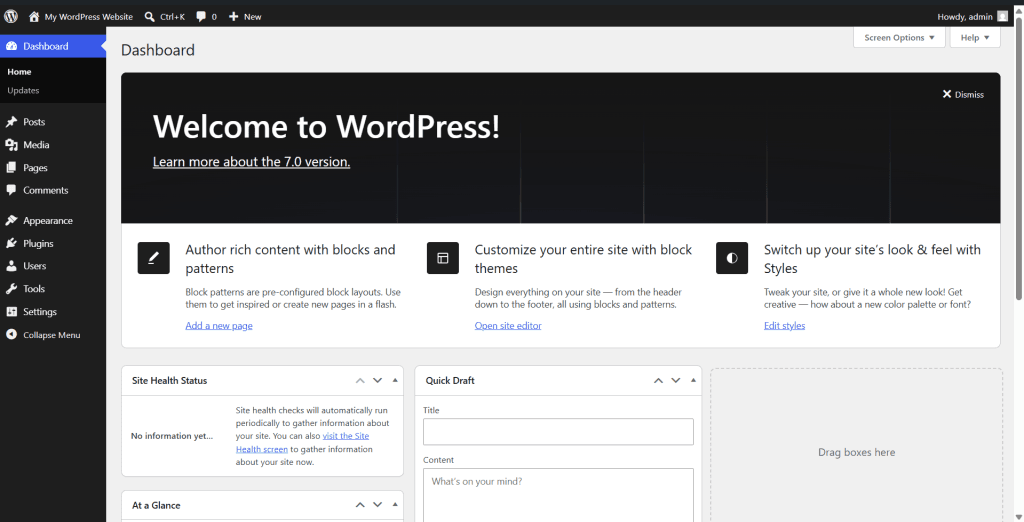
After updating, you’ll see a new Connectors page in your Settings menu.
It lists three AI providers: Anthropic (Claude), Google (Gemini), and OpenAI (ChatGPT). Click Install next to the one you want to use, then enter your API key.
To get an API key:
Step 3: Install and Configure AI Experiments.
Install the AI Experiments plugin from wordpress.org or directly from the admin plugin area. Next, go to Settings → AI and toggle on the Enable AI switch at the top right.
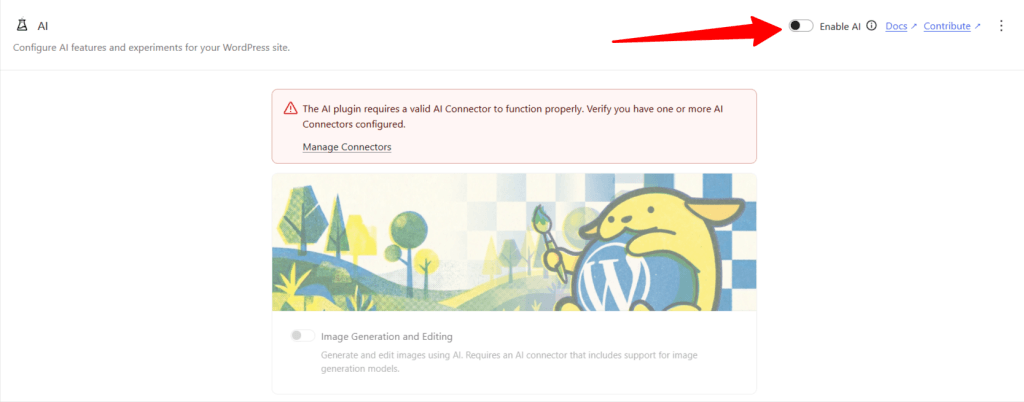
Then enable the individual experiments you want to use.
That’s it. Once a connector is active, every experiment you enable will have access to it.
What I Found When Testing It
I tested this hands-on using WordPress Playground running 7.0-RC3 — the third release candidate, just a few days before the final release.
The AI settings page loaded correctly, showing all the Editor and Admin experiments listed above. But every feature was toggled off and greyed out with a red warning at the top:
Warning!
The AI plugin requires a valid AI Connector to function properly. Verify you have one or more Connectors configured.”
The Install button for the connector plugins also didn’t work. Here’s why.
WordPress Playground blocks all network access by default. It runs entirely in your browser as a sandboxed simulation, so it can’t access the WordPress plugin directory or authenticate with Anthropic, Google, or OpenAI’s servers.
That’s why the Install button did nothing. There was no network connection to work with.
If you want to test specifically in WordPress Playground, there is a workaround. Add ?networking=yes to your Playground URL to enable network access.
Alternatively, if you’re using the Blueprint API to configure a custom Playground instance, add “features”: { “networking”: true } to your JSON file.
Either method unlocks plugin installs and external API connections inside Playground.
That said, the cleanest testing experience is still on a real staging site. On an actual server with a valid API key, the full setup works without any workarounds.
Important: This Is Infrastructure, Not a Magic Button
One thing worth being honest about is that WordPress 7.0 does not turn WordPress into an AI that runs your site for you.
What it does is lay the groundwork — a standardized, secure, platform-level foundation that AI-powered plugins can build on. Think of it like the electrical wiring in a new house. The wiring is in, but you still need to install the lights and other electrical appliances you want to use.
The AI Experiments plugin is the first set of lights. More will follow as plugin developers, including page builders, SEO tools, and e-commerce plugins, build on this new infrastructure throughout 2026 and beyond.
For now, the practical day-to-day value is in the editor: faster titles, auto-generated excerpts, alt text on images, and smarter post reviews. For a beginner managing a WordPress blog, those features alone are worth paying attention to.
Do You Need to Pay for This?
The AI infrastructure in WordPress 7.0 is free. The AI Experiments plugin is free. But the AI providers themselves are not.
You’ll need an API key from Anthropic, OpenAI, or Google, and you’ll pay based on usage.
That said, usage for typical blogging tasks (generating titles, excerpts, alt text) is very light. You’ll probably stay well within the free tiers or pay only a few cents per month at usage-based rates.
What’s Coming Next
WordPress 7.0 is just the start. The roadmap includes:
FAQs
The Bottom Line
WordPress 7.0 is the most significant platform shift in years. AI is no longer something you add to WordPress; it’s becoming part of what WordPress is.
For beginners, the practical advice is straightforward: update to 7.0 when it releases on May 20, install the AI Experiments plugin, connect one AI provider, and start with the features that match your workflow, such as title generation and excerpt writing, which are the easiest entry points.
You don’t need to understand how the infrastructure works under the hood. You just need to know that it’s there, it’s stable, and it’s only going to get more capable from here.
WordPress 7.0 will be released on May 20, 2026. The AI Experiments plugin is now available on WordPress.org. Always test major updates on a staging site before applying them to your live site.