

I’ve reviewed WordPress.com and Kinsta separately on this site, and both reviews were built on hands-on testing and personal experiences.
Putting the two side by side made sense for one simple reason. They sit at almost opposite ends of the managed WordPress hosting spectrum, and the data from testing both makes that gap obvious in a way a spec sheet never could.
This WordPress.com vs Kinsta comparison isn’t a “which one is better” post. It’s a breakdown of where each platform actually wins, backed by the numbers I pulled while testing both, so you can figure out which one fits your situation.
Quick Answer
If you want the short version: WordPress.com wins on entry-level pricing, raw global performance, and zero-maintenance simplicity. Kinsta wins on developer tooling from day one, security depth, and handling serious traffic on Google Cloud infrastructure.
They’re not really competing for the same customer, and the rest of this post explains why.
| Category | Winner | Why |
|---|---|---|
| Entry-level pricing | WordPress.com | $4/month vs. $30/month to get started |
| Global TTFB performance | WordPress.com | 180ms average (Grade A) vs. 762ms average (Grade E) |
| Developer tools at entry tier | Kinsta | SSH, WP-CLI, Git, and staging included from the first plan |
| Security stack | Kinsta | Enterprise WAF, DDoS protection, free malware cleanup |
| Beginner-friendliness | WordPress.com | Familiar WP admin, though the dashboard learning curve is real either way |
| Plugin freedom | WordPress.com | No banned-plugins list; Kinsta restricts caching and backup plugins |
| High-traffic scalability | Kinsta | Built for traffic spikes on Google’s C2/C3D infrastructure |
| Migration | Tie | Both offer free migration handling |
Performance and Speed
This is where the two platforms diverge the most, and it’s worth walking through both tests in detail because the testing conditions were similar enough to make the comparison fair.
Thankfully, Kinsta and WordPress.com both run high-capacity server infrastructure, automated server failover, and a 100% uptime guarantee. Making them legitimate candidates for businesses requiring hosting that can handle sudden traffic bursts or automatic server resource scaling.
While WordPress.com runs on the WP Cloud infrastructure, Kinsta utilize Google Cloud Platform with built-in Cloudflare CDN and security features. Both systems are on the high end of the hosting discussions.
Let’s look at how both host compare in real-world situations.
WordPress.com’s TTFB Results
Testing was done on a Personal plan with WordPress.com’s native stack only: global edge caching, Memcached-backed Batcache, and the built-in CDN across a 28 PoP network. No third-party caching plugins were installed.
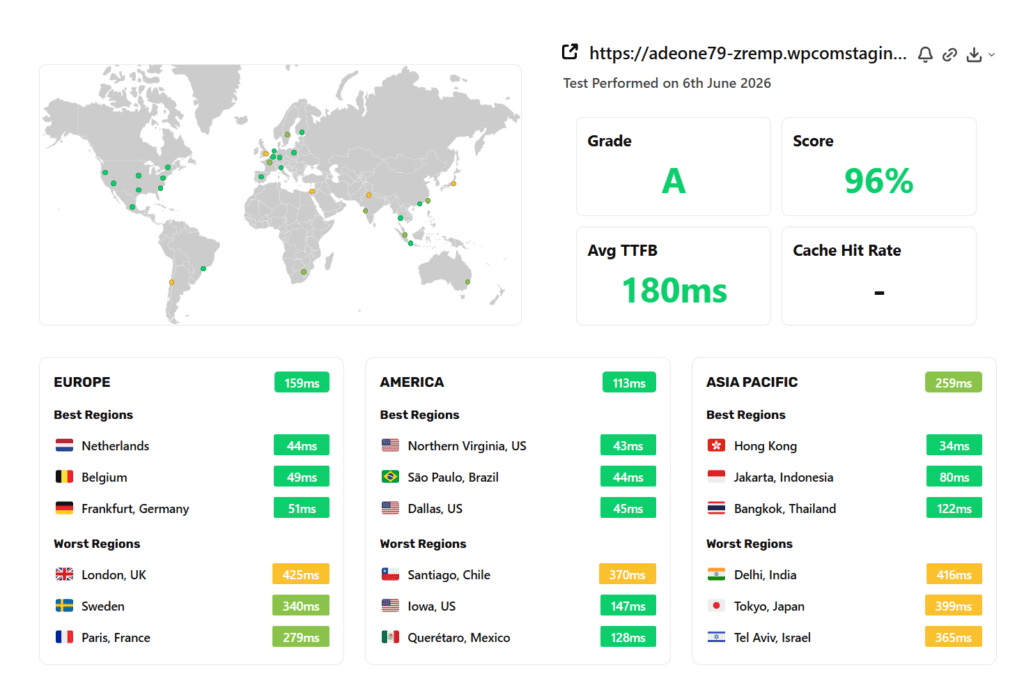
Running SpeedVitals across 40 global locations returned a Grade A, 96% score, and 180ms average TTFB. Regional breakdowns showed America averaging 113ms, Europe at 159ms, and Asia Pacific at 259ms, with a few outliers in London, Delhi, Tokyo, and Santiago pulling the average up in those regions.
NOTE:
For a thorough breakdown of WordPress.com , its pros, cons, features, and how it compares to competitors in the same range, read my review.
Kinsta’s TTFB Results
Testing was done on a demo site running the Astra starter theme with seven plugins installed, using only Kinsta’s built-in caching (page, server-side, and mobile cache) with no additional optimization plugins.
Kinsta has over 35 datacenters and leverages Cloudflare 300+ CDN locations. I chose the “Lowa” datacenter, which is one of the “Boosted datacenters”. Kinsta boosted datacenters are server location with significant performance improvements.
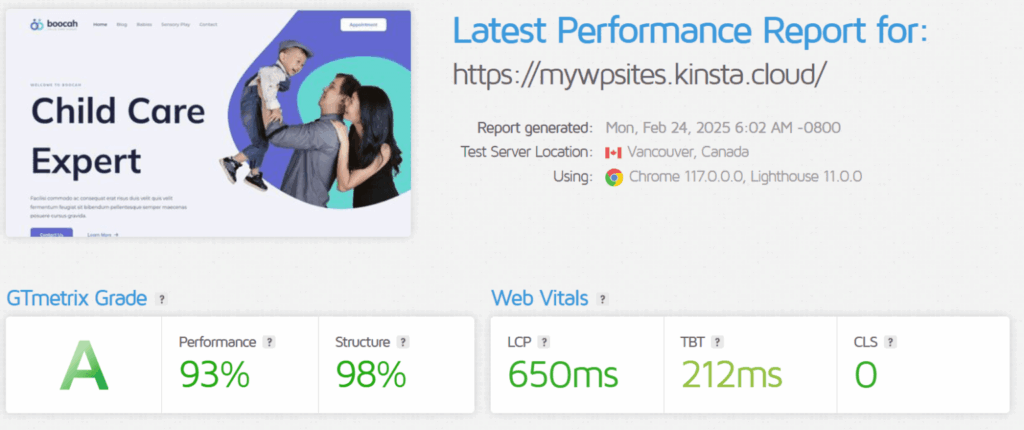
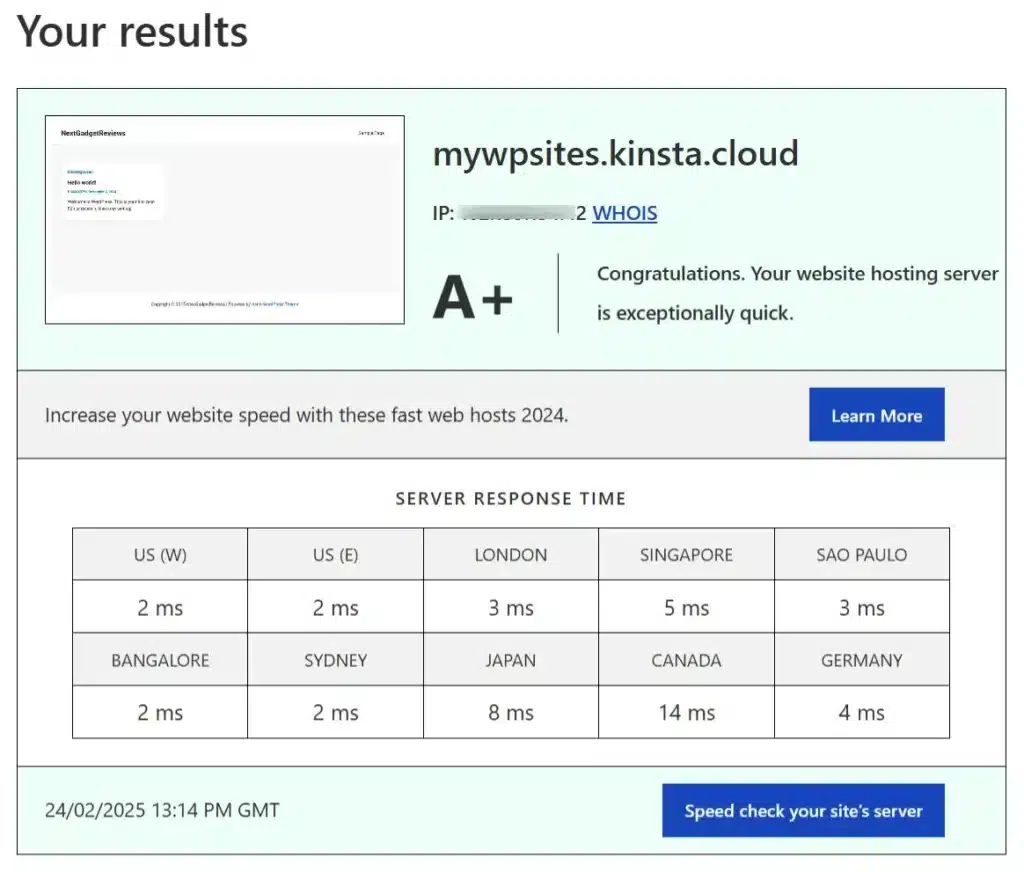
I tested TTFB and other performance metrics with two quick tools: BitCatcha and GTmetrix; both returned strong results (an A+ rating and a Grade A, respectively).
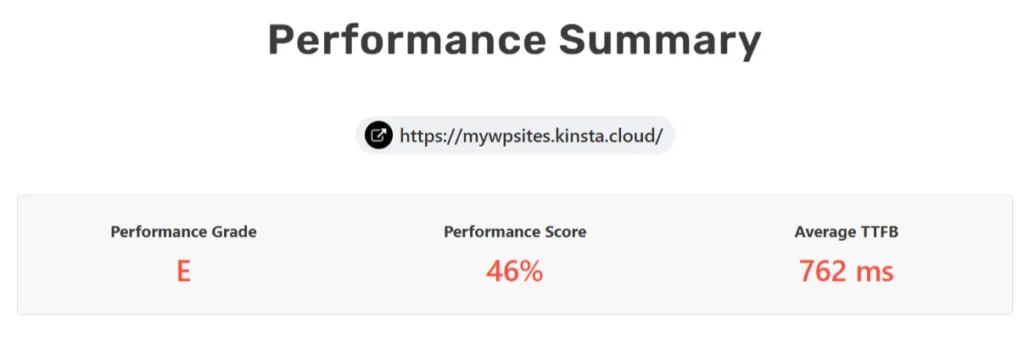
But running the same SpeedVitals test across the same 40 global locations told a different story: Grade E, a 46% score, and a 762ms average TTFB.
What This Actually Means
The gap here is large enough that it’s worth pausing on. WordPress.com’s 180ms average came from a $4/month plan. Kinsta’s 762ms average came from a $30/month plan running on Google Cloud’s premium-tier network, hardware that’s genuinely fast on paper.
The discrepancy between Kinsta’s strong BitCatcha and GTmetrix scores and its weak global SpeedVitals result suggests the issue isn’t raw server hardware. It’s more likely related to how traffic is routed to the origin outside North America, since the review noted Kinsta performed noticeably better for an American audience than elsewhere.
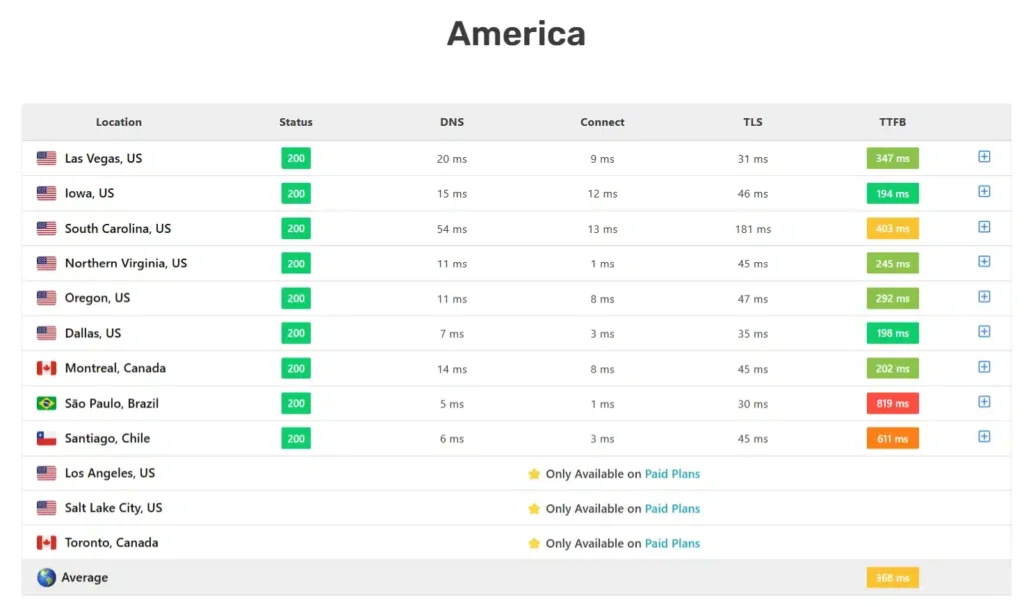
If your audience is genuinely global and TTFB matters to your Core Web Vitals, this single data point should carry real weight in your decision. If your audience is concentrated in North America, the gap narrows considerably.
Pricing: Two Very Different Starting Points
WordPress.com’s pricing ladder starts at free and scales gradually, with storage capacity increasing at each tier:
All of these prices are for annual billing, and WordPress.com also offers 2-year and 3-year plans that push the effective monthly cost even lower (Personal drops as low as $2.75/month on a 3-year term).
Its built-in AI Assistant is available on every plan, though usage limits get more generous as you move up tiers, and there’s now a guided AI website builder for getting a site launched from a prompt.
Kinsta’s pricing is structured around bandwidth, visits, and site count rather than feature tiers:
NOTE:
Review the complete list of Kinsta pricing to see what you get in each hosting plan.
Every Kinsta plan, including the entry tier, includes staging, SSH, WP-CLI, Git, free SSL, a 99.9% uptime SLA, one-click cloning, the Kinsta API, and SAML SSO. Account managers, though, are reserved for higher-tier single-site plans and multi-site plans of 10+ installs.
That’s a meaningfully different value proposition than WordPress.com, where developer tools don’t appear until the $25/month Business plan.
A first-month-free promotion currently applies to Kinsta’s lowest single-site and 2-site plans specifically, not across the board, and every plan carries a 30-day money-back guarantee regardless.
Kinsta also carries some add-on costs worth budgeting for: Redis caching at $100/month, premium staging at $20/month per environment, reverse proxy setup at $50/site/month, extra disk space at $20 per 20 GB increment, automatic plugin/theme updates at $3/environment/month, and $30/month per additional site beyond your plan’s limit.
The practical takeaway: if budget is the primary constraint and you don’t need SSH access or staging, WordPress.com’s Personal or Premium plan is the cheaper path by a wide margin.
If you need developer tools from day one and can absorb $30+/month, Kinsta gives you more of that out of the gate than WordPress.com does at any price point below Business.
Ease of Use and Dashboard Experience
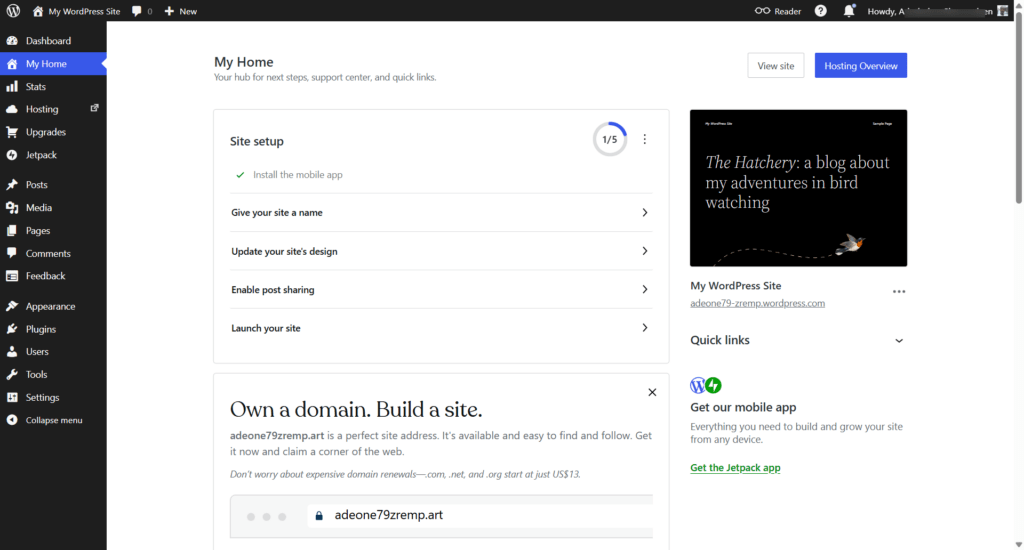
WordPress.com uses the standard WordPress admin dashboard, which feels familiar if you’ve used self-hosted WordPress before. That said, testing showed a real learning curve even after a decade of WordPress experience, mostly around the “My Home” onboarding checklist and where hosting-specific settings live relative to standard WP settings.
Kinsta skips cPanel entirely and uses its own custom MyKinsta dashboard. It’s built around server-level tasks: PHP version switching, SFTP/SSH credentials, database access, backup management, and analytics for bandwidth, RAM, and CPU usage.
One notable convenience is being able to deactivate plugins or themes remotely from the dashboard, useful if you’re locked out of wp-admin.
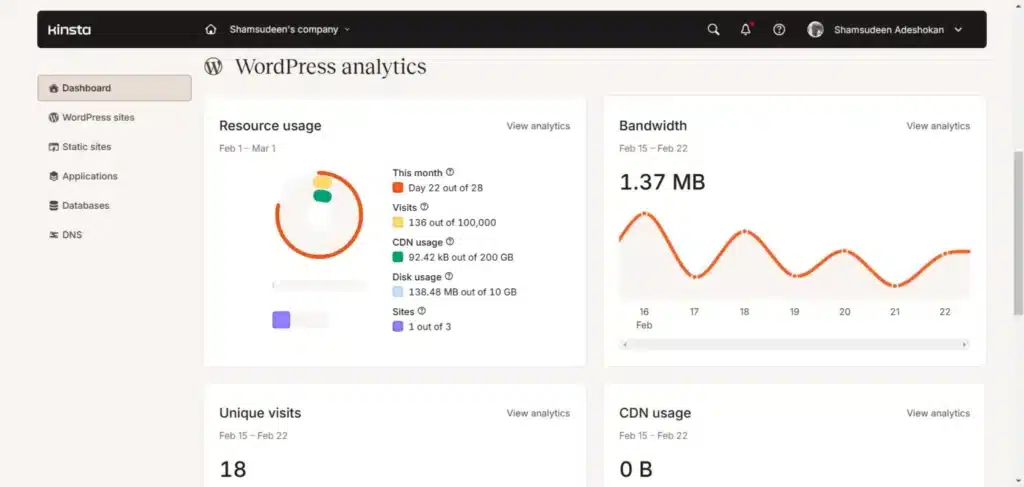
Since Kinsta runs on NGINX rather than Apache, there’s no .htaccess file. Basic rules like redirects and forcing HTTPS go through the MyKinsta tool, and anything more advanced requires contacting support to edit the NGINX config directly.
Verdict: WordPress.com’s dashboard is more familiar to anyone coming from self-hosted WordPress. Kinsta’s dashboard is more powerful for server-level management but has its own learning curve, particularly around the NGINX/.htaccess difference.
Developer Tools and Flexibility
This is one of the clearest points of separation between the two platforms.
WordPress.com locks SSH, SFTP, WP-CLI, and Git deployments behind the Business plan at $25/month. Below that, you’re working entirely within the WordPress admin, with no server-level access or staging environment.
Kinsta includes staging environments, SSH access, WP-CLI, and Git version control on every plan, including the $30/month entry tier. PHP version switching is available from 7.4 (end-of-life) through the latest version, and custom PHP configuration lets you adjust execution time and memory limits directly.
Kinsta also runs its own Application Performance Monitoring (APM) tool for diagnosing slow queries and bottlenecks, separate from New Relic.
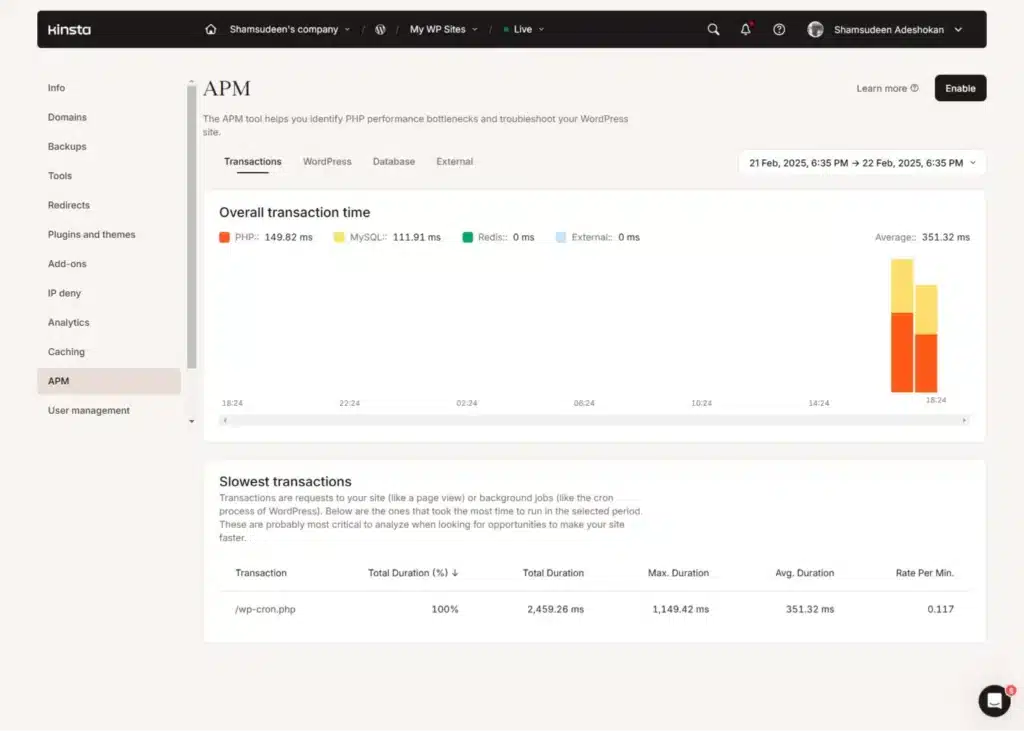
Verdict: if developer tooling is a requirement rather than a nice-to-have, Kinsta gives you more for your entry-dollar than WordPress.com does anywhere below $25/month.
Plugins and Extensibility
WordPress.com runs its own plugin marketplace, organized by category and use case, with both free and paid options. One genuine advantage here is billing flexibility. Some premium plugins offer monthly pricing through WordPress.com that isn’t available on the plugin’s own site.
The tradeoff is that WordPress.com’s checkout doesn’t always specify which feature tier of a plugin you’re purchasing, which matters for anything with a meaningful annual cost.
Kinsta takes the opposite approach: certain categories of plugins are banned outright, including most caching, backup, and image optimization plugins, since Kinsta’s own infrastructure already handles those functions.
UpdraftPlus is the one backup plugin still allowed, and even then it’s limited to one backup per month.
Verdict: WordPress.com gives you more plugin freedom. Kinsta trades that freedom for tighter control over what runs on its infrastructure, which is a reasonable tradeoff if you’re relying on its built-in caching and backup systems anyway.
Security and Backups
Kinsta’s security stack is genuinely comprehensive: Cloudflare-powered DDoS protection, an enterprise Web Application Firewall, bot traffic protection, HTTP/3 support, and free SSL with wildcard certificate support.
Every plan, including the entry-level, now also includes SAML SSO with just-in-time provisioning and dedicated bot protection with its own analytics, both of which used to be the kind of thing you’d only find on enterprise hosting.
If your site gets hacked, Kinsta will clean it up at no charge, which isn’t standard across the hosting industry.
Backup options on Kinsta include daily, hourly, manual, and system-generated backups. Entry-level plans get 14 days of retention, and that climbs to 20 or 30 days on higher-tier and agency plans.
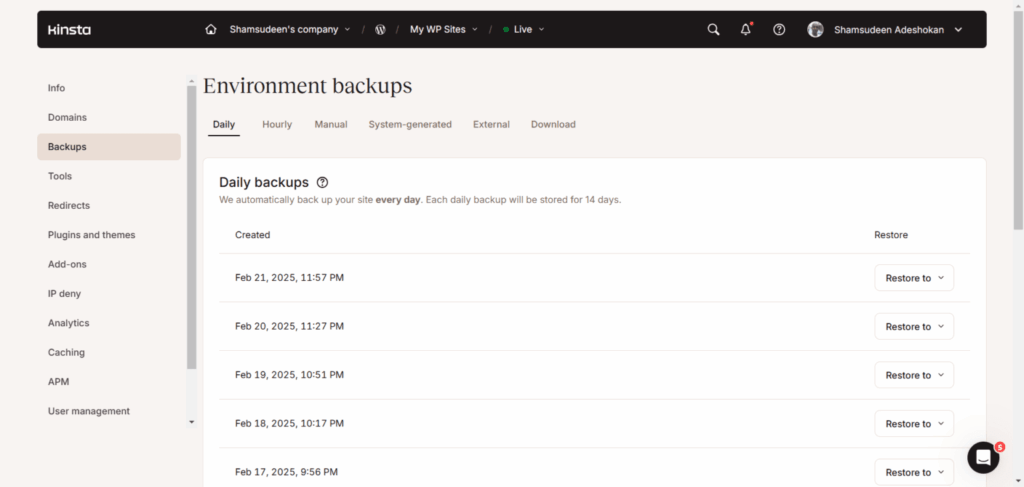
External backups to Amazon S3 or Google Cloud cost $2/month per site, and hourly backup add-ons run $20 to $100/month depending on frequency.
WordPress.com’s security is solid but more tiered. You get a Web Application Firewall and authentication logging on all plans, but Edge Defensive Mode and more advanced server-level security tools are reserved for Business and Commerce plans.
Automated backups (VaultPress Backup, via Jetpack) are included, though some backup-related Jetpack features also require Business plan.
Verdict: Kinsta’s security and backup depth is stronger across the board, and it’s included at the entry tier rather than gated behind a higher plan.
Migration and Support
Both platforms offer free migration handling, which removes one common source of hosting-switch anxiety. Kinsta offers unlimited free migrations regardless of site count or complexity, with a paid $49 option to skip the standard 24-hour queue and get it done in under 8 hours.
On support, WordPress.com’s plans scale from standard support on Personal up to priority 24/7 support on Business and Commerce (notably, priority support isn’t available at all on monthly billing).
Kinsta offers 24/7 support across phone, live chat, tickets, scheduled appointments, and even WhatsApp, which is a wider range of channels than most hosts provide.
Kinsta also currently holds the top spot in G2’s managed WordPress hosting category with a 4.8-star average across 1,200+ reviews, and counts brands like NASA, Calm, and TripAdvisor among its 230,000+ customers.
Verdict: essentially a tie on migration. On support channels, Kinsta’s range is broader, though WordPress.com’s support scales meaningfully with plan tier as well.
Standout Features Worth Knowing About
WordPress.com has a couple of features Kinsta simply doesn’t offer, since Kinsta is infrastructure-focused rather than a content platform:
Kinsta’s standout tools lean developer-side:
Who Should Choose WordPress.com
Who Should Choose Kinsta
FAQs
Final Thoughts
WordPress.com and Kinsta aren’t really fighting over the same customer. WordPress.com is built for people who want WordPress without ever thinking about servers, and the pricing and performance numbers back that up convincingly at the entry level.
Kinsta is built for people who already know they need staging environments, SSH access, and enterprise-grade security, and are willing to pay a premium price for infrastructure that can handle real growth.
If you’re choosing based on budget and simplicity, WordPress.com is the easier recommendation. If you’re choosing based on developer control and you have the budget for it, Kinsta earns its price tag in the areas that matter most to that kind of user.